Diagrams
Every Orrery file starts with a header that declares what the file contains. There are two file types: diagram files that produce rendered output, and library files that contain only reusable definitions.
File types
Diagram files
A diagram file begins with a diagram header and produces rendered output:
diagram <kind> [attributes];
The kind is either component or sequence. Diagram files can contain imports, type definitions, and diagram elements.
Library files
A library file begins with a library header:
library;
Library files contain only imports and type definitions — no diagram elements, no rendered output. They exist to share types across multiple diagrams. See Imports for details.
Component diagrams
Component diagrams show the structural parts of a system and how they connect.
diagram component;

type Service = Rectangle [fill_color="#e6f3ff", rounded=5];
type Database = Rectangle [fill_color="#e0f0e0", rounded=10];

api as "API Gateway": Service;
auth as "Auth Service": Service;
db as "Users DB": Database;

api -> auth: "Validate";
auth -> db: "Query";
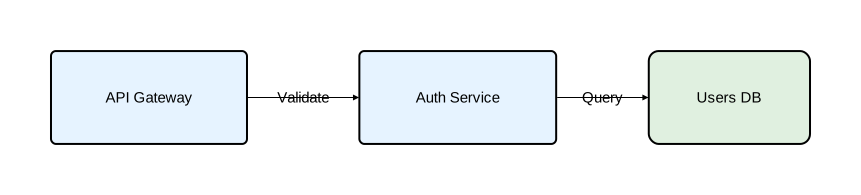
Component diagrams support:
- All shape types (Rectangle, Oval, Component, Actor, Entity, Control, Interface, Boundary)
- Nesting components inside other components
- Embedded diagrams inside components
- Layout engines:
basic,sugiyama, andgraphviz
Sequence diagrams
Sequence diagrams show interactions between participants over time. Time flows downward.
diagram sequence;

client: Rectangle;
server: Rectangle;
database: Rectangle;

client -> server: "POST /login";
server -> database: "SELECT user";
database -> server: "User row";
server -> client: "200 OK";
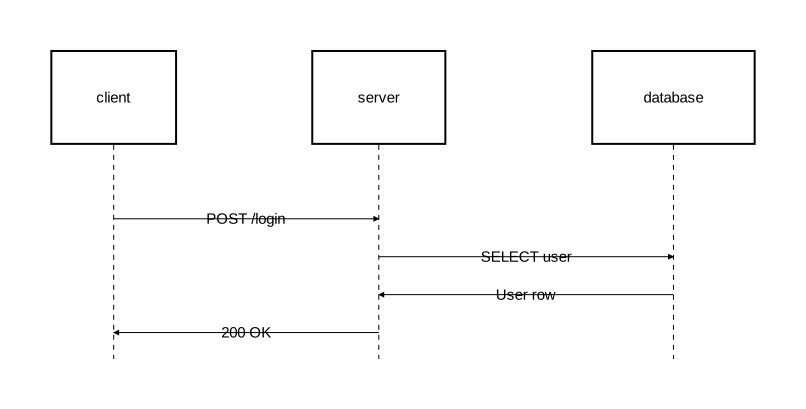
Sequence diagrams support:
- Activation blocks on lifelines
- Fragments for conditional and looping flows (alt, opt, loop, par, break, critical)
- Notes attached to participants or placed in margins
Diagram attributes
Attributes are specified in square brackets after the kind:
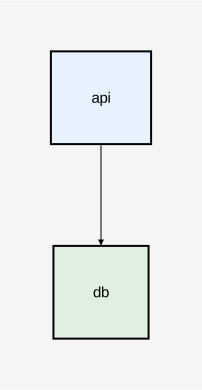
diagram component [background_color="#f5f5f5", layout_engine="sugiyama"];

api: Rectangle [fill_color="#e6f3ff"];
db: Rectangle [fill_color="#e0f0e0"];
api -> db;
| Attribute | Type | Description | Applies to |
|---|---|---|---|
background_color | color | Background color of the diagram | Both |
layout_engine | string | Layout algorithm: "basic", "sugiyama", or "graphviz" | Both (sugiyama/graphviz only for component) |
These can also be set in the configuration file as defaults.
Layout engines
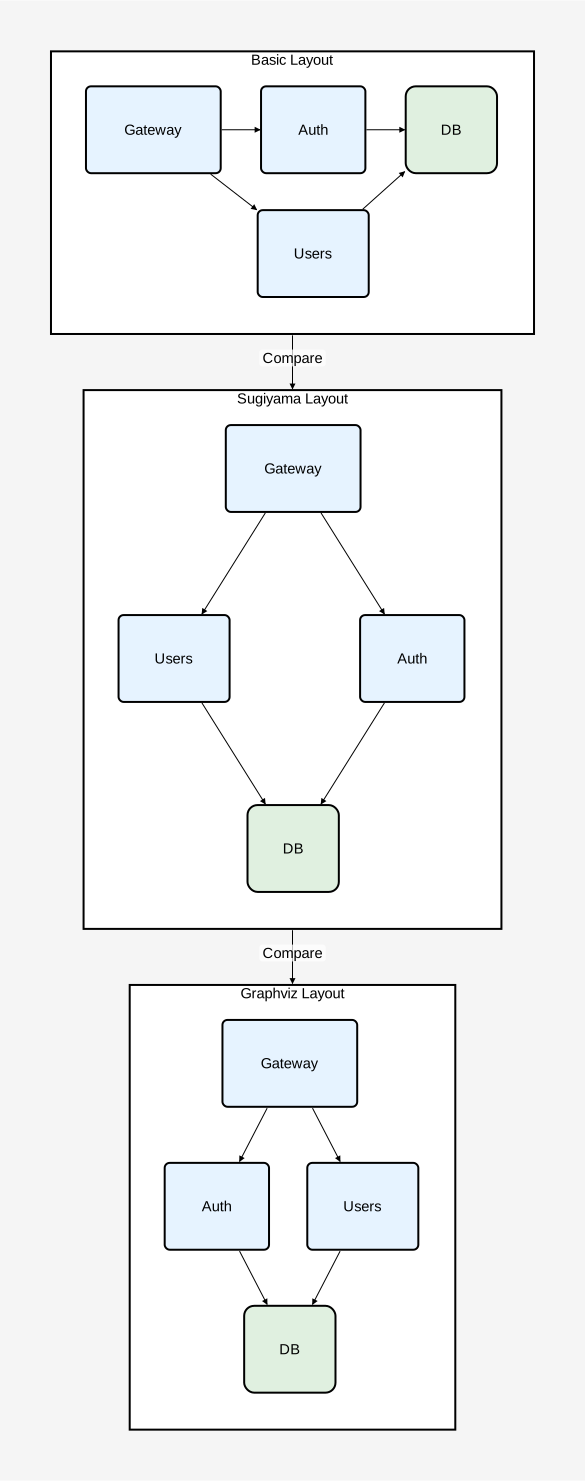
Orrery supports three layout engines for positioning elements:
basic— Simple deterministic positioning. Available for both component and sequence diagrams.sugiyama— Hierarchical layered layout that arranges nodes in layers to minimize edge crossings. Available for component diagrams only.graphviz— Graphviz-backed layout via the externaldotCLI, producing balanced placements with fewer edge crossings on non-trivial graphs. Available for component diagrams only. Requires thegraphvizCargo feature (enabled by default in the CLI binary) and a Graphviz installation.
The default engine depends on how the binary was built: graphviz when the graphviz Cargo feature is enabled (the CLI default), otherwise basic. See Configuration — Priority for the full resolution order.
diagram component [background_color="#f5f5f5"];

basic_view as "Basic Layout": Rectangle embed {
    diagram component [layout_engine="basic", background_color="#ffffff"];

    type Service = Rectangle [fill_color="#e6f3ff", rounded=5];
    type Database = Rectangle [fill_color="#e0f0e0", rounded=10];

    gw as "Gateway": Service;
    auth as "Auth": Service;
    users as "Users": Service;
    db as "DB": Database;

    gw -> auth;
    gw -> users;
    auth -> db;
    users -> db;
};

sugiyama_view as "Sugiyama Layout": Rectangle embed {
    diagram component [layout_engine="sugiyama", background_color="#ffffff"];

    type Service = Rectangle [fill_color="#e6f3ff", rounded=5];
    type Database = Rectangle [fill_color="#e0f0e0", rounded=10];

    gw as "Gateway": Service;
    auth as "Auth": Service;
    users as "Users": Service;
    db as "DB": Database;

    gw -> auth;
    gw -> users;
    auth -> db;
    users -> db;
};

graphviz_view as "Graphviz Layout": Rectangle embed {
    diagram component [layout_engine="graphviz", background_color="#ffffff"];

    type Service = Rectangle [fill_color="#e6f3ff", rounded=5];
    type Database = Rectangle [fill_color="#e0f0e0", rounded=10];

    gw as "Gateway": Service;
    auth as "Auth": Service;
    users as "Users": Service;
    db as "DB": Database;

    gw -> auth;
    gw -> users;
    auth -> db;
    users -> db;
};

basic_view -> sugiyama_view: "Compare";
sugiyama_view -> graphviz_view: "Compare";
Embedded diagrams
A component can contain an entire diagram inside it using the embed keyword. This lets you show the internal behavior or structure of a component. Only content-supporting shapes support embedding.
Orrery supports two forms of embedding: inline (define the diagram directly) and import-based (reference an external file).
Inline embedding
name [as "Label"]: Type [attributes] embed {
    diagram <kind> [diagram_attributes];
    // diagram contents
};
The embedded block is structurally identical to a standalone diagram file — it starts with a diagram header followed by elements. Embedded diagrams follow the syntax and layout rules of their declared kind.
Import-based embedding
When a diagram file is imported with a namespaced import, it can be embedded by referencing the import name:
import "path/to/diagram";

name [as "Label"]: Type embed diagram_name;
See Imports — Diagram embedding for details.
Sequence diagram inside a component
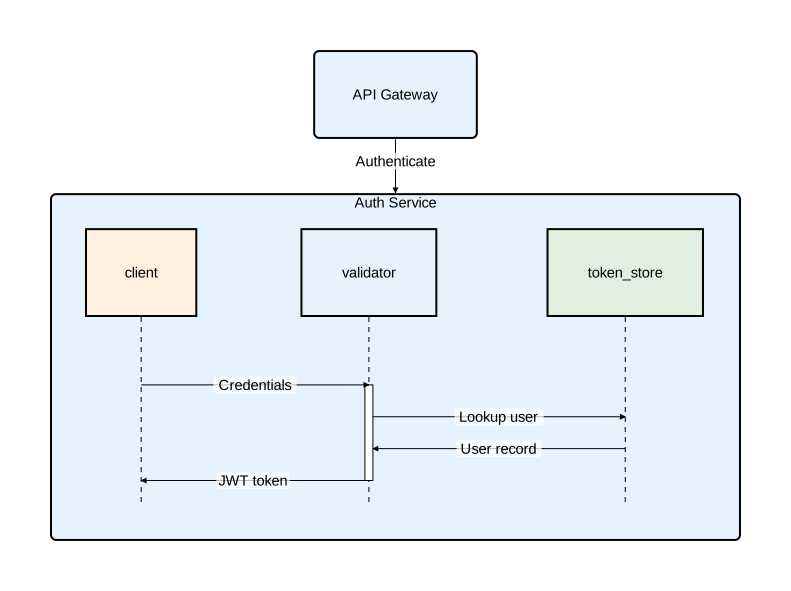
Show the internal message flow of a service:
diagram component;

type Service = Rectangle [fill_color="#e6f3ff", rounded=5];

auth_service as "Auth Service": Service embed {
    diagram sequence;

    client: Rectangle [fill_color="#fff0e0"];
    validator: Rectangle [fill_color="#e6f3ff"];
    token_store: Rectangle [fill_color="#e0f0e0"];

    client -> validator: "Credentials";
    activate validator {
        validator -> token_store: "Lookup user";
        token_store -> validator: "User record";
        validator -> client: "JWT token";
    };
};

gateway as "API Gateway": Service;
gateway -> auth_service: "Authenticate";
Component diagram inside a component
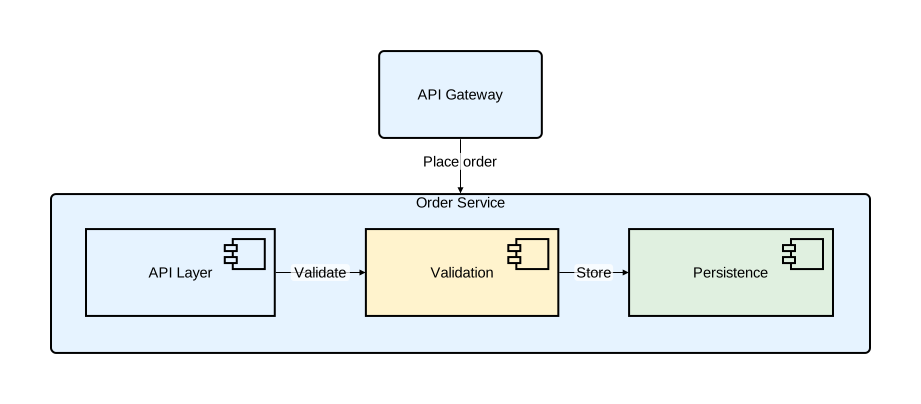
Show the internal architecture of a service:
diagram component;

type Service = Rectangle [fill_color="#e6f3ff", rounded=5];

order_service as "Order Service": Service embed {
    diagram component [layout_engine="basic", background_color="#fafafa"];

    api as "API Layer": Component [fill_color="#e6f3ff"];
    validation as "Validation": Component [fill_color="#fff3cd"];
    persistence as "Persistence": Component [fill_color="#e0f0e0"];

    api -> validation: "Validate";
    validation -> persistence: "Store";
};

gateway as "API Gateway": Service;
gateway -> order_service: "Place order";
Embedded diagrams in sequence participants
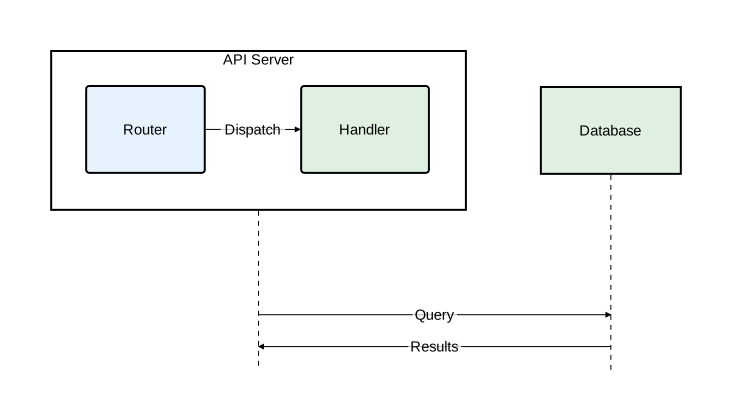
Sequence diagram participants can also embed diagrams:
diagram sequence;

api_node as "API Server": Rectangle embed {
    diagram component [layout_engine="basic", background_color="#f8f8ff"];

    router as "Router": Rectangle [fill_color="#e6f3ff", rounded=3];
    handler as "Handler": Rectangle [fill_color="#e0f0e0", rounded=3];
    router -> handler: "Dispatch";
};

db as "Database": Rectangle [fill_color="#e0f0e0"];

api_node -> db: "Query";
db -> api_node: "Results";
Comments
Orrery supports line comments with //:
// This is a comment
diagram component; // inline comment
Document structure
Every Orrery file follows a strict declaration order:
- File header —
diagram <kind> [attributes];orlibrary; - Import declarations (optional) — all
importstatements - Type definitions (optional) — all
typedefinitions - Diagram elements (diagram files only) — components, relations, fragments, notes, etc.
Diagram file
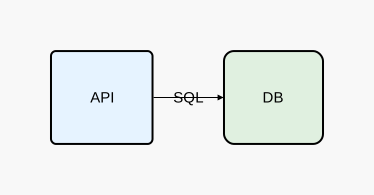
diagram component [background_color="#f8f8f8"];

// Type definitions
type Service = Rectangle [fill_color="#e6f3ff", rounded=5];
type Database = Rectangle [fill_color="#e0f0e0", rounded=10];

// Elements
api as "API": Service;
db as "DB": Database;
api -> db: "SQL";
Library file
library;

import "base/types"::*;

type Service = Rectangle [fill_color="#e6f3ff", rounded=5];
type Database = Rectangle [fill_color="#e0f0e0", rounded=10];
Library files export all their types to any file that imports them. See Imports for details.