Installation
From crates.io
The easiest way to install Orrery is via Cargo:
cargo install orrery-cli
This installs the orrery binary to your Cargo bin directory (typically ~/.cargo/bin/).
From source
Clone the repository and build in release mode:
git clone https://github.com/orreryworks/orrery.git
cd orrery
cargo install --path crates/orrery-cli
Verify installation
orrery --version
You should see the version number printed. If the command is not found, ensure ~/.cargo/bin is in your PATH.
Requirements
- Rust 1.88 or later (for building from source)
Optional dependencies
The CLI binary ships with the graphviz layout engine enabled by default. To use it, install Graphviz so that the dot command is available on your PATH:
| Platform | Command |
|---|---|
| macOS | brew install graphviz |
| Ubuntu/Debian | sudo apt install graphviz |
| Fedora | sudo dnf install graphviz |
| Windows | winget install graphviz |
If you don’t need the Graphviz engine, you can install without it:
cargo install orrery-cli --no-default-features
This builds a binary that uses only the basic and sugiyama layout engines with no external dependencies.
Your First Diagram
Let’s create a simple component diagram and render it to SVG.
Create the source file
Create a file called hello.orr with the following content:
diagram component;

client: Oval;
server: Rectangle;
database: Rectangle;

client -> server: "Request";
server -> database: "Query";
database -> server: "Result";
server -> client: "Response";
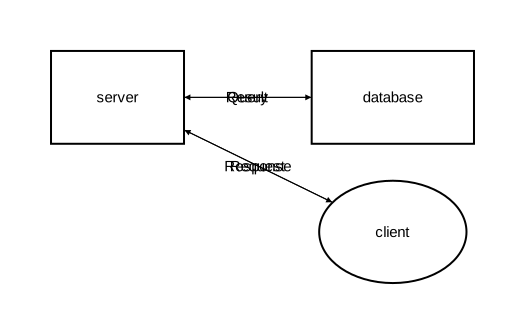
This defines:
- A component diagram with three elements
clientas an oval shape,serveranddatabaseas rectangles- Four relations (arrows) with labels describing the data flow
Render to SVG
orrery hello.orr -o hello.svg
Open hello.svg in a browser or image viewer. You should see a diagram with three components connected by labeled arrows.
Add types for reusable styles
Now let’s improve the diagram with custom types:
diagram component;

type Service = Rectangle [fill_color="#e6f3ff", rounded=5];
type Database = Rectangle [fill_color="#e0f0e0", rounded=10];
type Client = Oval [fill_color="#fff0e0"];

client: Client;
server as "API Server": Service;
database as "Users DB": Database;

client -> server: "HTTP Request";
server -> database: "SELECT * FROM users";
database -> server: "Result set";
server -> client: "JSON Response";
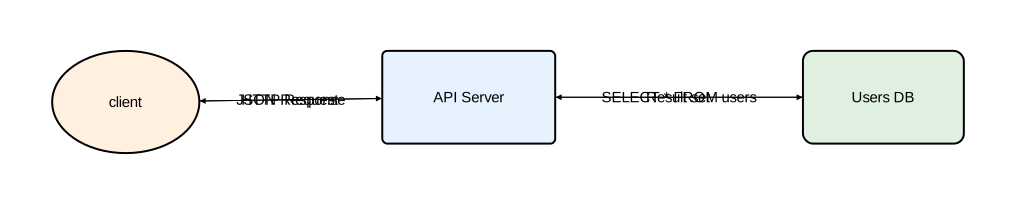
New concepts:
typedeclarations define reusable styles with custom colors and rounded cornersas "..."gives elements a display name different from their identifier- Types are applied with the
: TypeNamesyntax
Render it:
orrery hello.orr -o hello.svg
The output now shows colored, rounded shapes with descriptive labels.
Try a sequence diagram
Change the diagram type to sequence:
diagram sequence;

type Service = Rectangle [fill_color="#e6f3ff", rounded=5];
type Database = Rectangle [fill_color="#e0f0e0", rounded=10];
type Client = Oval [fill_color="#fff0e0"];

client: Client;
server as "API Server": Service;
database as "Users DB": Database;

client -> server: "HTTP Request";
server -> database: "SELECT * FROM users";
database -> server: "Result set";
server -> client: "JSON Response";
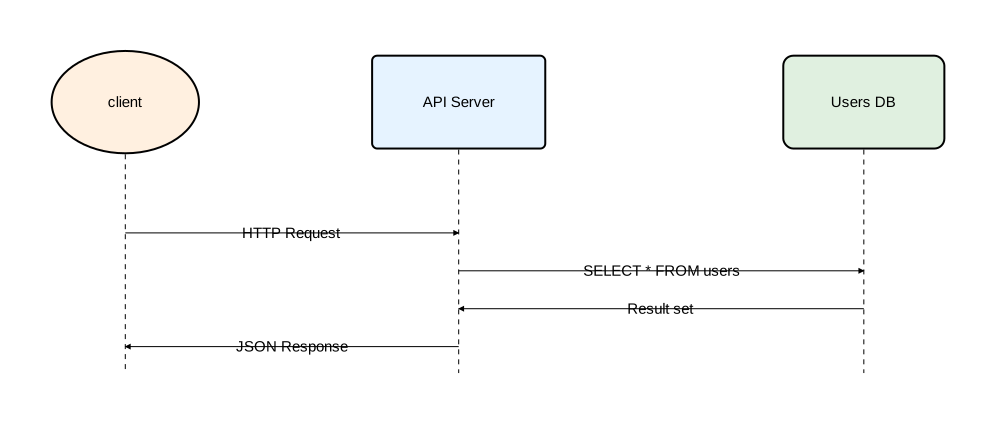
The same elements and types are now laid out as a sequence diagram: participants arranged horizontally with messages flowing downward in order.
Next steps
- CLI Usage — command-line options and configuration
- Language Reference — complete language reference
- Examples — more diagram examples
CLI Usage
Basic command
orrery <input.orr> [OPTIONS]
Options
Arguments:
  <INPUT>  Path to the input Orrery file

Options:
  -o, --output <OUTPUT>        Path to output SVG file [default: out.svg]
  -c, --config <CONFIG>        Path to configuration file (TOML)
      --log-level <LOG_LEVEL>  Log level (off, error, warn, info, debug, trace)
                               [default: info]
  -h, --help                   Print help
  -V, --version                Print version
Examples
# Render a diagram to SVG
orrery diagram.orr -o output.svg

# Use a custom configuration file
orrery diagram.orr -o output.svg --config my-config.toml

# Silence log output
orrery diagram.orr -o output.svg --log-level off

# Debug output for troubleshooting
orrery diagram.orr -o output.svg --log-level debug
Configuration
Orrery looks for a configuration file in several locations. See the Configuration reference for the full details.
Quick setup for a project:
mkdir orrery
cat > orrery/config.toml << 'EOF'
[layout]
component = "sugiyama"

[style]
background_color = "#ffffff"
EOF
Now any orrery command run from this directory will use the Sugiyama layout engine for component diagrams and a white background by default.
Exit codes
0— success1— error (parse failure, invalid input, I/O error)
Error messages include file location, error code, and a help message pointing to the source of the problem.
Component Diagrams
Component diagrams visualize the structure of a system — its parts and how they connect.
Declaring components
Every component diagram starts with a diagram component; declaration, followed by component definitions and relations.
diagram component;

frontend: Rectangle;
backend: Rectangle;
database: Rectangle;

frontend -> backend: "API calls";
backend -> database: "Queries";
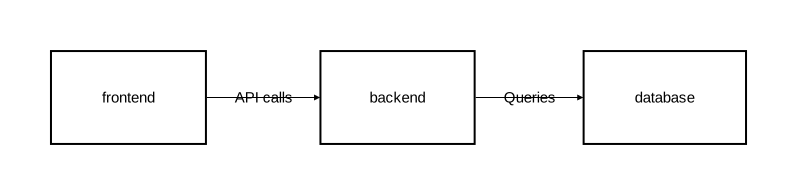
Each component needs a name and a shape type. The built-in shape types are:
| Type | Description | Can contain children |
|---|---|---|
Rectangle | Rectangular box | Yes |
Oval | Elliptical shape | Yes |
Component | UML component icon | Yes |
Actor | Stick figure | No |
Entity | Circle | No |
Control | Circle with arrow | No |
Interface | Small circle | No |
Boundary | Circle with line | No |
See Shape types for the full list and details.
Display names
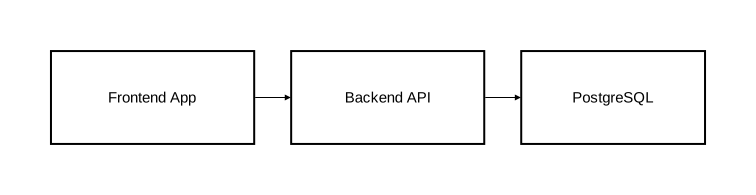
By default, the identifier is used as the label. Use as "..." to set a different display name:
diagram component;

fe as "Frontend App": Rectangle;
be as "Backend API": Rectangle;
db as "PostgreSQL": Rectangle;

fe -> be;
be -> db;
Styling with attributes
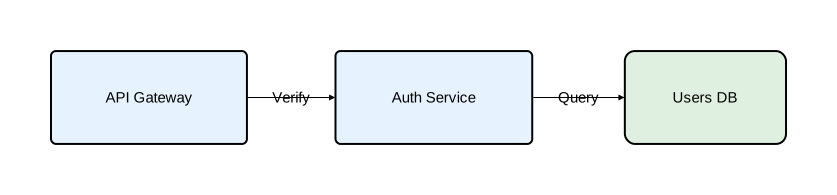
Components accept attributes in square brackets to control their appearance:
diagram component;

api as "API Gateway": Rectangle [fill_color="#e6f3ff", rounded=5];
auth as "Auth Service": Rectangle [fill_color="#e6f3ff", rounded=5];
users_db as "Users DB": Rectangle [fill_color="#e0f0e0", rounded=10];

api -> auth: "Verify";
auth -> users_db: "Query";
See Component attributes for the full list of available attributes.
Custom types
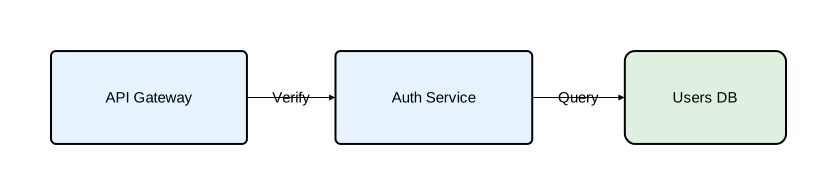
When multiple components share the same style, define a named type to avoid repetition:
diagram component;

type Service = Rectangle [fill_color="#e6f3ff", rounded=5];
type Database = Rectangle [fill_color="#e0f0e0", rounded=10];

api as "API Gateway": Service;
auth as "Auth Service": Service;
users_db as "Users DB": Database;

api -> auth: "Verify";
auth -> users_db: "Query";
Types can extend other types:
type Service = Rectangle [fill_color="#e6f3ff", rounded=5];
type CriticalService = Service [fill_color="#ffe0e0", stroke=[color="red", width=2.0]];
See Type System for type extension and composition.
Nesting
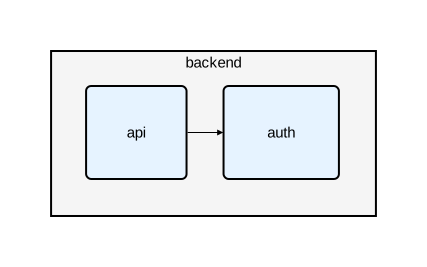
Components can contain other components, creating a hierarchy:
diagram component;

type Service = Rectangle [fill_color="#e6f3ff", rounded=5];

backend: Rectangle [fill_color="#f5f5f5"] {
    api: Service;
    auth: Service;
    api -> auth;
};
Nesting can go multiple levels deep:
platform: Rectangle [fill_color="#fafafa"] {
    gateway: Service;

    services: Rectangle [fill_color="#f0f0f0"] {
        users: Service;
        orders: Service;
        users -> orders;
    };

    gateway -> services;
};
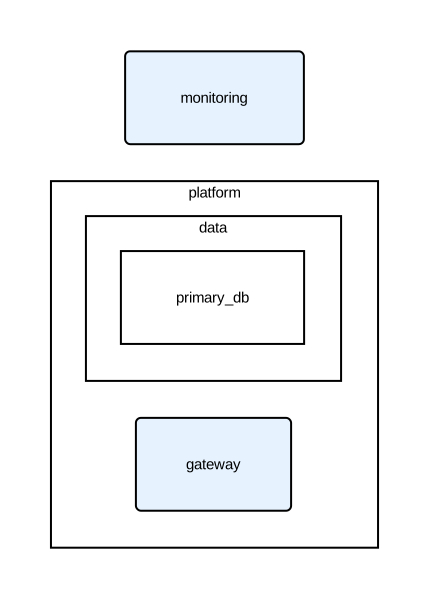
Cross-level relations
Use :: to reference components inside nested containers:
diagram component;

type Service = Rectangle [fill_color="#e6f3ff", rounded=5];

platform: Rectangle {
    gateway: Service;
    data: Rectangle {
        primary_db: Rectangle;
    };
};

// Top-level to nested
monitoring: Service;
monitoring -> platform::gateway;
monitoring -> platform::data::primary_db;

// Nested to top-level
platform::gateway -> monitoring: "Metrics";
Relation types
Four relation types are available:
a -> b: "Forward";      // arrow from a to b
a <- b: "Backward";     // arrow from b to a
a <-> b: "Bidirectional"; // arrows both ways
a - b: "Plain";         // line, no arrowheads
See Relations for styling and typed relations.
Layout engines
Component diagrams support three layout engines:
// Simple deterministic positioning
diagram component [layout_engine="basic"];

// Hierarchical layout (better for layered architectures)
diagram component [layout_engine="sugiyama"];

// Graphviz layout (balanced placement, fewer crossings on complex graphs)
diagram component [layout_engine="graphviz"];
The CLI binary defaults to graphviz, which delegates positioning to the external dot CLI (requires Graphviz installed — see Installation for setup). If built without the graphviz feature, the default is basic.
The layout engine can also be set in a configuration file.
Embedded diagrams
A component can contain an entirely different diagram type inside it:
diagram component;

type Service = Rectangle [fill_color="#e6f3ff"];

auth_service: Service embed {
    diagram sequence;

    client: Rectangle;
    auth: Rectangle;
    db: Rectangle;

    client -> auth: "Login";
    auth -> db: "Validate";
    db -> auth: "Result";
    auth -> client: "Token";
};

gateway: Service;
gateway -> auth_service: "Authenticate";
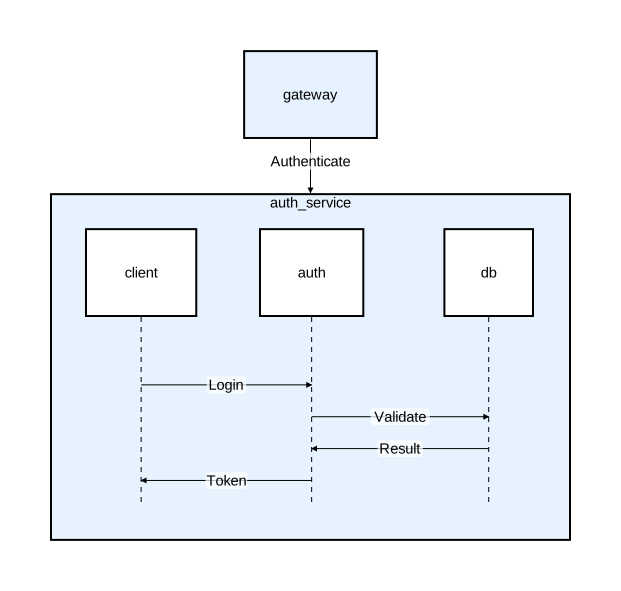
This embeds a sequence diagram inside a component node, showing both the structural and behavioral view. See Diagrams for diagram-level options and embedding.
Sequence Diagrams
Sequence diagrams model interactions between participants over time. Messages flow downward in the order they appear in the source.
Basic structure
diagram sequence;

client: Rectangle;
server: Rectangle;
database: Rectangle;

client -> server: "POST /login";
server -> database: "SELECT user";
database -> server: "User record";
server -> client: "200 OK";
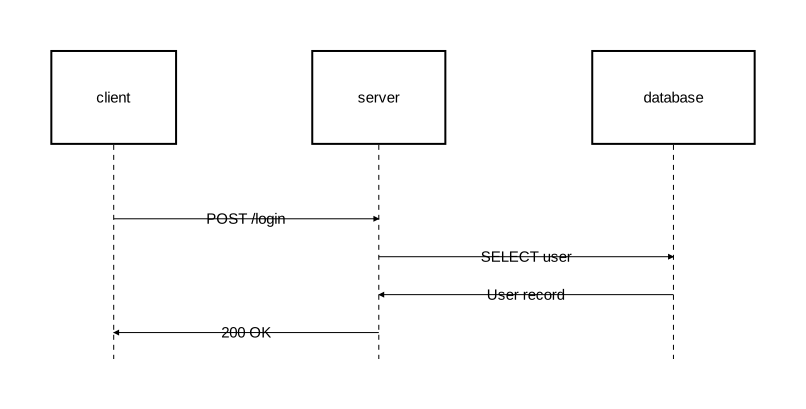
Participants are arranged horizontally. Each has a lifeline extending downward, and messages appear as horizontal arrows between them.
Participants and types
Participants are declared the same way as components — with an identifier, optional display name, and a type:
diagram sequence;

type Service = Rectangle [fill_color="#e6f3ff", stroke=[color="#336699"]];
type Store = Rectangle [fill_color="#e0f0e0", rounded=8];

client as "Browser": Service;
api as "API Gateway": Service;
db as "Database": Store;

client -> api: "Request";
api -> db: "Query";
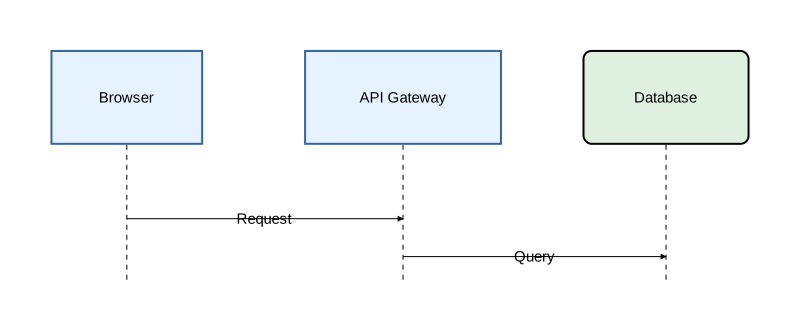
Relation types
The same four relation types work in sequence diagrams:
client -> server: "Request";       // forward arrow
client <- server: "Push event";    // backward arrow
client <-> server: "Healthcheck";  // bidirectional
client - server: "Connection pool"; // plain line
See Relations for styling and typed relations.
Self-messages
A participant can send a message to itself:
api -> api: "Rate limit check";
Activation blocks
Activation marks when a participant is actively processing. Use the block form to group related messages:
diagram sequence;

client: Rectangle;
server: Rectangle;
db: Rectangle;

client -> server: "Request";
activate server {
    server -> db: "Query";
    activate db {
        db -> server: "Result";
    };
    server -> client: "Response";
};
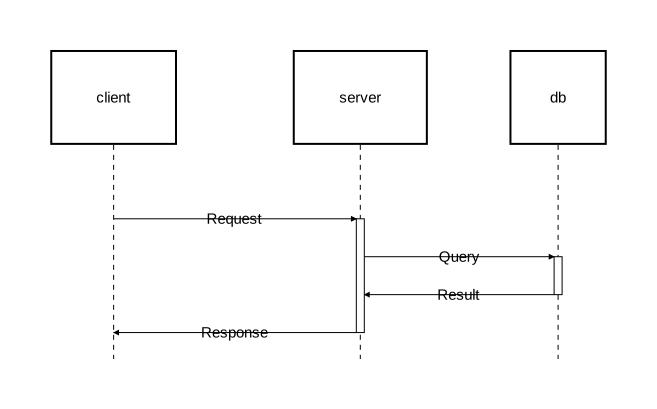
Activation blocks can be nested to any depth. The visual result is stacked rectangles on the lifeline.
Explicit activate/deactivate
For cases where activations overlap without one containing the other, use explicit statements:
diagram sequence;

type AsyncArrow = Arrow [stroke=[color="#888888", style="dashed"]];

client: Rectangle;
server: Rectangle;
worker: Rectangle;

client -> server: "POST /export";
activate server;
server -> @AsyncArrow worker: "Start export job";
activate worker;
server -> client: "202 Accepted";
deactivate server;
worker -> @AsyncArrow client: "Export ready";
deactivate worker;
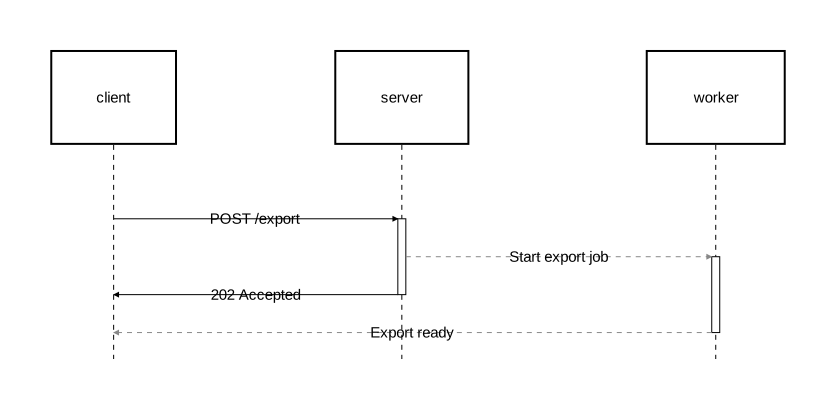
Here server and worker are both active concurrently, but neither activation fully contains the other — this cannot be expressed with nested block form.
Custom activation types
type CriticalActivation = Activate [
    fill_color="rgba(255,180,180,0.4)",
    stroke=[color="red", width=2.0]
];

activate @CriticalActivation server {
    server -> db: "DELETE cascade";
};
See Activation for the full activation syntax.
Fragments
Fragments group related interactions into labeled sections. Orrery provides sugar keywords for common UML interaction operators.
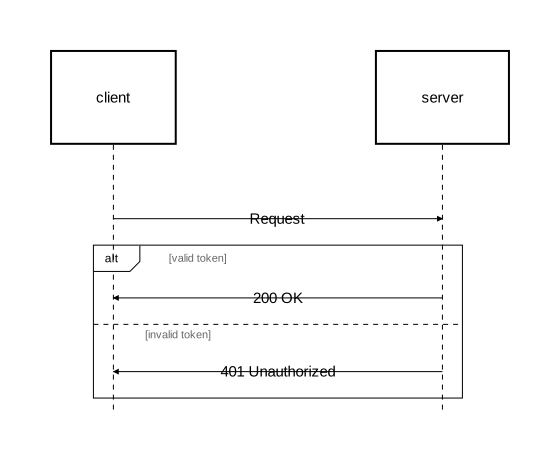
alt/else — conditional branching
diagram sequence;

client: Rectangle;
server: Rectangle;

client -> server: "Request";
alt "valid token" {
    server -> client: "200 OK";
} else "invalid token" {
    server -> client: "401 Unauthorized";
};
opt — optional execution
opt "cache hit" {
    server -> cache: "Lookup";
    cache -> server: "Cached data";
};
loop — iteration
loop "for each page" {
    client -> server: "GET /items?page=N";
    server -> client: "Page data";
};
par — parallel execution
par "fetch user data" {
    server -> db: "SELECT users";
} par "fetch settings" {
    server -> db: "SELECT settings";
};
break — interruption
break "rate limit exceeded" {
    server -> client: "429 Too Many Requests";
};
critical — atomic region
critical "payment transaction" {
    server -> db: "BEGIN";
    server -> db: "UPDATE balance";
    server -> db: "COMMIT";
};
Custom fragment types
You can use fragment/section directly for custom operators:
fragment "review" {
    section "approved" {
        server -> client: "200 OK";
    };
    section "rejected" {
        server -> client: "403 Forbidden";
    };
};
See Fragments for the full syntax.
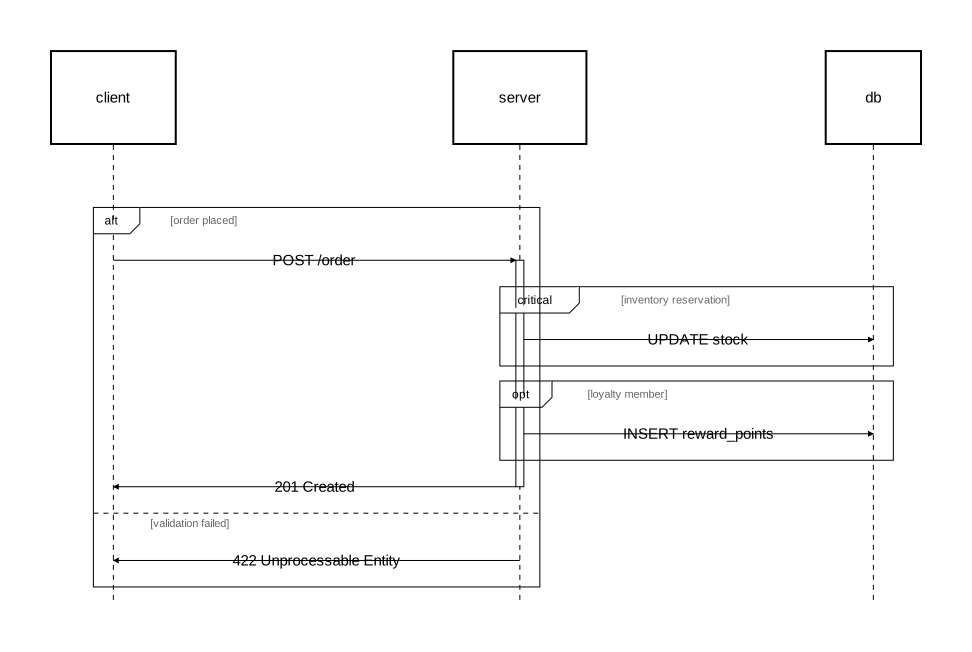
Nesting fragments
Fragments can be nested inside other fragments and combined with activation:
diagram sequence;

client: Rectangle;
server: Rectangle;
db: Rectangle;

alt "order placed" {
    client -> server: "POST /order";

    activate server {
        critical "inventory reservation" {
            server -> db: "UPDATE stock";
        };

        opt "loyalty member" {
            server -> db: "INSERT reward_points";
        };

        server -> client: "201 Created";
    };
} else "validation failed" {
    server -> client: "422 Unprocessable Entity";
};
Styling fragments
alt [background_color="rgba(255,220,220,0.15)", border_stroke=[color="red"]] "auth check" {
    client -> server: "Authenticated request";
} else "rejected" {
    server -> client: "Forbidden";
};
See Fragments for all available attributes and custom fragment types.
Notes
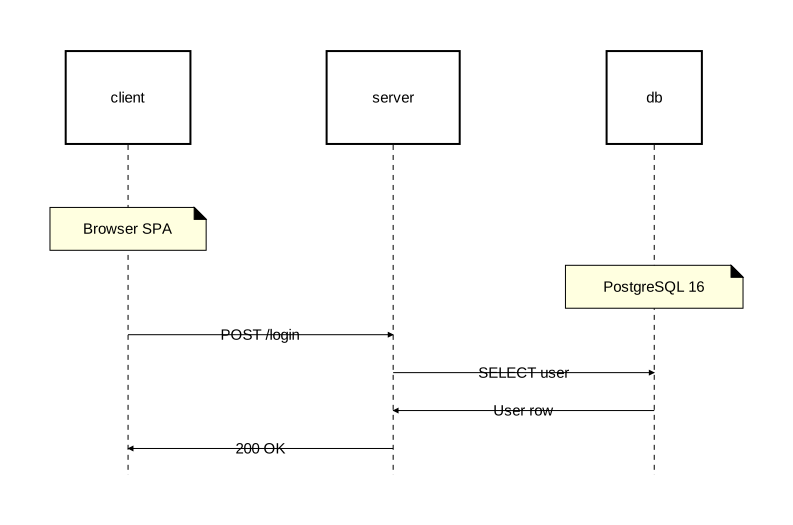
Attach annotations to participants with the on attribute:
diagram sequence;

client: Rectangle;
server: Rectangle;
db: Rectangle;

note [on=[client]]: "Browser SPA";
note [on=[db]]: "PostgreSQL 16";

client -> server: "POST /login";
server -> db: "SELECT user";
db -> server: "User row";
server -> client: "200 OK";
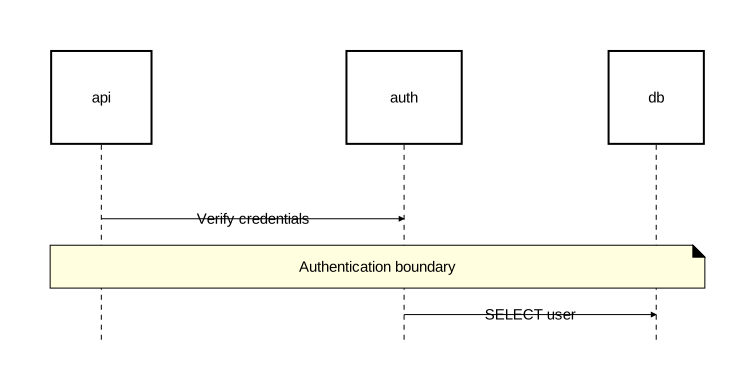
Notes can span multiple participants:
diagram sequence;

api: Rectangle;
auth: Rectangle;
db: Rectangle;

api -> auth: "Verify credentials";
note [on=[api, auth, db]]: "Authentication boundary";
auth -> db: "SELECT user";
See the Notes reference for margin notes, alignment, and styling.
Styling
This tutorial shows how to style different parts of a diagram. For the complete list of attributes and their values, see the Styling reference.
Components
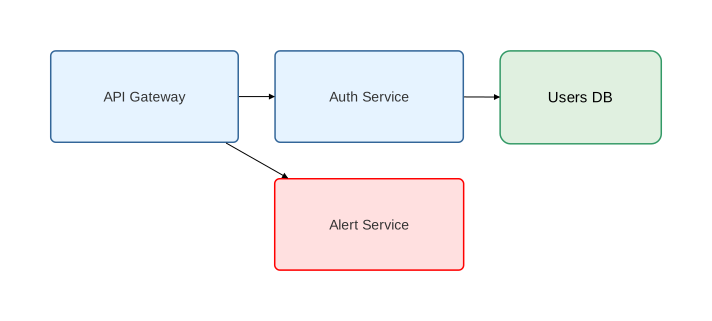
diagram component;

type Service = Rectangle [
    fill_color="#e6f3ff",
    rounded=5,
    stroke=[color="#336699", width=1.5],
    text=[font_size=14, color="#333"]
];

type Database = Rectangle [
    fill_color="#e0f0e0",
    rounded=10,
    stroke=[color="#339966", width=1.5]
];

api as "API Gateway": Service;
auth as "Auth Service": Service;
db as "Users DB": Database;

// Instance-level override
alert as "Alert Service": Service [fill_color="#ffe0e0", stroke=[color="red"]];

api -> auth;
api -> alert;
auth -> db;
Relations
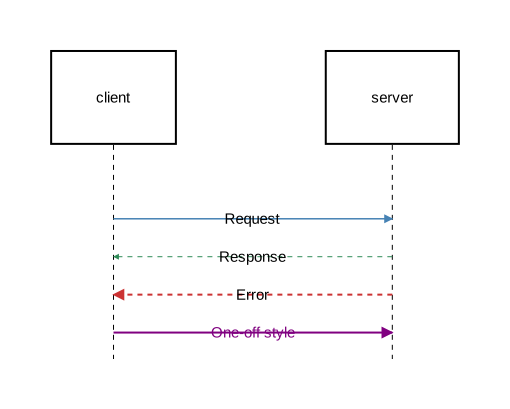
diagram sequence;

type RequestArrow = Arrow [stroke=[color="steelblue", width=1.5]];
type ResponseArrow = Arrow [stroke=[color="seagreen", width=1.0, style="dashed"]];
type ErrorArrow = Arrow [stroke=[color="#cc3333", width=2.0, style="dashed"]];

client: Rectangle;
server: Rectangle;

client -> @RequestArrow server: "Request";
server -> @ResponseArrow client: "Response";
server -> @ErrorArrow client: "Error";

// Inline styling without defining a type
client -> [stroke=[color="purple", width=2.0], text=[color="purple"]] server: "One-off style";
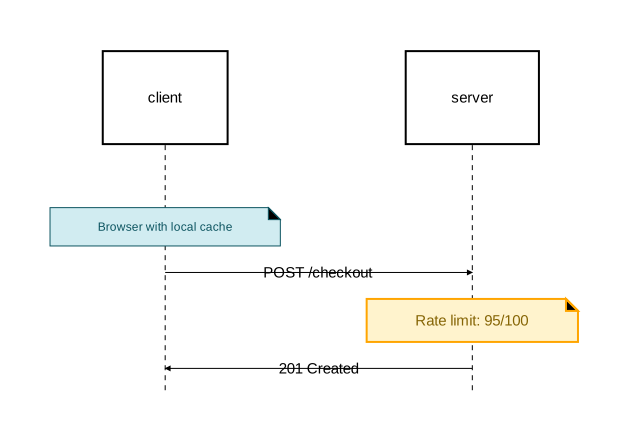
Notes
diagram sequence;

type InfoNote = Note [
    background_color="#d1ecf1",
    stroke=[color="#0c5460"],
    text=[color="#0c5460", font_size=12]
];

type WarningNote = Note [
    background_color="#fff3cd",
    stroke=[color="orange", width=2.0],
    text=[color="#856404"]
];

client: Rectangle;
server: Rectangle;

note @InfoNote [on=[client]]: "Browser with local cache";
client -> server: "POST /checkout";
note @WarningNote [on=[server]]: "Rate limit: 95/100";
server -> client: "201 Created";
Activation blocks
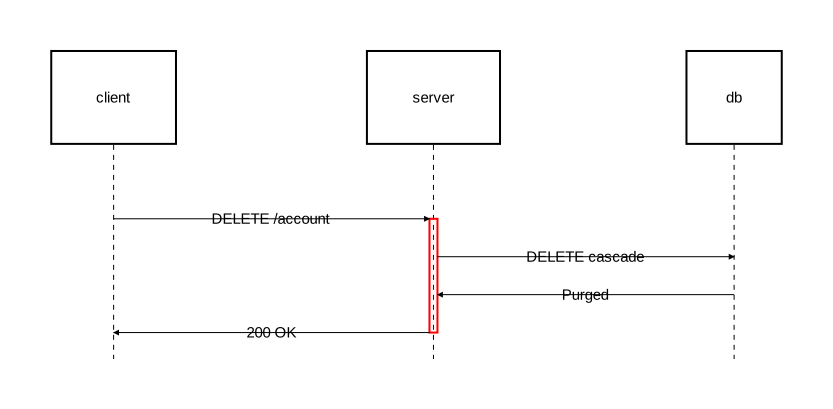
diagram sequence;

type CriticalActivation = Activate [
    fill_color="rgba(255,180,180,0.3)",
    stroke=[color="red", width=2.0]
];

client: Rectangle;
server: Rectangle;
db: Rectangle;

client -> server: "DELETE /account";
activate @CriticalActivation server {
    server -> db: "DELETE cascade";
    db -> server: "Purged";
    server -> client: "200 OK";
};
Fragments
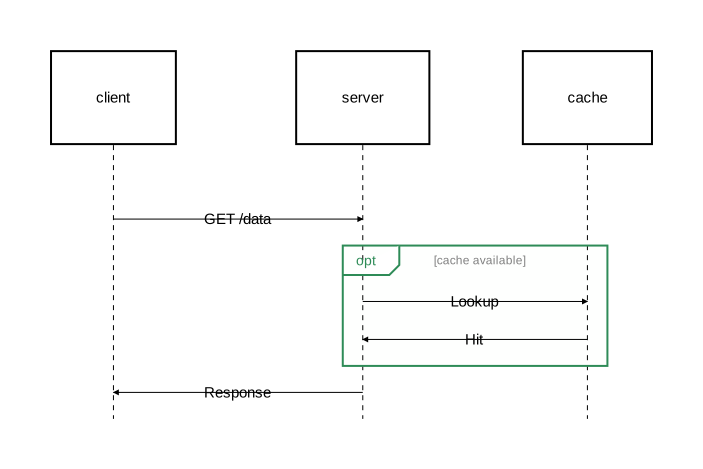
diagram sequence;

client: Rectangle;
server: Rectangle;
cache: Rectangle;

client -> server: "GET /data";
opt [
    background_color="rgba(144, 238, 144, 0.1)",
    border_stroke=[color="seagreen", width=2.0],
    operation_label_text=[font_size=14, color="seagreen"],
    section_title_text=[font_size=12, color="gray"]
] "cache available" {
    server -> cache: "Lookup";
    cache -> server: "Hit";
};
server -> client: "Response";
See Fragments reference for all fragment-specific attributes.
Diagram-level styling
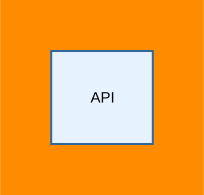
Set a background color on the entire diagram:
diagram component [background_color="darkorange"];

api as "API": Rectangle [fill_color="#e6f3ff", stroke=[color="#336699"]];
Imports
This tutorial walks through sharing types across files and embedding external diagrams. By the end you’ll have a small multi-file project that reuses a shared style library and embeds one diagram inside another.
Create a shared library
Start by creating a library file with reusable types. Create shared/styles.orr:
library;

type Service = Rectangle[fill_color="#e6f3ff", rounded=5];
type Database = Oval[fill_color="#e0f0e0"];
type Client = Oval[fill_color="#fff0e0"];
A library file starts with library; instead of diagram ...;. It can only contain imports and type definitions — no diagram elements. It’s not renderable on its own.
Import types into a diagram
Now create a diagram that uses these shared types. Create main.orr alongside the shared/ directory:
diagram component;

import "shared/styles"::*;

api as "API Gateway": Service;
db as "Users DB": Database;
user: Client;

user -> api: "Request";
api -> db: "Query";
db -> api: "Result";
api -> user: "Response";
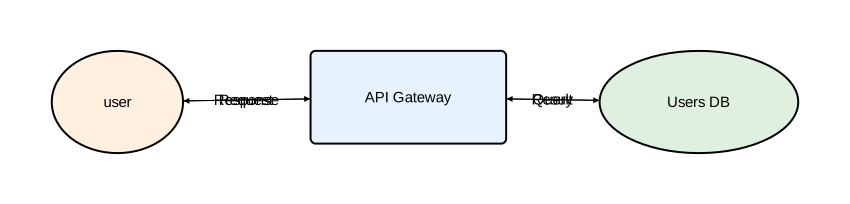
The ::* glob import brings all types from the library flat into scope. You can use Service, Database, and Client directly — no prefix needed.
Render it:
orrery main.orr -o main.svg
Use namespaced imports
If you prefer explicit namespaces, or need to avoid name collisions, use a namespaced import instead:
diagram component;

import "shared/styles";

api as "API Gateway": styles::Service;
db as "Users DB": styles::Database;
user: styles::Client;

user -> api: "Request";
api -> db: "Query";
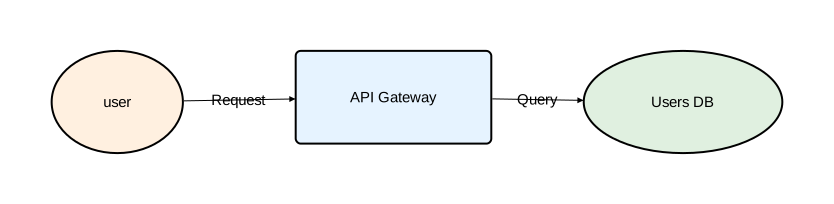
The namespace name comes from the last segment of the path — styles in this case. You can override it with as:
import "shared/styles" as theme;

api: theme::Service;
Extend imported types
Build on imported types to create specialized variants. Create shared/secure.orr:
library;

import "styles";

type SecureService = styles::Service[stroke=[color="red", width=2.0]];
type CriticalService = SecureService[fill_color="#8b0000", text=[color="white"]];
Then use both libraries in a diagram:
diagram component;

import "shared/styles"::*;
import "shared/secure" as sec;

api as "Public API": Service;
auth as "Auth Service": sec::SecureService;
db as "Users DB": Database;

api -> auth: "Authenticate";
auth -> db: "Verify";
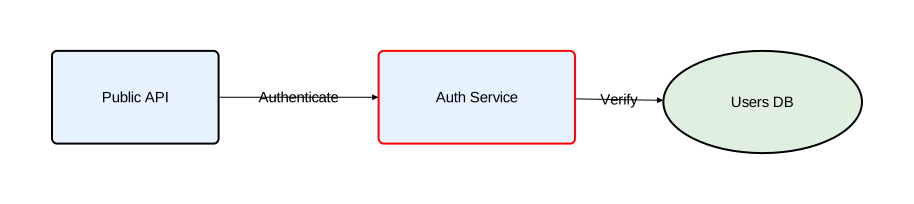
Glob and namespaced imports can be mixed freely. The glob gives you base types without a prefix; the namespaced import keeps specialized types clearly scoped.
Embed an external diagram
Create a reusable sequence diagram. Create auth_flow.orr next to main.orr:
diagram sequence;

import "shared/styles"::*;

client: Service;
server: Service;
database: Database;

client -> server: "Login";
server -> database: "Verify";
database -> server: "Token";
server -> client: "Authenticated";
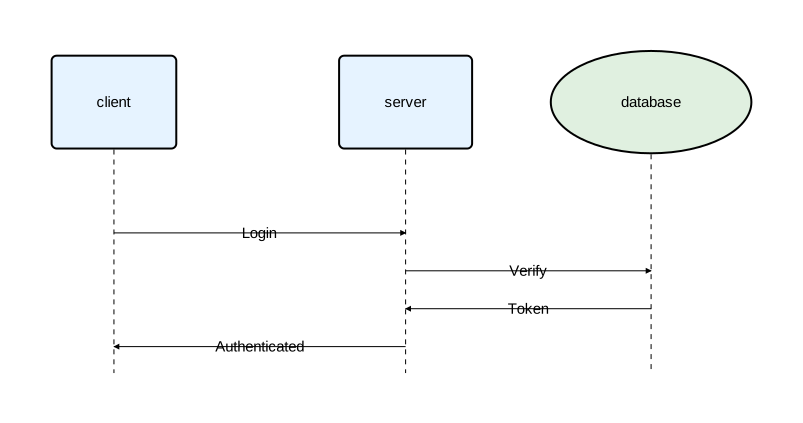
Now embed it inside a component in another diagram:
diagram component;

import "shared/styles"::*;
import "auth_flow";

auth_box as "Auth Service": Service embed auth_flow;
gateway as "API Gateway": Service;

gateway -> auth_box: "Authenticate";
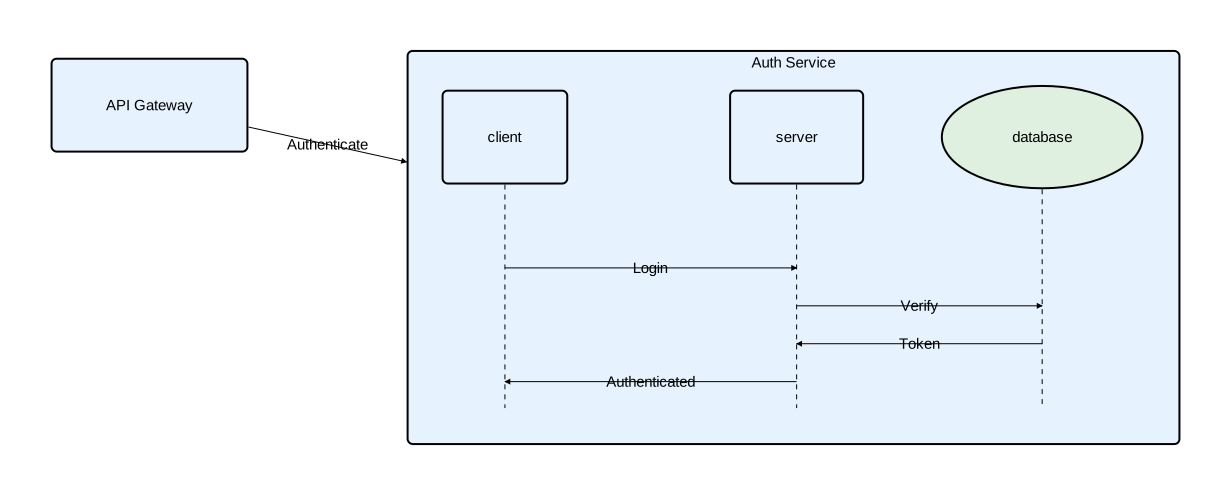
The namespaced import import "auth_flow" creates an embed reference. Using embed auth_flow on a component renders the imported diagram inside it.
Next steps
- Import Reference — complete syntax, namespaces, conflict resolution, and transitive re-export rules
- Type System Reference — type composition and attribute overrides
- Embedded Diagrams — inline and import-based embedding
Diagrams
Every Orrery file starts with a header that declares what the file contains. There are two file types: diagram files that produce rendered output, and library files that contain only reusable definitions.
File types
Diagram files
A diagram file begins with a diagram header and produces rendered output:
diagram <kind> [attributes];
The kind is either component or sequence. Diagram files can contain imports, type definitions, and diagram elements.
Library files
A library file begins with a library header:
library;
Library files contain only imports and type definitions — no diagram elements, no rendered output. They exist to share types across multiple diagrams. See Imports for details.
Component diagrams
Component diagrams show the structural parts of a system and how they connect.
diagram component;

type Service = Rectangle [fill_color="#e6f3ff", rounded=5];
type Database = Rectangle [fill_color="#e0f0e0", rounded=10];

api as "API Gateway": Service;
auth as "Auth Service": Service;
db as "Users DB": Database;

api -> auth: "Validate";
auth -> db: "Query";
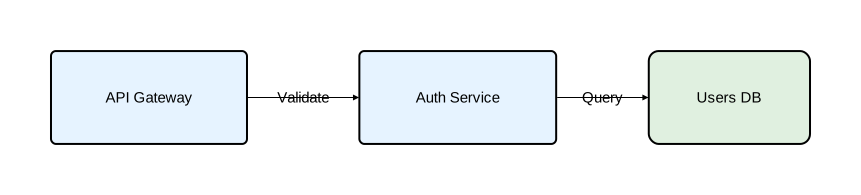
Component diagrams support:
- All shape types (Rectangle, Oval, Component, Actor, Entity, Control, Interface, Boundary)
- Nesting components inside other components
- Embedded diagrams inside components
- Layout engines:
basic,sugiyama, andgraphviz
Sequence diagrams
Sequence diagrams show interactions between participants over time. Time flows downward.
diagram sequence;

client: Rectangle;
server: Rectangle;
database: Rectangle;

client -> server: "POST /login";
server -> database: "SELECT user";
database -> server: "User row";
server -> client: "200 OK";
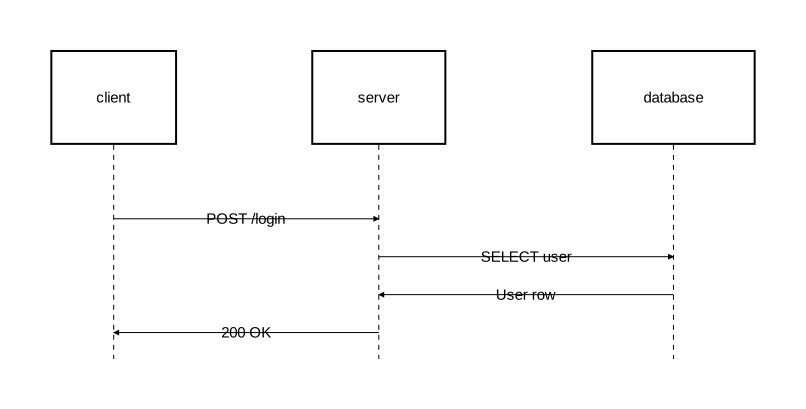
Sequence diagrams support:
- Activation blocks on lifelines
- Fragments for conditional and looping flows (alt, opt, loop, par, break, critical)
- Notes attached to participants or placed in margins
Diagram attributes
Attributes are specified in square brackets after the kind:
diagram component [background_color="#f5f5f5", layout_engine="sugiyama"];

api: Rectangle [fill_color="#e6f3ff"];
db: Rectangle [fill_color="#e0f0e0"];
api -> db;
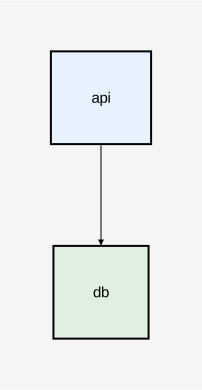
| Attribute | Type | Description | Applies to |
|---|---|---|---|
background_color | color | Background color of the diagram | Both |
layout_engine | string | Layout algorithm: "basic", "sugiyama", or "graphviz" | Both (sugiyama/graphviz only for component) |
These can also be set in the configuration file as defaults.
Layout engines
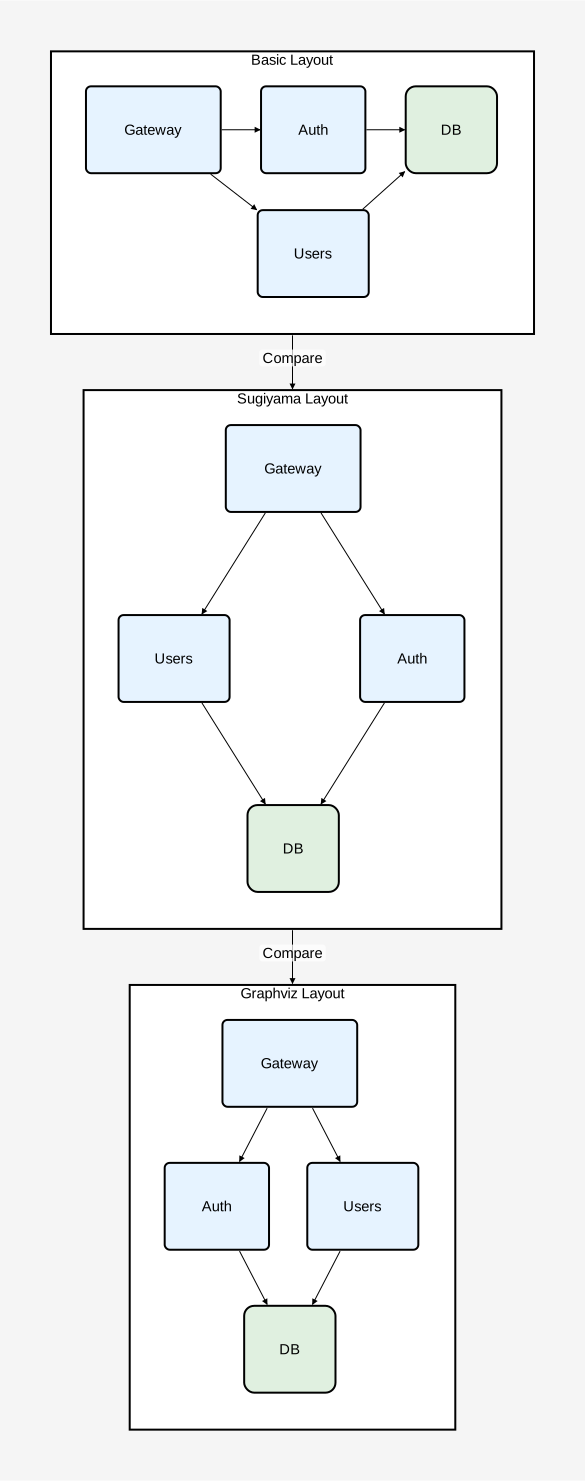
Orrery supports three layout engines for positioning elements:
basic— Simple deterministic positioning. Available for both component and sequence diagrams.sugiyama— Hierarchical layered layout that arranges nodes in layers to minimize edge crossings. Available for component diagrams only.graphviz— Graphviz-backed layout via the externaldotCLI, producing balanced placements with fewer edge crossings on non-trivial graphs. Available for component diagrams only. Requires thegraphvizCargo feature (enabled by default in the CLI binary) and a Graphviz installation.
The default engine depends on how the binary was built: graphviz when the graphviz Cargo feature is enabled (the CLI default), otherwise basic. See Configuration — Priority for the full resolution order.
diagram component [background_color="#f5f5f5"];

basic_view as "Basic Layout": Rectangle embed {
    diagram component [layout_engine="basic", background_color="#ffffff"];

    type Service = Rectangle [fill_color="#e6f3ff", rounded=5];
    type Database = Rectangle [fill_color="#e0f0e0", rounded=10];

    gw as "Gateway": Service;
    auth as "Auth": Service;
    users as "Users": Service;
    db as "DB": Database;

    gw -> auth;
    gw -> users;
    auth -> db;
    users -> db;
};

sugiyama_view as "Sugiyama Layout": Rectangle embed {
    diagram component [layout_engine="sugiyama", background_color="#ffffff"];

    type Service = Rectangle [fill_color="#e6f3ff", rounded=5];
    type Database = Rectangle [fill_color="#e0f0e0", rounded=10];

    gw as "Gateway": Service;
    auth as "Auth": Service;
    users as "Users": Service;
    db as "DB": Database;

    gw -> auth;
    gw -> users;
    auth -> db;
    users -> db;
};

graphviz_view as "Graphviz Layout": Rectangle embed {
    diagram component [layout_engine="graphviz", background_color="#ffffff"];

    type Service = Rectangle [fill_color="#e6f3ff", rounded=5];
    type Database = Rectangle [fill_color="#e0f0e0", rounded=10];

    gw as "Gateway": Service;
    auth as "Auth": Service;
    users as "Users": Service;
    db as "DB": Database;

    gw -> auth;
    gw -> users;
    auth -> db;
    users -> db;
};

basic_view -> sugiyama_view: "Compare";
sugiyama_view -> graphviz_view: "Compare";
Embedded diagrams
A component can contain an entire diagram inside it using the embed keyword. This lets you show the internal behavior or structure of a component. Only content-supporting shapes support embedding.
Orrery supports two forms of embedding: inline (define the diagram directly) and import-based (reference an external file).
Inline embedding
name [as "Label"]: Type [attributes] embed {
    diagram <kind> [diagram_attributes];
    // diagram contents
};
The embedded block is structurally identical to a standalone diagram file — it starts with a diagram header followed by elements. Embedded diagrams follow the syntax and layout rules of their declared kind.
Import-based embedding
When a diagram file is imported with a namespaced import, it can be embedded by referencing the import name:
import "path/to/diagram";

name [as "Label"]: Type embed diagram_name;
See Imports — Diagram embedding for details.
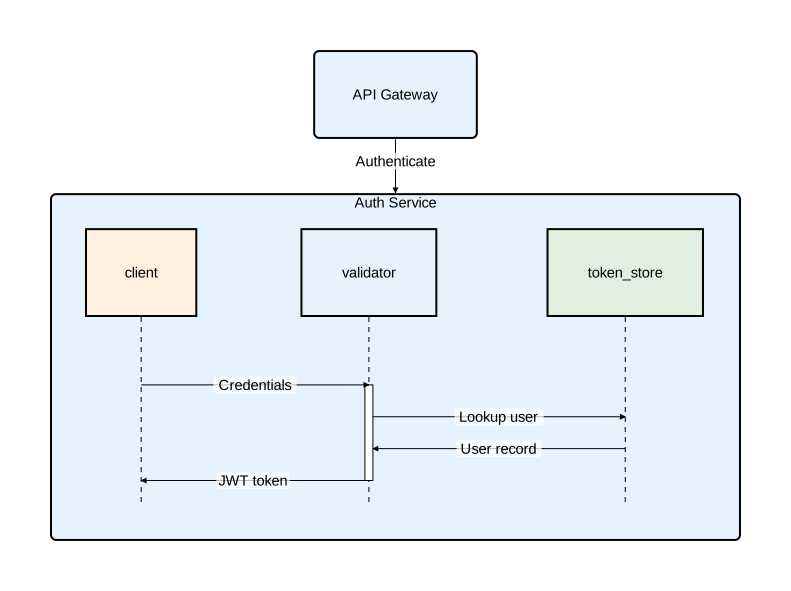
Sequence diagram inside a component
Show the internal message flow of a service:
diagram component;

type Service = Rectangle [fill_color="#e6f3ff", rounded=5];

auth_service as "Auth Service": Service embed {
    diagram sequence;

    client: Rectangle [fill_color="#fff0e0"];
    validator: Rectangle [fill_color="#e6f3ff"];
    token_store: Rectangle [fill_color="#e0f0e0"];

    client -> validator: "Credentials";
    activate validator {
        validator -> token_store: "Lookup user";
        token_store -> validator: "User record";
        validator -> client: "JWT token";
    };
};

gateway as "API Gateway": Service;
gateway -> auth_service: "Authenticate";
Component diagram inside a component
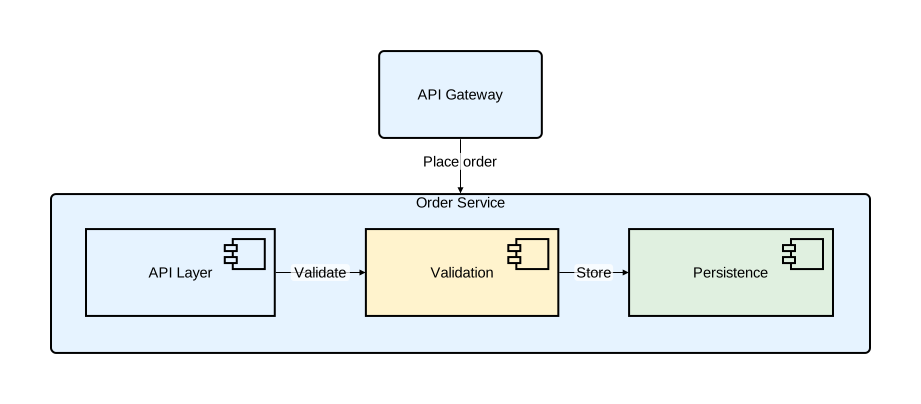
Show the internal architecture of a service:
diagram component;

type Service = Rectangle [fill_color="#e6f3ff", rounded=5];

order_service as "Order Service": Service embed {
    diagram component [layout_engine="basic", background_color="#fafafa"];

    api as "API Layer": Component [fill_color="#e6f3ff"];
    validation as "Validation": Component [fill_color="#fff3cd"];
    persistence as "Persistence": Component [fill_color="#e0f0e0"];

    api -> validation: "Validate";
    validation -> persistence: "Store";
};

gateway as "API Gateway": Service;
gateway -> order_service: "Place order";
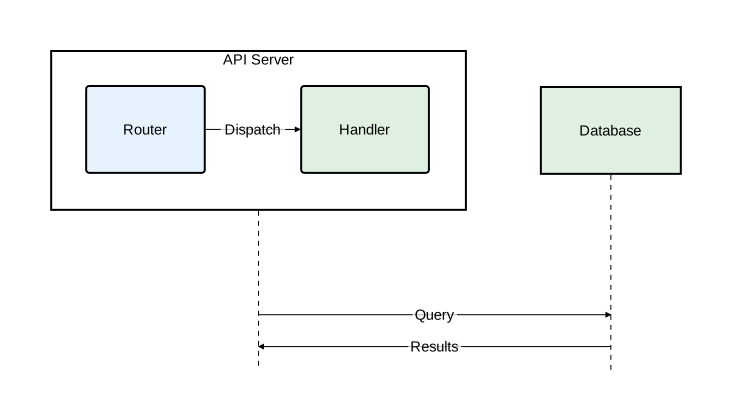
Embedded diagrams in sequence participants
Sequence diagram participants can also embed diagrams:
diagram sequence;

api_node as "API Server": Rectangle embed {
    diagram component [layout_engine="basic", background_color="#f8f8ff"];

    router as "Router": Rectangle [fill_color="#e6f3ff", rounded=3];
    handler as "Handler": Rectangle [fill_color="#e0f0e0", rounded=3];
    router -> handler: "Dispatch";
};

db as "Database": Rectangle [fill_color="#e0f0e0"];

api_node -> db: "Query";
db -> api_node: "Results";
Comments
Orrery supports line comments with //:
// This is a comment
diagram component; // inline comment
Document structure
Every Orrery file follows a strict declaration order:
- File header —
diagram <kind> [attributes];orlibrary; - Import declarations (optional) — all
importstatements - Type definitions (optional) — all
typedefinitions - Diagram elements (diagram files only) — components, relations, fragments, notes, etc.
Diagram file
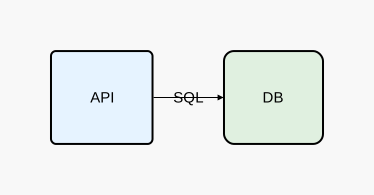
diagram component [background_color="#f8f8f8"];

// Type definitions
type Service = Rectangle [fill_color="#e6f3ff", rounded=5];
type Database = Rectangle [fill_color="#e0f0e0", rounded=10];

// Elements
api as "API": Service;
db as "DB": Database;
api -> db: "SQL";
Library file
library;

import "base/types"::*;

type Service = Rectangle [fill_color="#e6f3ff", rounded=5];
type Database = Rectangle [fill_color="#e0f0e0", rounded=10];
Library files export all their types to any file that imports them. See Imports for details.
Components
Components are the building blocks of Orrery diagrams. In component diagrams they represent system parts; in sequence diagrams they represent participants.
Declaring components
name: Type;
name as "Display Name": Type;
name: Type [attributes];
The name is an identifier used to reference the component elsewhere — in relations, activation blocks, note targets, and more. It must start with a letter and can contain letters, digits, and underscores. By convention, names use snake_case.
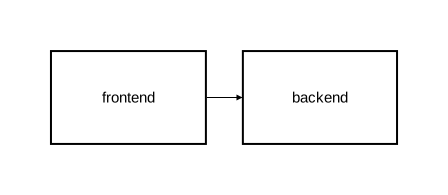
diagram component;

frontend: Rectangle;
backend: Rectangle;
frontend -> backend;
Display names
By default, the component name is used as the visible label. Use as "..." to set a different label:
diagram component;

fe as "Frontend App": Rectangle;
be as "Backend API": Rectangle;
db as "PostgreSQL": Rectangle;

fe -> be;
be -> db;
Shape types
Orrery provides eight built-in shape types, divided into two categories.
Content-supporting shapes
These shapes can contain nested elements and embedded diagrams inside them:
| Shape | Description |
|---|---|
Rectangle | Rectangular box — the most common shape |
Oval | Elliptical shape |
Component | UML component icon with stereotype tabs |
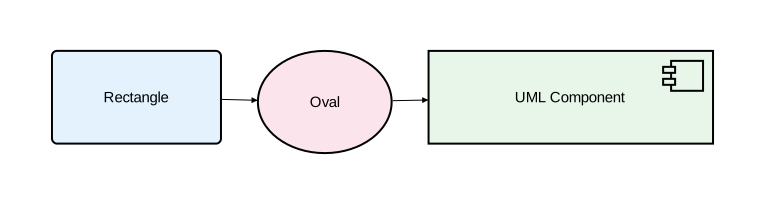
diagram component;

rect as "Rectangle": Rectangle [fill_color="#e3f2fd", rounded=5];
oval as "Oval": Oval [fill_color="#fce4ec"];
comp as "UML Component": Component [fill_color="#e8f5e9"];

rect -> oval;
oval -> comp;
Content-free shapes
These shapes cannot contain nested elements. Their label appears below the shape.
| Shape | Description |
|---|---|
Actor | A user or external agent |
Entity | A data entity |
Control | Control logic |
Interface | An interface |
Boundary | A system boundary |
diagram component;

customer as "Customer": Actor;
account as "Account": Entity;
auth_logic as "Auth Logic": Control;
rest_api as "REST API": Interface;
external as "External System": Boundary;

customer -> rest_api: "Request";
rest_api -> auth_logic: "Authenticate";
auth_logic -> account: "Validate";
account -> external: "Sync";

Attempting to nest elements inside a content-free shape produces an error.
Component attributes
| Attribute | Type | Description |
|---|---|---|
fill_color | color | Background color |
rounded | float | Corner radius for rectangles |
stroke | Stroke | Border styling |
text | Text | Text styling |
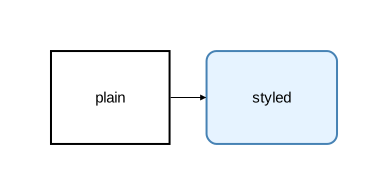
diagram component;

plain: Rectangle;
styled: Rectangle [fill_color="#e6f3ff", rounded=10, stroke=[color="steelblue", width=2.0]];
plain -> styled;
Custom types
Define reusable types to avoid repeating attributes:
diagram component;

type Service = Rectangle [fill_color="#e6f3ff", rounded=5];
type Database = Rectangle [fill_color="#e0f0e0", rounded=10];
type Client = Oval [fill_color="#fff0e0"];

web_app as "Web Application": Client;
api as "API Gateway": Service;
db as "Users DB": Database;

web_app -> api: "HTTP";
api -> db: "SQL";
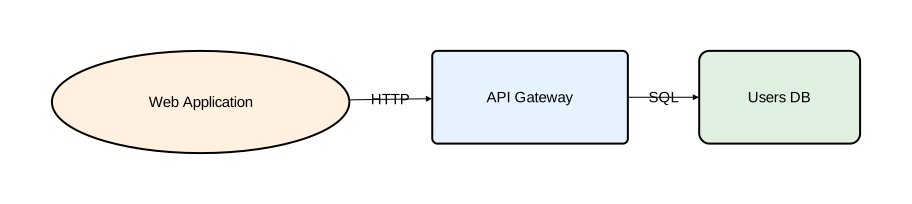
Types can extend other types. Later attributes override earlier ones:
diagram component;

type Service = Rectangle [fill_color="#e6f3ff", rounded=5, stroke=[color="#336699"]];
type CriticalService = Service [fill_color="#ffe0e0", stroke=[color="red", width=3.0]];

api: Service;
auth as "Auth (Critical)": CriticalService;
api -> auth;
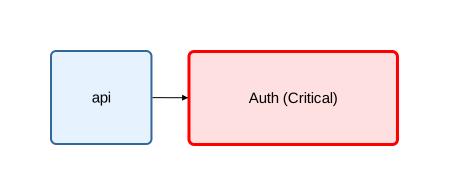
For the full type system, see Type System.
Nesting
Content-supporting shapes can contain other components, creating a hierarchy:
diagram component;

type Service = Rectangle [fill_color="#e6f3ff", rounded=5];

backend: Rectangle [fill_color="#f5f5f5"] {
    api: Service;
    auth: Service;
    api -> auth;
};
Multi-level nesting
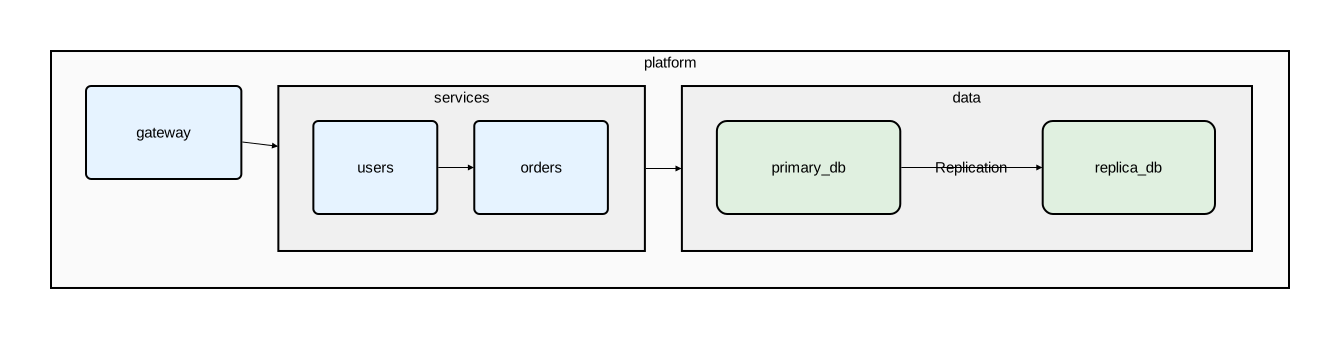
Nesting can go multiple levels deep:
diagram component;

type Service = Rectangle [fill_color="#e6f3ff", rounded=5];
type Database = Rectangle [fill_color="#e0f0e0", rounded=10];

platform: Rectangle [fill_color="#fafafa"] {
    gateway: Service;

    services: Rectangle [fill_color="#f0f0f0"] {
        users: Service;
        orders: Service;
        users -> orders;
    };

    data: Rectangle [fill_color="#f0f0f0"] {
        primary_db: Database;
        replica_db: Database;
        primary_db -> replica_db: "Replication";
    };

    gateway -> services;
    services -> data;
};
Cross-level relations
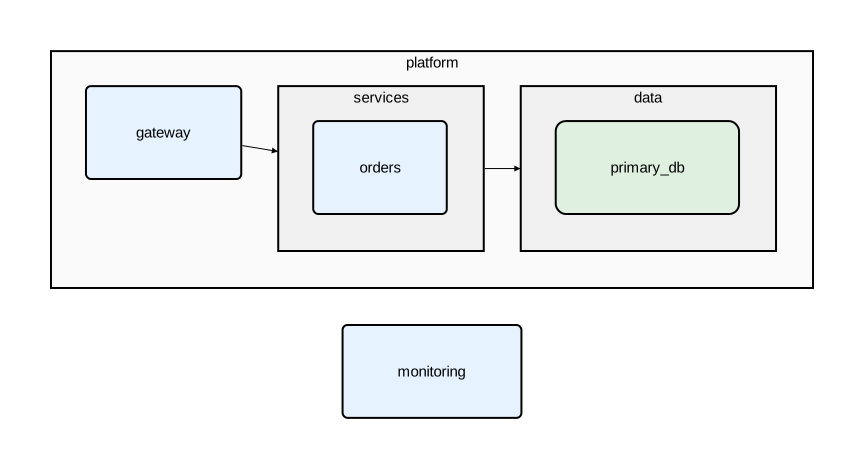
Use :: to reference nested components from outside their parent:
diagram component;

type Service = Rectangle [fill_color="#e6f3ff", rounded=5];
type Database = Rectangle [fill_color="#e0f0e0", rounded=10];

platform: Rectangle [fill_color="#fafafa"] {
    gateway: Service;
    services: Rectangle [fill_color="#f0f0f0"] {
        orders: Service;
    };
    data: Rectangle [fill_color="#f0f0f0"] {
        primary_db: Database;
    };
    gateway -> services;
    services -> data;
};

// Top-level to nested
monitoring: Service;
monitoring -> platform::gateway;
monitoring -> platform::data::primary_db;

// Nested to top-level
platform::services::orders -> monitoring: "Metrics";

// Across nesting boundaries
platform::gateway -> platform::data::primary_db;
Naming conventions
| Element | Convention | Examples |
|---|---|---|
| Component names | snake_case | user_service, primary_db |
| Type names | CamelCase | Database, ApiGateway |
| Display names | Free-form string | "Auth Service", "PostgreSQL" |
Names are case-sensitive. They must start with a letter and can contain letters, digits, and underscores.
Relations
Relations connect components with arrows or lines. They work in both component and sequence diagrams.
Syntax
source -> target;
source -> target: "label";
source -> @TypeName [attributes] target: "label";
Arrow types
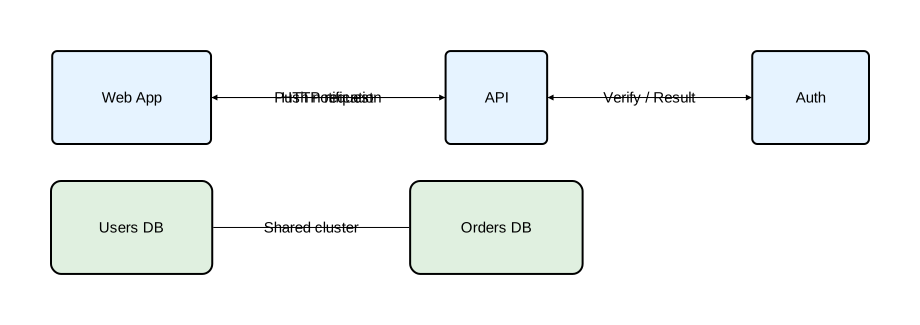
Orrery provides four relation types:
| Syntax | Name | Description |
|---|---|---|
-> | Forward | Arrow from source to target |
<- | Backward | Arrow from target to source |
<-> | Bidirectional | Arrows in both directions |
- | Plain | Line with no arrowheads |
diagram component;

type Service = Rectangle [fill_color="#e6f3ff", rounded=5];
type Database = Rectangle [fill_color="#e0f0e0", rounded=10];

web_app as "Web App": Service;
api as "API": Service;
auth as "Auth": Service;
users_db as "Users DB": Database;
orders_db as "Orders DB": Database;

// Forward arrow
web_app -> api: "HTTP request";

// Backward arrow
web_app <- api: "Push notification";

// Bidirectional
api <-> auth: "Verify / Result";

// Plain line (no arrowhead)
users_db - orders_db: "Shared cluster";
Labels
Labels are optional strings that appear on the relation line:
diagram sequence;

client: Rectangle;
server: Rectangle;

client -> server: "POST /login";
server -> client: "200 OK";
client -> server;
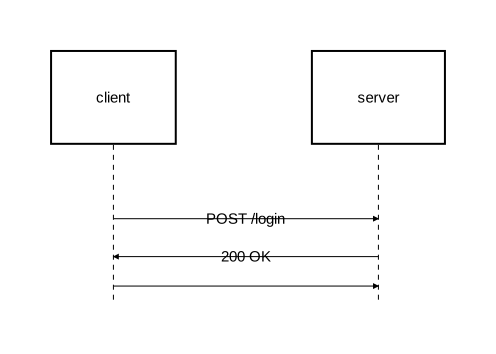
When omitted, the relation is drawn without a label.
Self-messages
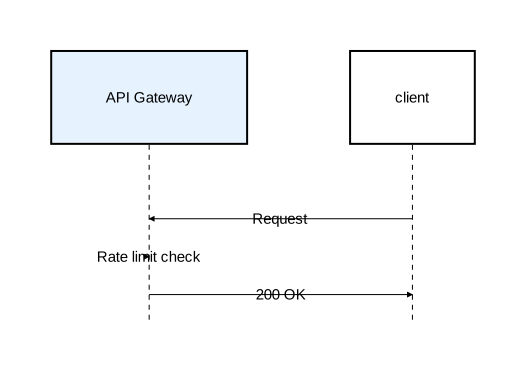
A component can have a relation to itself:
diagram sequence;

type Service = Rectangle [fill_color="#e6f3ff"];

api as "API Gateway": Service;
client: Rectangle;

client -> api: "Request";
api -> api: "Rate limit check";
api -> client: "200 OK";
Inline styling
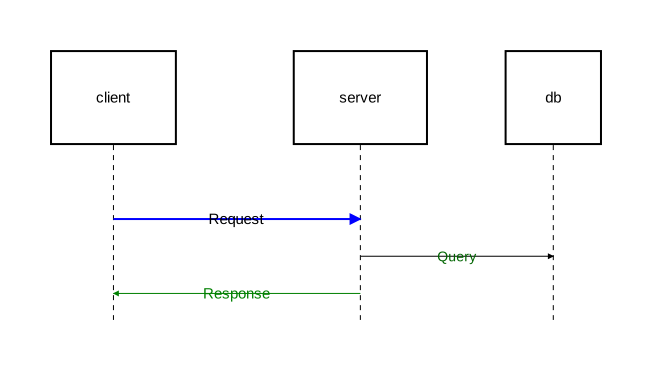
Override attributes directly on a relation using square brackets after the arrow operator:
diagram sequence;

client: Rectangle;
server: Rectangle;
db: Rectangle;

// Styled stroke
client -> [stroke=[color="blue", width=2.0]] server: "Request";

// Styled label text
server -> [text=[color="darkgreen", font_size=14]] db: "Query";

// Both stroke and text
server -> [stroke=[color="green"], text=[color="green"]] client: "Response";
Typed arrows
Define reusable arrow types with type, then apply them with @. See Type System for more on type definitions.
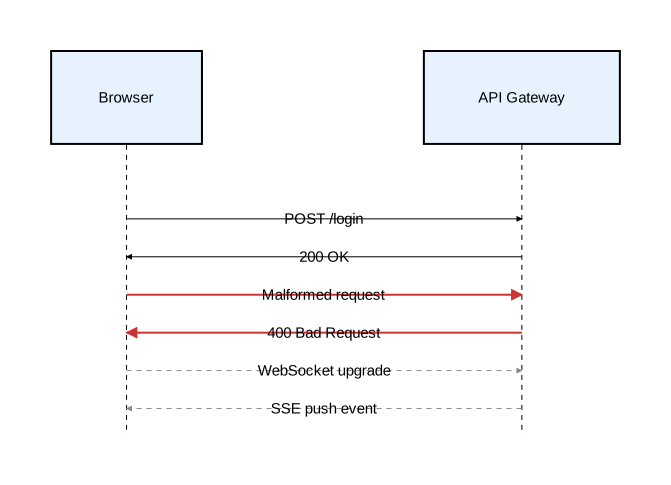
diagram sequence;

type ErrorArrow = Arrow [stroke=[color="#cc3333", width=2.0]];
type AsyncArrow = Arrow [stroke=[color="#888888", style="dashed"]];
type Participant = Rectangle [fill_color="#e6f3ff"];

client as "Browser": Participant;
api as "API Gateway": Participant;

client -> api: "POST /login";
api -> client: "200 OK";

// Named type
client -> @ErrorArrow api: "Malformed request";
api -> @ErrorArrow client: "400 Bad Request";

// Async messages
client -> @AsyncArrow api: "WebSocket upgrade";
client <- @AsyncArrow api: "SSE push event";
Anonymous type overrides
Apply attributes inline without defining a named type:
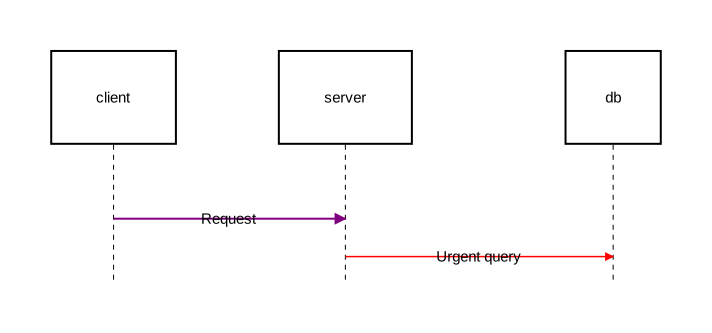
diagram sequence;

type RequestArrow = Arrow [stroke=[color="steelblue", width=1.5]];

client: Rectangle;
server: Rectangle;
db: Rectangle;

// Anonymous type (extending Arrow)
client -> @Arrow[stroke=[color="purple", width=2.0]] server: "Request";

// Extending a named type with overrides
server -> @RequestArrow[stroke=[color="red"]] db: "Urgent query";
Default type
When @TypeName is omitted, the relation defaults to @Arrow:
client -> server;                         // same as: client -> @Arrow server;
client -> [stroke=[color="red"]] server;  // same as: client -> @Arrow[stroke=[color="red"]] server;
Cross-level relations
In diagrams with nested components, use :: to reference elements at different nesting levels:
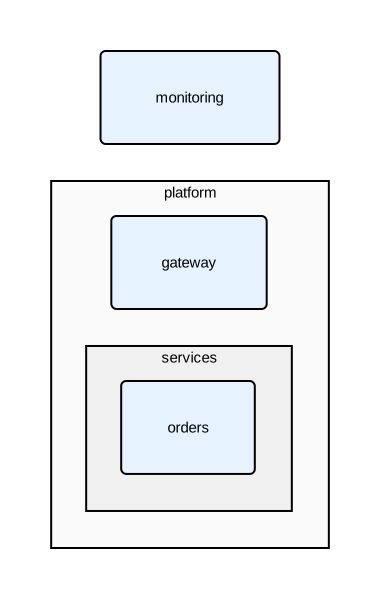
diagram component;

type Service = Rectangle [fill_color="#e6f3ff", rounded=5];

platform: Rectangle [fill_color="#fafafa"] {
    gateway: Service;
    services: Rectangle [fill_color="#f0f0f0"] {
        orders: Service;
    };
};

monitoring: Service;

// Top-level to nested
monitoring -> platform::gateway;

// Nested to top-level
platform::services::orders -> monitoring: "Metrics";
Relation attributes
| Attribute | Type | Description |
|---|---|---|
stroke | Stroke | Line styling |
text | Text | Label text styling |
style | string | Routing style: "straight" (default), "curved", or "orthogonal" |
See Styling for full details on stroke and text attributes.
Type System
Orrery’s type system lets you define reusable visual styles and apply them consistently across your diagrams. Types build on built-in base types and can be composed and extended.
Types can also be shared across files using the import system. Define types in a library file and import them into any diagram that needs them.
Defining types
Use the type keyword to create a named type from a base type with attributes:
type TypeName = BaseType [attributes];
Type names must be CamelCase starting with an uppercase letter.
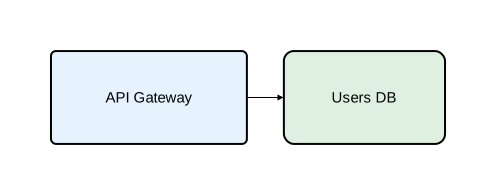
diagram component;

type Service = Rectangle [fill_color="#e6f3ff", rounded=5];
type Database = Rectangle [fill_color="#e0f0e0", rounded=10];

api as "API Gateway": Service;
db as "Users DB": Database;
api -> db;
Declarations vs. invocations
The type system has two ways to use types, depending on the construct:
Declarations (:)
Create a named component that can be referenced in relations. Used for defining components and participants.
identifier: TypeName;
identifier: TypeName [attribute_overrides];
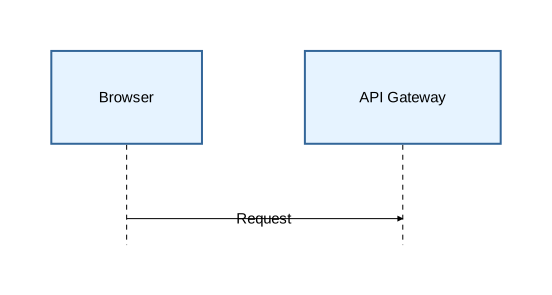
diagram sequence;

type Participant = Rectangle [fill_color="#e6f3ff", stroke=[color="#336699"]];

client as "Browser": Participant;
api as "API Gateway": Participant;

client -> api: "Request";
Invocations (@)
Apply a type to a construct — relations, notes, activations, or fragments. These are anonymous actions, not named entities.
keyword @TypeName ...
keyword @TypeName [attribute_overrides] ...
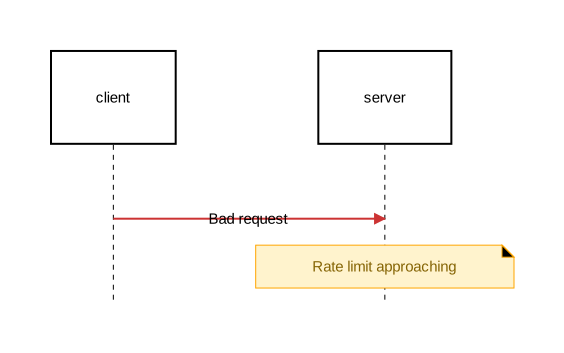
diagram sequence;

type ErrorArrow = Arrow [stroke=[color="#cc3333", width=2.0]];
type WarningNote = Note [background_color="#fff3cd", stroke=[color="orange"], text=[color="#856404"]];

client: Rectangle;
server: Rectangle;

client -> @ErrorArrow server: "Bad request";
note @WarningNote [on=[server]]: "Rate limit approaching";
Default types
When @TypeSpec is omitted, Orrery uses a default:
| Construct | Default type | Sugar | Explicit equivalent |
|---|---|---|---|
| Relations | Arrow | a -> b | a -> @Arrow b |
| Notes | Note | note: "text" | note @Note: "text" |
| Activations | Activate | activate x { } | activate @Activate x { } |
| Fragments | Fragment | alt "cond" { } | alt @Fragment "cond" { } |
You can still pass inline attributes when using the sugar form:
client -> [stroke=[color="red"]] server; // same as: client -> @Arrow[stroke=[color="red"]] server;
Built-in base types
Component shapes
| Type | Description | Can contain children |
|---|---|---|
Rectangle | Rectangular box | Yes |
Oval | Elliptical shape | Yes |
Component | UML component icon | Yes |
Actor | Stick figure | No |
Entity | Diamond shape | No |
Control | Circle | No |
Interface | Circle with label | No |
Boundary | Rounded rectangle | No |
Relation type
| Type | Description |
|---|---|
Arrow | Configurable arrow for connections between components |
Construct types
| Type | Description |
|---|---|
Note | Annotations attached to components or placed in margins |
Activate | Activation boxes on sequence diagram lifelines |
Fragment | Interaction fragments (alt, opt, loop, par, break, critical) |
Attribute group types
| Type | Description |
|---|---|
Stroke | Reusable group of stroke attributes (color, width, style, cap, join) |
Text | Reusable group of text attributes (font_size, font_family, color, background_color, padding) |
Attribute group types follow the same type definition syntax as other types and support composition and overrides. They are used inside other type definitions as attribute values, not for creating components directly. See Styling for attribute details.
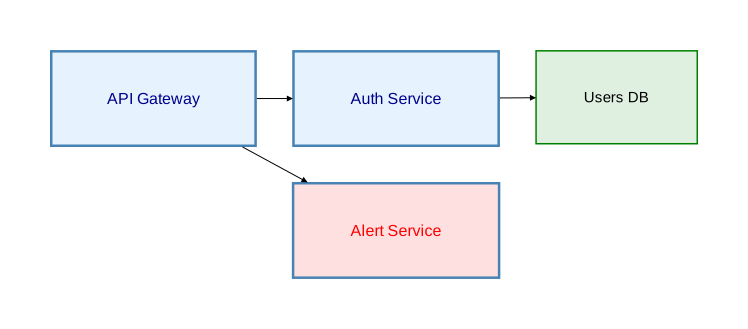
diagram component;

type ThickBlue = Stroke [color="steelblue", width=2.5];
type Heading = Text [font_size=16, color="darkblue", font_family="Arial"];

// Named attribute group usage
type Service = Rectangle [fill_color="#e6f3ff", stroke=ThickBlue, text=Heading];

// Named attribute group with overrides
type Alert = Rectangle [fill_color="#ffe0e0", stroke=ThickBlue, text=Heading[color="red"]];

// Anonymous attribute group usage
type Database = Rectangle [fill_color="#e0f0e0", stroke=[color="green", width=1.5]];

api as "API Gateway": Service;
auth as "Auth Service": Service;
alert as "Alert Service": Alert;
db as "Users DB": Database;
api -> auth;
api -> alert;
auth -> db;
Type composition
Types can extend other types. Later attributes override earlier ones:
diagram sequence;

// Base types
type ThickSolid = Stroke [color="steelblue", width=2.5];
type BoldText = Text [font_size=16, color="darkblue", font_family="Arial"];

// Component type using attribute groups
type Service = Rectangle [fill_color="#e6f3ff", stroke=ThickSolid, text=BoldText];

// Extended type — overrides fill_color and stroke color
type CriticalService = Service [fill_color="#ffe0e0", stroke=[color="red", width=3.0]];

// Arrow types with composition
type RequestArrow = Arrow [stroke=ThickSolid];
type UrgentRequest = RequestArrow [stroke=[color="red"]];

client as "Browser": Service;
api as "API Gateway": CriticalService;

client -> @RequestArrow api: "Normal request";
client -> @UrgentRequest api: "Urgent request";
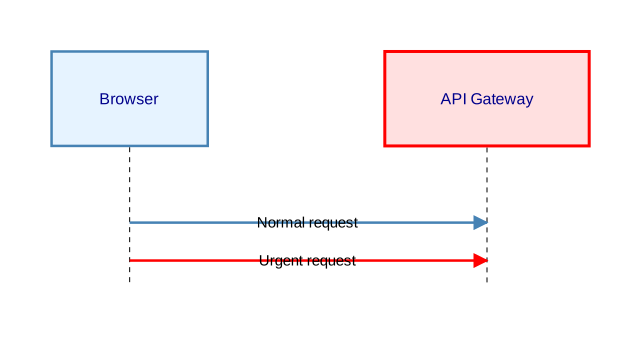
The inheritance chain resolves attributes step by step:
CriticalServiceinheritsService’s stroke and text, then overridesfill_colorandstrokeUrgentRequestinheritsRequestArrow’s stroke (which usesThickSolid), then overrides the color to red
Named vs. anonymous TypeSpecs
Named TypeSpec
References a previously defined type by name:
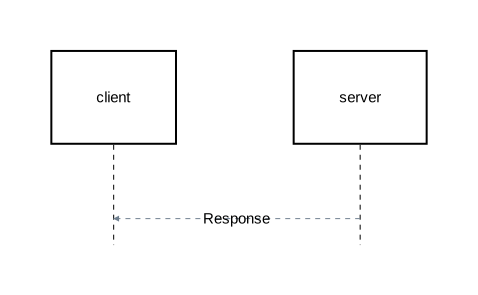
diagram sequence;

type ResponseArrow = Arrow [stroke=[color="slategray", width=1.0, style="dashed"]];

client: Rectangle;
server: Rectangle;

server -> @ResponseArrow client: "Response";
Anonymous TypeSpec
Creates a one-off type inline with attributes, without giving it a name:
diagram sequence;

type RequestArrow = Arrow[stroke=[color="steelblue", width=1.5]];

client: Rectangle;
server: Rectangle;
db: Rectangle;

// Anonymous type extending a base type
client -> @Arrow[stroke=[color="purple", width=2.0]] server: "Request";

// Anonymous type extending a named type, overriding stroke color
server -> @RequestArrow[stroke=[color="red"]] db: "Urgent query";
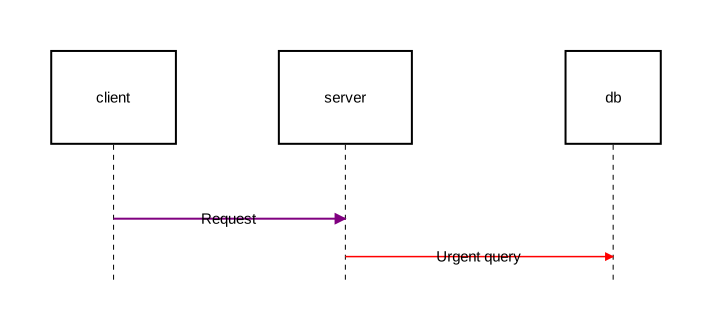
Anonymous types are useful for one-off styling. If you use the same attributes more than once, define a named type instead.
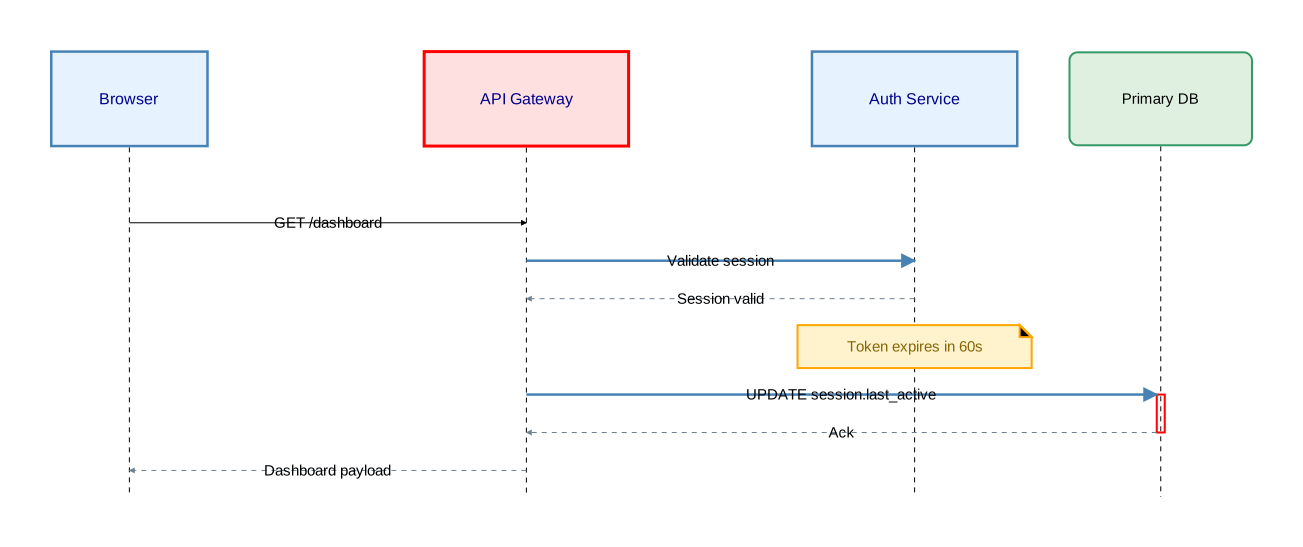
Complete example
diagram sequence;

// Attribute group types
type ThinDashed = Stroke [color="slategray", width=1.0, style="dashed"];
type ThickSolid = Stroke [color="steelblue", width=2.5];
type BoldText = Text [font_size=16, color="darkblue", font_family="Arial"];

// Component types
type Service = Rectangle [fill_color="#e6f3ff", stroke=ThickSolid, text=BoldText];
type Store = Rectangle [fill_color="#e0f0e0", stroke=[color="#339966"], rounded=8];
type CriticalService = Service [fill_color="#ffe0e0", stroke=[color="red", width=3.0]];

// Arrow types
type RequestArrow = Arrow [stroke=ThickSolid];
type ResponseArrow = Arrow [stroke=ThinDashed];
type ErrorArrow = Arrow [stroke=[color="#cc3333", width=2.0, style="dashed"]];

// Construct types
type WarningNote = Note [background_color="#fff3cd", stroke=[color="orange", width=2.0], text=[color="#856404"]];
type CriticalActivation = Activate [fill_color="rgba(255,180,180,0.3)", stroke=[color="red", width=2.0]];

// Participants (declarations with :)
client as "Browser": Service;
api as "API Gateway": CriticalService;
auth as "Auth Service": Service;
primary_db as "Primary DB": Store;

// Messages (invocations with @)
client -> api: "GET /dashboard";
api -> @RequestArrow auth: "Validate session";
auth -> @ResponseArrow api: "Session valid";
note @WarningNote [on=[auth]]: "Token expires in 60s";

// Typed activation
api -> @RequestArrow primary_db: "UPDATE session.last_active";
activate @CriticalActivation primary_db {
    primary_db -> @ResponseArrow api: "Ack";
};

api -> @ResponseArrow client: "Dashboard payload";
Imports
Orrery’s import system enables reuse and composition across .orr files. Import types from shared libraries to keep diagrams DRY, or reference external diagram files and embed them inside components.
File types
Orrery distinguishes two kinds of .orr files based on their header declaration. See Diagrams — File types for an overview.
| Feature | Diagram file | Library file |
|---|---|---|
| Header | diagram <kind> [attributes]; | library; |
| Contains imports | Yes | Yes |
| Contains type definitions | Yes | Yes |
| Contains diagram elements | Yes | No |
| Renderable | Yes | No |
| Exports types to importers | No | Yes |
| Can be embedded via import | Yes | No |
Import syntax
The import keyword brings types and diagram references from other .orr files into the current file’s scope.
Namespaced import
Imports all types behind a namespace. Types are accessed via namespace::TypeName.
import "path";
import "shared/styles";

api: styles::Service;
db: styles::Database;
Glob import
Imports all types flat into the current scope. No namespace prefix is required.
import "path"::*;
import "shared/styles"::*;

api: Service;
db: Database;
Summary
| Form | Syntax | Result |
|---|---|---|
| Namespaced | import "path"; | All types behind namespace, accessed as name::Type |
| Glob | import "path"::*; | All types flat in current scope |
Import paths
Import paths are expressed as string literals:
import "shared/styles";
import "../common/base";
The .orr extension is omitted from import paths — the compiler appends it automatically.
Paths are resolved relative to the importing file’s directory. There are no global search paths or project-root-relative resolution.
Path rules
- Paths use forward slashes only (
/), regardless of operating system - The
.orrextension is never included in the path - Circular import dependencies are a compile-time error
Namespaces
Derived namespace name
For namespaced imports, the namespace name is derived from the last segment of the import path:
import "shared/styles";       // namespace: styles
import "../common/base";      // namespace: base
import "auth_flow";           // namespace: auth_flow
Namespace override with as
The derived namespace name can be overridden using the as keyword:
import "shared/styles" as theme;
import "../common/base" as core;
Namespace access with ::
Types within a namespace are accessed using the :: operator:
import "shared/styles";

api: styles::Service;
db: styles::Database;
api -> @styles::DashedArrow db: "Query";
Diagram embedding via import
A namespaced import of a diagram file creates an embed reference. The namespace identifier doubles as the embed name, which can be used with the embed keyword:
import "auth_flow";

auth_box: Rectangle embed auth_flow;
The as keyword customizes the embed reference name:
import "diagrams/complex_authentication_flow" as auth;

auth_box: Rectangle embed auth;
Restrictions
- Only namespaced imports create embed references — glob imports do not
- Only diagram files can be embedded — attempting to embed a library file is a compile-time error
- The derived namespace name must be a valid identifier (starts with a letter, contains only letters, digits, and underscores). If the file name does not qualify (e.g.
my-utils), useasto provide one:import "my-utils" as my_utils;
| Import form | Creates embed reference |
|---|---|
import "diagram_file"; | Yes |
import "diagram_file" as name; | Yes (uses alias) |
import "diagram_file"::*; | No |
Comparison with inline embedding
Orrery supports two approaches to embedding diagrams:
Inline embedding (defined in Embedded Diagrams):
user_service: Rectangle embed {
    diagram sequence;

    client: Rectangle;
    server: Rectangle;
    client -> server: "Request";
};
Import-based embedding:
import "user_service_flow";

user_service: Rectangle embed user_service_flow;
Scope and visibility
Everything is public
Orrery has no visibility modifiers. All types in a library file are accessible to any file that imports it.
Diagram files are self-contained renderable units. Their type definitions are internal and are not exported. Importing a diagram file creates an embed reference only.
Transitive re-export
Transitive re-export is the default behavior for library files. A library’s namespace exposes everything visible in its scope — its own types plus everything it imported.
Diagram file types are not re-exported.
Example:
base.orr:
library;

type Service = Rectangle[fill_color="lightblue"];
type Database = Oval[fill_color="lightgreen"];
extended.orr:
library;

import "base"::*;

type SecureService = Service[stroke=[color="red"]];
main.orr:
diagram component;

import "extended";

// Own types from extended
api: extended::SecureService;

// Transitively re-exported from base via extended
db: extended::Database;
svc: extended::Service;
Chained access
Transitive visibility enables chained namespace access:
import "parent";

item: parent::child::TypeName;
This works when parent.orr contains import "child"; (namespaced), making child’s types accessible through parent’s namespace.
Conflict resolution
Last writer wins
When multiple imports or definitions introduce the same type name into the flat scope, the last definition wins. The order of import statements and type definitions matters.
import "theme_a"::*;   // defines Service with fill_color="blue"
import "theme_b"::*;   // defines Service with fill_color="red"

api: Service;           // uses theme_b's Service
Local definitions override imports
Local type definitions override any imported type with the same name:
import "shared/styles"::*;   // defines Service

type Service = Rectangle[fill_color="#fff3e0"];  // overrides imported Service

api: Service;  // uses local Service
Namespaced imports avoid conflicts
Namespaced imports avoid flat-scope conflicts entirely:
import "theme_a";
import "theme_b";

blue_api: theme_a::Service;
red_api: theme_b::Service;
File structure
See Diagrams — Document structure for the strict declaration ordering that applies to all Orrery files. Import declarations go between the file header and type definitions.
Complete example
Project structure
project/
├── shared/
│   ├── styles.orr       # library — base types
│   └── secure.orr       # library — imports styles, adds secure types
├── auth_flow.orr        # diagram — reusable sequence diagram
└── main.orr             # diagram — imports everything, embeds auth_flow
shared/styles.orr
library;

type DashedLine = Stroke[style="dashed", color="gray"];
type ThickBorder = Stroke[color="#336699", width=2.0];

type Service = Rectangle[fill_color="#e6f3ff", stroke=ThickBorder, rounded=5];
type Database = Oval[fill_color="#e0f0e0", stroke=[color="#339966"]];
type Client = Oval[fill_color="#fff0e0", stroke=DashedLine];

type DashedArrow = Arrow[stroke=DashedLine];
type StrongArrow = Arrow[stroke=ThickBorder];
shared/secure.orr
library;

import "styles";

type SecureService = styles::Service[stroke=[color="red", width=2.0]];
type CriticalService = SecureService[fill_color="#8b0000", text=[color="white"]];

type SecureArrow = styles::DashedArrow[stroke=[color="red"]];
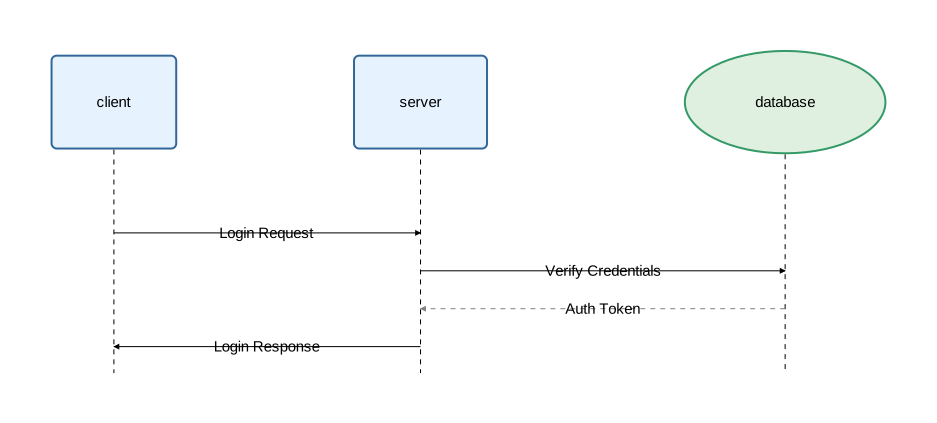
auth_flow.orr
diagram sequence;

import "shared/styles"::*;

client: Service;
server: Service;
database: Database;

client -> server: "Login Request";
server -> database: "Verify Credentials";
database -> @DashedArrow server: "Auth Token";
server -> client: "Login Response";
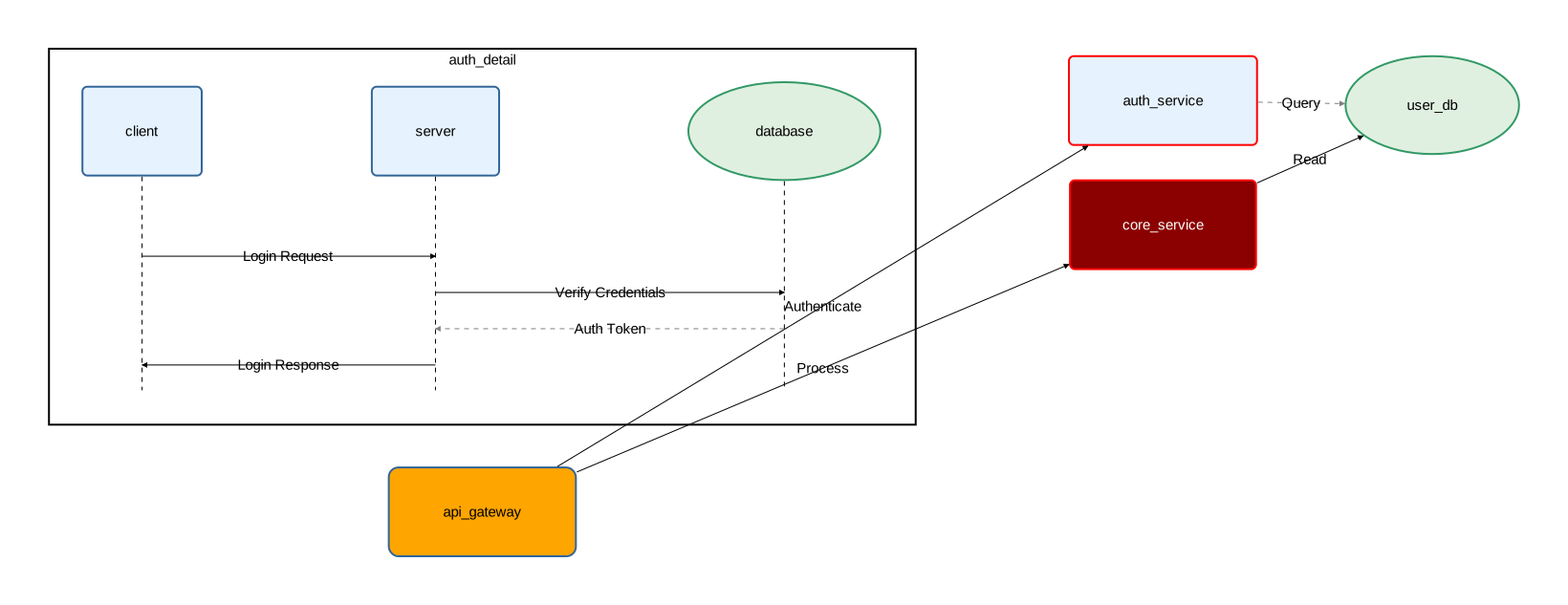
main.orr
diagram component;

import "auth_flow";
import "shared/secure" as sec;
import "shared/styles"::*;

type Gateway = Service[rounded=10, fill_color="orange"];

api_gateway: Gateway;
auth_service: sec::SecureService;
core_service: sec::CriticalService;
user_db: Database;

auth_detail: Rectangle embed auth_flow;

api_gateway -> auth_service: "Authenticate";
api_gateway -> core_service: "Process";
auth_service -> @DashedArrow user_db: "Query";
core_service -> user_db: "Read";
Activation
Activation represents periods when a participant is actively processing — the “focus of control” in sequence diagrams. Visually, it appears as a rectangle on the participant’s lifeline.
Activation is only available in sequence diagrams.
Syntax
Block form:
activate [@TypeSpec] [attributes] component_name {
    // interactions
};
Explicit form:
activate [@TypeSpec] [attributes] component_name;
deactivate component_name;
Block form
The block form groups related interactions within curly braces. This is the recommended form when activations nest cleanly (each one fully contains or is fully contained by another):
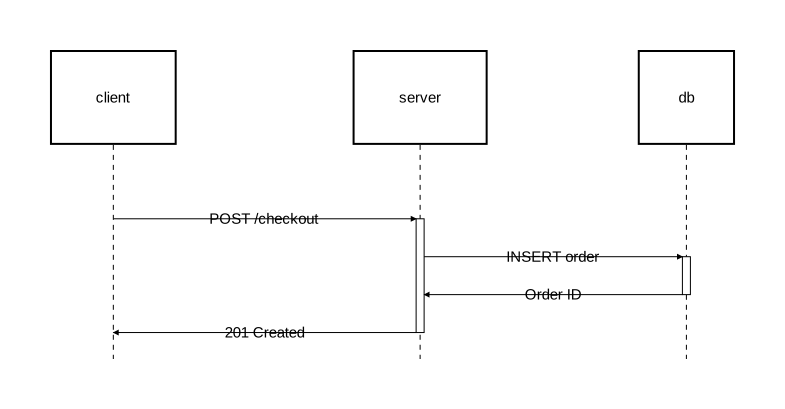
diagram sequence;

client: Rectangle;
server: Rectangle;
db: Rectangle;

client -> server: "POST /checkout";
activate server {
    server -> db: "INSERT order";
    activate db {
        db -> server: "Order ID";
    };
    server -> client: "201 Created";
};
Explicit form
The explicit form uses separate activate and deactivate statements:
diagram sequence;

type AsyncArrow = Arrow [stroke=[color="#888888", style="dashed"]];

client: Rectangle;
server: Rectangle;
worker: Rectangle;

client -> server: "POST /export";
activate server;
server -> @AsyncArrow worker: "Start export job";
activate worker;
worker -> worker: "Process rows";
server -> client: "202 Accepted";
deactivate server;
worker -> @AsyncArrow client: "Export ready";
deactivate worker;
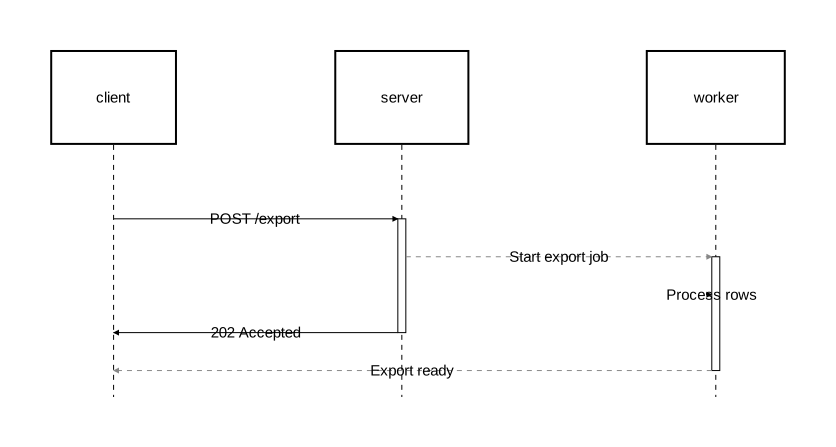
Use the explicit form when activations overlap without one containing the other. In the example above, server and worker are both active concurrently, but neither activation fully contains the other — this cannot be expressed with nested block form.
The two forms are interchangeable. Internally, block form is desugared into explicit statements.
Nested activation
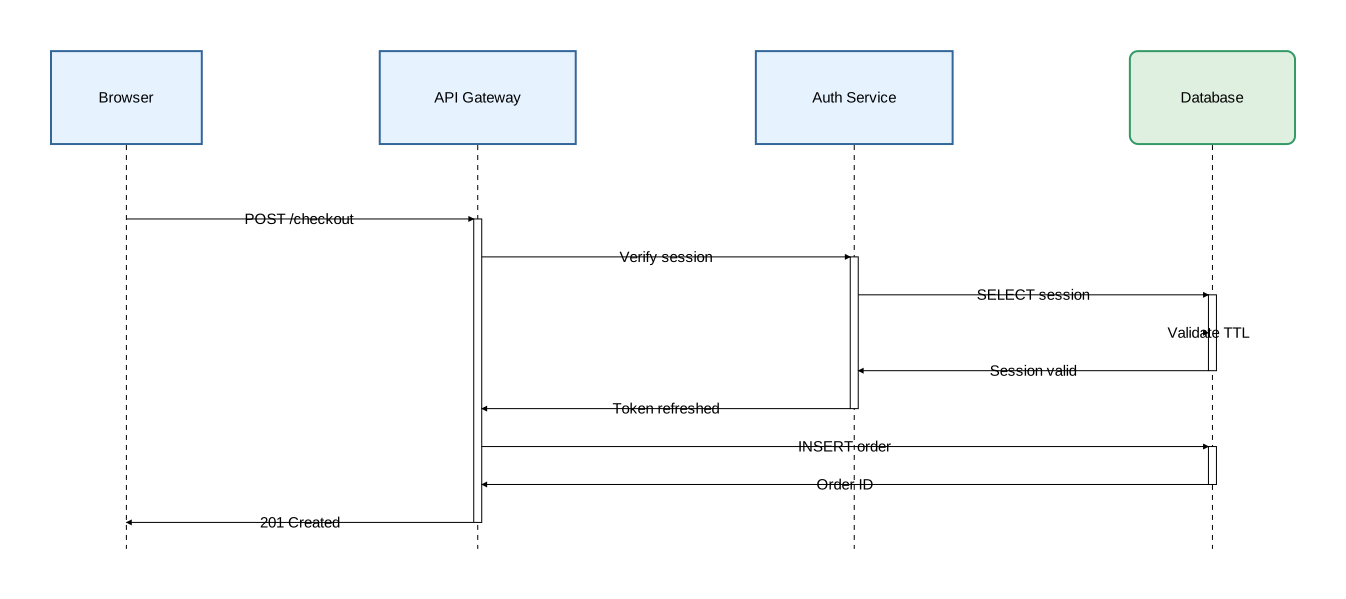
Activation can be nested across different participants:
diagram sequence;

type Participant = Rectangle [fill_color="#e6f3ff", stroke=[color="#336699"]];
type Store = Rectangle [fill_color="#e0f0e0", stroke=[color="#339966"], rounded=8];

client as "Browser": Participant;
api as "API Gateway": Participant;
auth as "Auth Service": Participant;
db as "Database": Store;

client -> api: "POST /checkout";
activate api {
    api -> auth: "Verify session";
    activate auth {
        auth -> db: "SELECT session";
        activate db {
            db -> db: "Validate TTL";
            db -> auth: "Session valid";
        };

        auth -> api: "Token refreshed";
    };

    api -> db: "INSERT order";
    activate db {
        db -> api: "Order ID";
    };

    api -> client: "201 Created";
};
Stacked activation
The same participant can have multiple activation levels stacked:
diagram sequence;

type RequestArrow = Arrow [stroke=[color="steelblue", width=1.5]];
type ResponseArrow = Arrow [stroke=[color="seagreen", style="dashed"]];

client: Rectangle;
api: Rectangle;
auth: Rectangle;
db: Rectangle;

client -> @RequestArrow api: "POST /payment";
activate api {
    api -> @RequestArrow db: "Check balance";
    activate db {
        db -> @ResponseArrow api: "Balance OK";
    };

    api -> @RequestArrow auth: "Fraud check";
    activate auth {
        auth -> @ResponseArrow api: "Cleared";
    };

    api -> @RequestArrow db: "INSERT transaction";
    activate db {
        db -> @ResponseArrow api: "Transaction ID";
    };

    api -> @ResponseArrow client: "Payment confirmed";
};
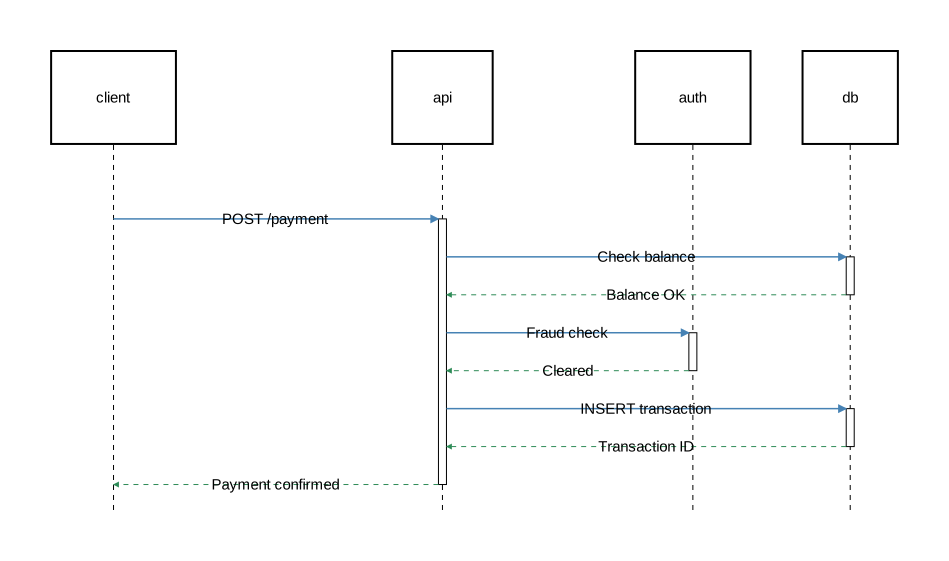
Each nested activate on the same participant adds another layer to the activation box.
Styling
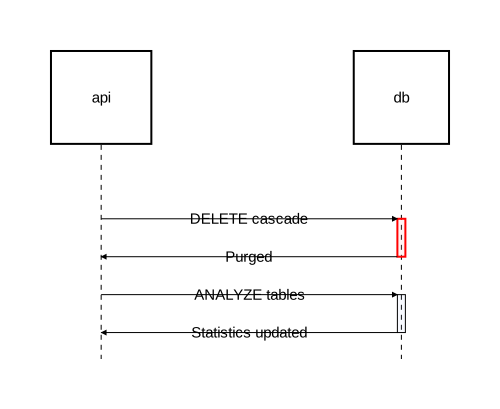
Customize activation appearance with fill_color and stroke:
diagram sequence;

type CriticalActivation = Activate [fill_color="rgba(255,180,180,0.4)", stroke=[color="red", width=2.0]];
type HighlightActivation = Activate [fill_color="rgba(180,200,255,0.3)"];

api: Rectangle;
db: Rectangle;

api -> db: "DELETE cascade";
activate @CriticalActivation db {
    db -> api: "Purged";
};

api -> db: "ANALYZE tables";
activate @HighlightActivation db {
    db -> api: "Statistics updated";
};
Activation attributes
| Attribute | Type | Description |
|---|---|---|
fill_color | color | Background color of the activation box |
stroke | Stroke | Border styling |
Typed activations
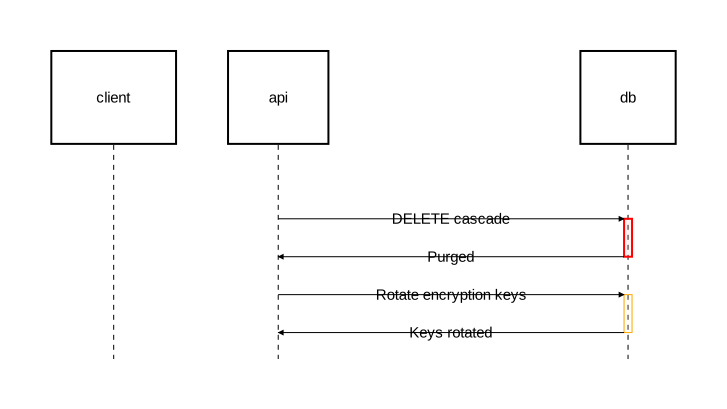
Define reusable activation types with type, then apply them with @:
diagram sequence;

type CriticalActivation = Activate [fill_color="rgba(255,180,180,0.4)", stroke=[color="red", width=2.0]];

client: Rectangle;
api: Rectangle;
db: Rectangle;

// Named type
api -> db: "DELETE cascade";
activate @CriticalActivation db {
    db -> api: "Purged";
};

// Anonymous type (inline)
api -> db: "Rotate encryption keys";
activate @Activate[fill_color="rgba(255,240,200,0.4)", stroke=[color="orange"]] db {
    db -> api: "Keys rotated";
};
When @TypeSpec is omitted, it defaults to @Activate:
activate server { };                          // same as: activate @Activate server { };
activate [fill_color="red"] server { };       // same as: activate @Activate[fill_color="red"] server { };
Scoping behavior
Activation blocks do not create component namespaces. Unlike nesting in component diagrams, identifiers remain flat:
// Correct — flat naming
client -> server: "Request";
activate server {
    server -> client: "Response";
};

// Incorrect — no namespace scoping in activation blocks
// server::client  ← this does not work
Combining with fragments and notes
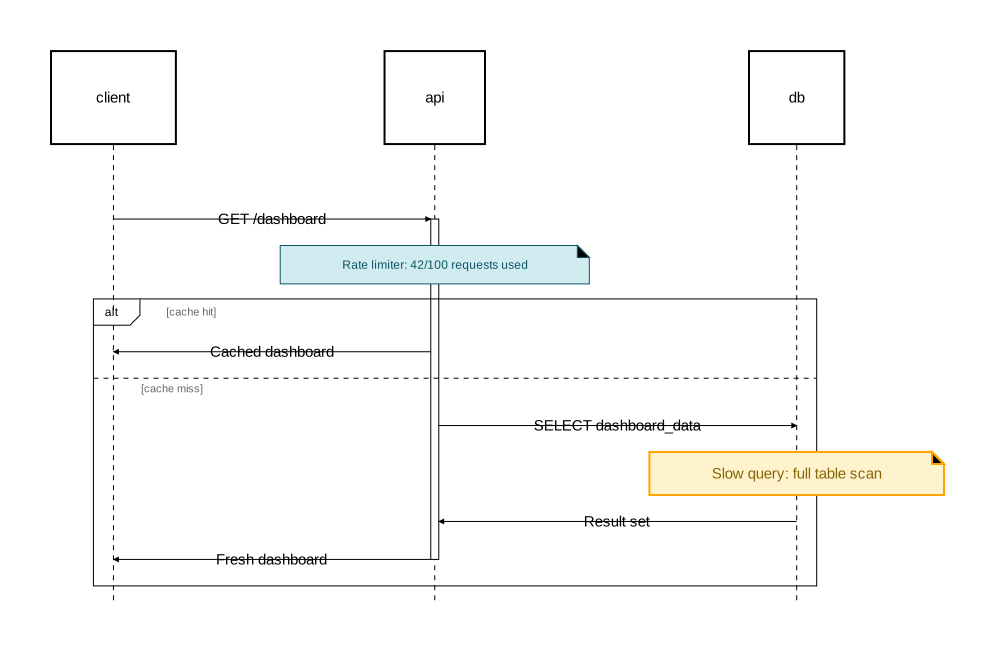
Activation blocks can contain fragments and notes:
diagram sequence;

type InfoNote = Note [background_color="#d1ecf1", stroke=[color="#0c5460"], text=[color="#0c5460", font_size=12]];
type WarningNote = Note [background_color="#fff3cd", stroke=[color="orange", width=2.0], text=[color="#856404"]];

client: Rectangle;
api: Rectangle;
db: Rectangle;

client -> api: "GET /dashboard";
activate api {
    note @InfoNote [on=[api]]: "Rate limiter: 42/100 requests used";

    alt "cache hit" {
        api -> client: "Cached dashboard";
    } else "cache miss" {
        api -> db: "SELECT dashboard_data";
        note @WarningNote [on=[db]]: "Slow query: full table scan";
        db -> api: "Result set";
        api -> client: "Fresh dashboard";
    };
};
Fragments
Fragments group related interactions in sequence diagrams into labeled sections. They represent conditional logic, loops, parallel execution, and other structured flows.
Fragments are only available in sequence diagrams.
Syntax
Sugar form (recommended):
keyword [@TypeSpec] [attributes] "guard" {
    // interactions
};
Base form with explicit sections:
fragment [@TypeSpec] [attributes] "operation" {
    section "title" {
        // interactions
    };
};
Sugar keywords
Orrery provides dedicated keywords for common UML interaction patterns. These are the recommended way to write fragments.
alt/else — Alternatives
Conditional branching with mutually exclusive paths:
diagram sequence;

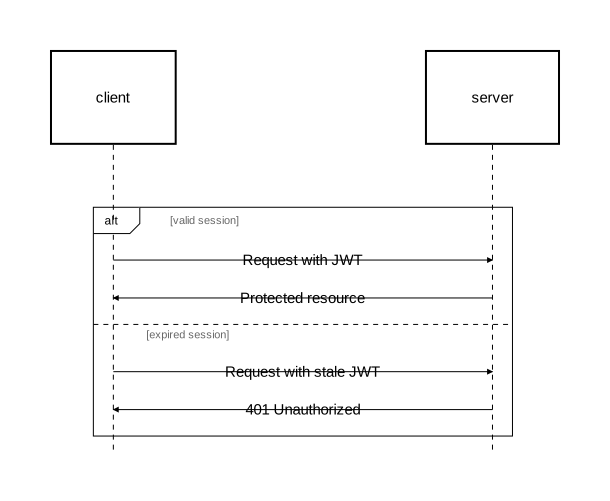
client: Rectangle;
server: Rectangle;

alt "valid session" {
    client -> server: "Request with JWT";
    server -> client: "Protected resource";
} else "expired session" {
    client -> server: "Request with stale JWT";
    server -> client: "401 Unauthorized";
};
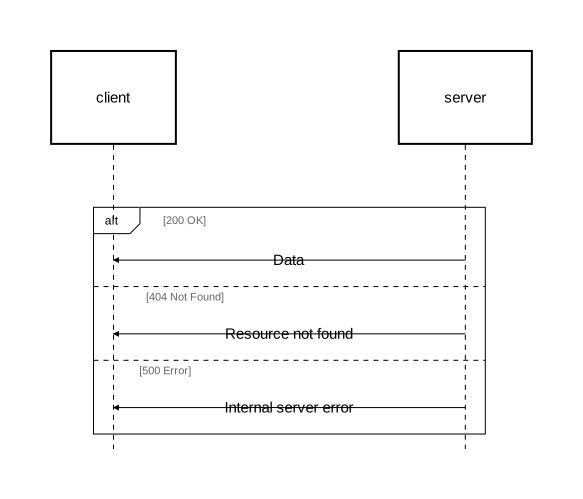
You can have multiple else branches:
diagram sequence;

client: Rectangle;
server: Rectangle;

alt "200 OK" {
    server -> client: "Data";
} else "404 Not Found" {
    server -> client: "Resource not found";
} else "500 Error" {
    server -> client: "Internal server error";
};
opt — Optional
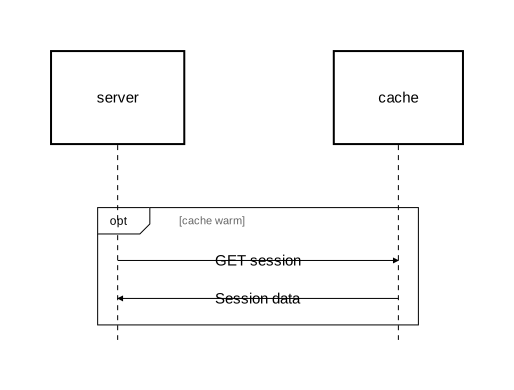
A single conditional path that may or may not execute:
diagram sequence;

server: Rectangle;
cache: Rectangle;

opt "cache warm" {
    server -> cache: "GET session";
    cache -> server: "Session data";
};
loop — Iteration
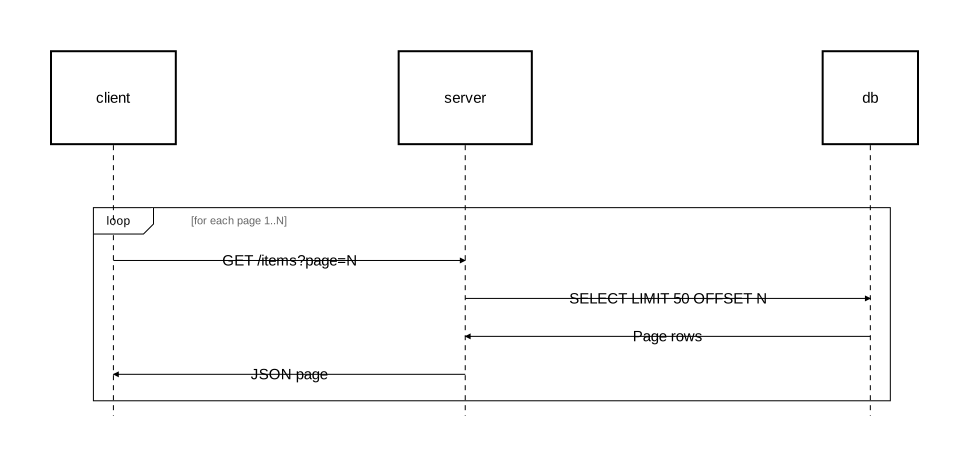
Repeated execution with a guard condition:
diagram sequence;

client: Rectangle;
server: Rectangle;
db: Rectangle;

loop "for each page 1..N" {
    client -> server: "GET /items?page=N";
    server -> db: "SELECT LIMIT 50 OFFSET N";
    db -> server: "Page rows";
    server -> client: "JSON page";
};
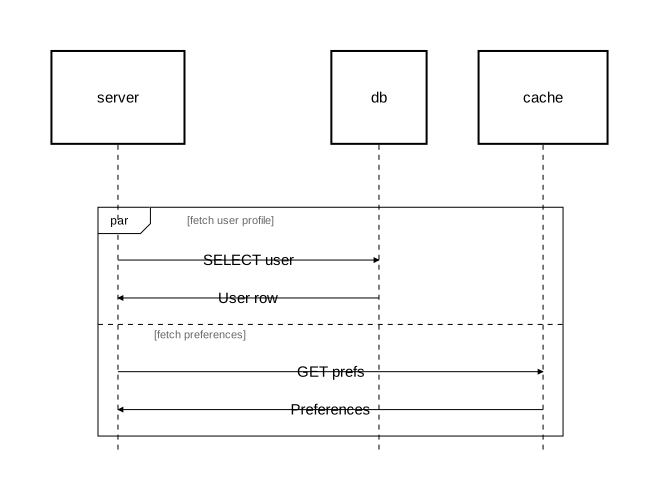
par — Parallel
Concurrent execution of multiple paths:
diagram sequence;

server: Rectangle;
db: Rectangle;
cache: Rectangle;

par "fetch user profile" {
    server -> db: "SELECT user";
    db -> server: "User row";
} par "fetch preferences" {
    server -> cache: "GET prefs";
    cache -> server: "Preferences";
};
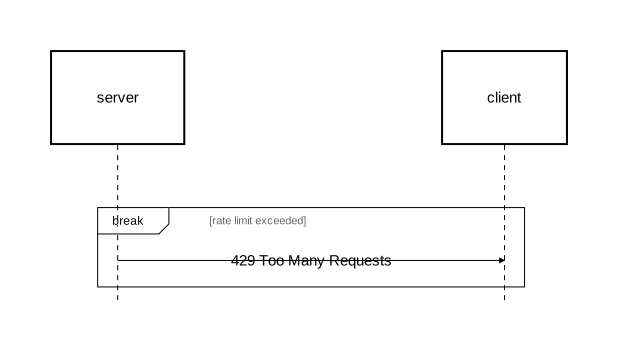
break — Interruption
Breaking out of an enclosing fragment:
diagram sequence;

server: Rectangle;
client: Rectangle;

break "rate limit exceeded" {
    server -> client: "429 Too Many Requests";
};
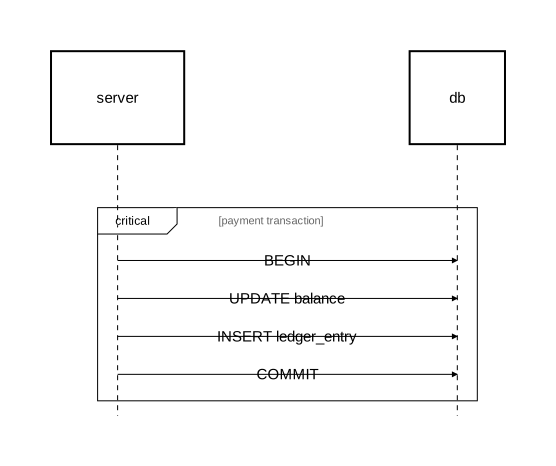
critical — Critical region
An atomic execution region that must not be interleaved:
diagram sequence;

server: Rectangle;
db: Rectangle;

critical "payment transaction" {
    server -> db: "BEGIN";
    server -> db: "UPDATE balance";
    server -> db: "INSERT ledger_entry";
    server -> db: "COMMIT";
};
Base fragment syntax
For custom operations or when you need explicit control, use the base fragment syntax with sections. Section titles are optional:
diagram sequence;

client: Rectangle;
server: Rectangle;
cache: Rectangle;
db: Rectangle;

fragment "Request Handling" {
    section "cache hit" {
        client -> server: "GET /products";
        server -> cache: "Lookup key";
        cache -> server: "Cached response";
        server -> client: "200 OK";
    };
    section "cache miss" {
        server -> db: "SELECT products";
        db -> server: "Result set";
        server -> cache: "SET key";
        server -> client: "200 OK";
    };
};
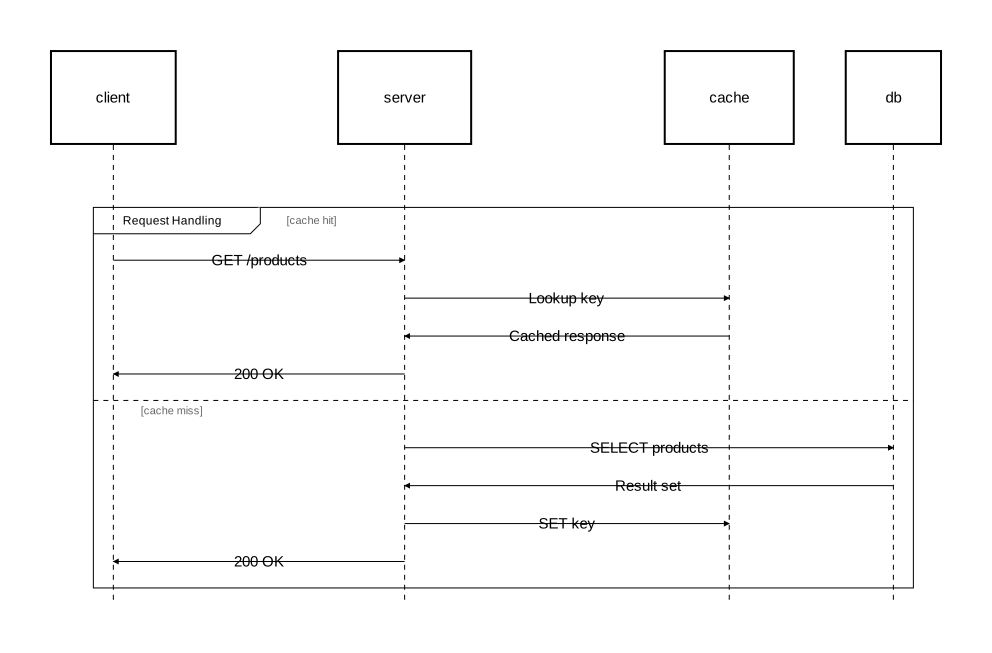
The sugar keywords desugar to this base syntax. For example, alt "cond1" { } else "cond2" { } becomes fragment "alt" { section "cond1" { }; section "cond2" { }; }.
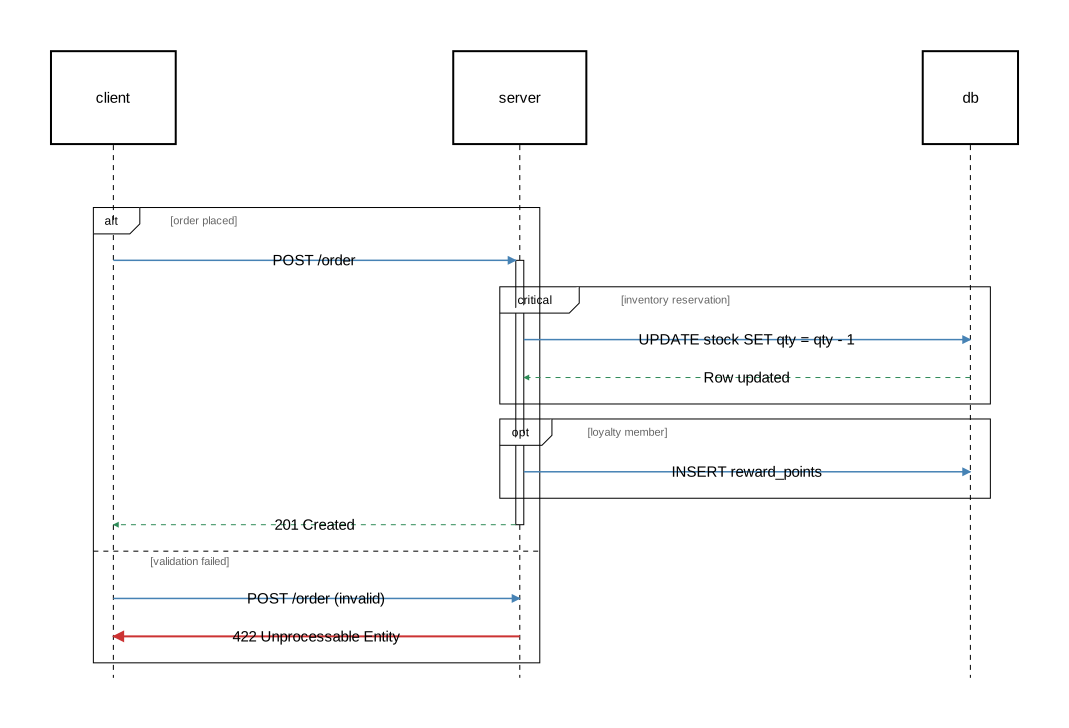
Nesting
Fragments can be nested inside other fragments and activation blocks:
diagram sequence;

type RequestArrow = Arrow [stroke=[color="steelblue", width=1.5]];
type ResponseArrow = Arrow [stroke=[color="seagreen", style="dashed"]];
type ErrorArrow = Arrow [stroke=[color="#cc3333", width=2.0]];

client: Rectangle;
server: Rectangle;
db: Rectangle;

alt "order placed" {
    client -> @RequestArrow server: "POST /order";

    activate server {
        critical "inventory reservation" {
            server -> @RequestArrow db: "UPDATE stock SET qty = qty - 1";
            db -> @ResponseArrow server: "Row updated";
        };

        opt "loyalty member" {
            server -> @RequestArrow db: "INSERT reward_points";
        };

        server -> @ResponseArrow client: "201 Created";
    };
} else "validation failed" {
    client -> @RequestArrow server: "POST /order (invalid)";
    server -> @ErrorArrow client: "422 Unprocessable Entity";
};
Styling
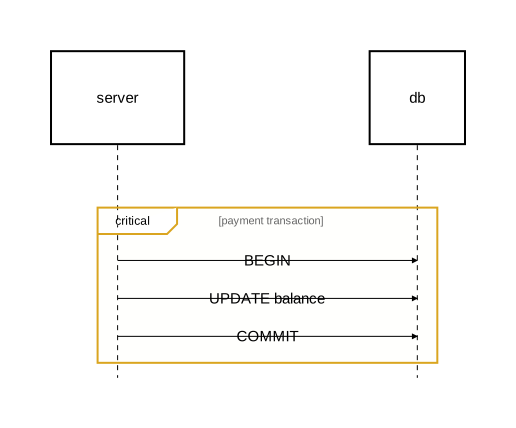
Fragment appearance can be customized with attributes:
diagram sequence;

server: Rectangle;
db: Rectangle;

critical [background_color="rgba(255,255,200,0.2)", border_stroke=[color="goldenrod", width=2.0]] "payment transaction" {
    server -> db: "BEGIN";
    server -> db: "UPDATE balance";
    server -> db: "COMMIT";
};
Fragment attributes
| Attribute | Type | Description |
|---|---|---|
border_stroke | Stroke | Outer border styling |
separator_stroke | Stroke | Section divider line styling |
background_color | color | Background color of the fragment |
content_padding | float | Padding around fragment content |
operation_label_text | Text | Text styling for the operation label (e.g. “alt”, “loop”) |
section_title_text | Text | Text styling for section titles |
Typed fragments
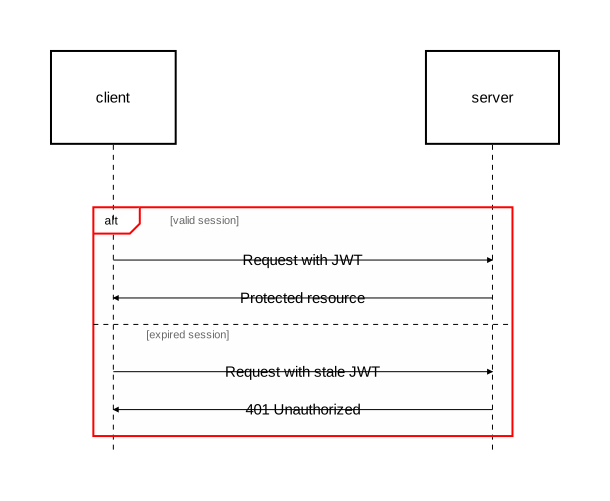
Define reusable fragment types with type, then apply them with @:
diagram sequence;

type SecurityFragment = Fragment [background_color="rgba(255,220,220,0.15)", border_stroke=[color="red", width=2.0]];

client: Rectangle;
server: Rectangle;

alt @SecurityFragment "valid session" {
    client -> server: "Request with JWT";
    server -> client: "Protected resource";
} else "expired session" {
    client -> server: "Request with stale JWT";
    server -> client: "401 Unauthorized";
};
When @TypeSpec is omitted, it defaults to @Fragment. You can also use anonymous types inline:
opt @Fragment[background_color="rgba(220,240,255,0.15)"] "cache warm" { ... };
Keyword reference
| Keyword | Sections | Description |
|---|---|---|
alt/else | One alt + zero or more else | Conditional branching |
opt | Single | Optional execution |
loop | Single | Repeated execution |
par | One or more par | Parallel execution |
break | Single | Interruption / break out of enclosing fragment |
critical | Single | Atomic execution region |
fragment | One or more section | Generic fragment with explicit sections |
Notes
Notes are annotations that add context to your diagrams. They can be attached to specific elements, span multiple elements, or appear in the diagram margins.
Notes work in both component and sequence diagrams.
Syntax
note [@TypeSpec] [attributes]: "text";
Attached notes
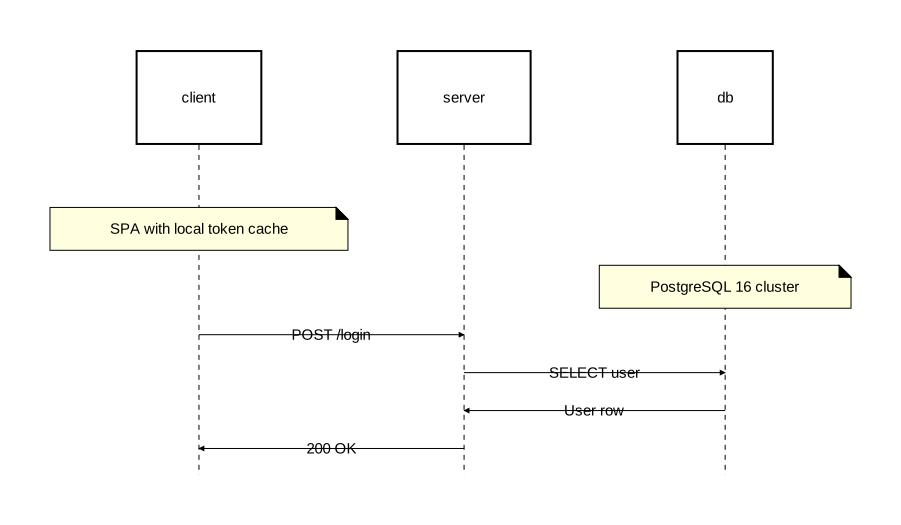
Attach a note to one or more elements with the on attribute:
diagram sequence;

client: Rectangle;
server: Rectangle;
db: Rectangle;

note [on=[client]]: "SPA with local token cache";
note [on=[db]]: "PostgreSQL 16 cluster";

client -> server: "POST /login";
server -> db: "SELECT user";
db -> server: "User row";
server -> client: "200 OK";
Spanning notes
List multiple elements in on to span a note across them:
diagram sequence;

api: Rectangle;
auth: Rectangle;
db: Rectangle;

api -> auth: "Verify credentials";
note [on=[api, auth, db]]: "Authentication boundary";
auth -> db: "SELECT user";
Margin notes
Omit the on attribute (or set it to an empty list) to place notes in the diagram margins:
diagram sequence;

client: Rectangle;
server: Rectangle;

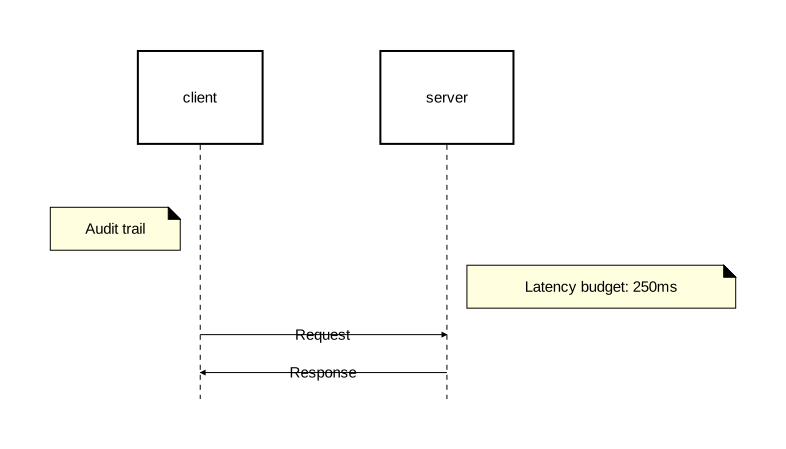
note [align="left"]: "Audit trail";
note [align="right"]: "Latency budget: 250ms";

client -> server: "Request";
server -> client: "Response";
Over-all notes
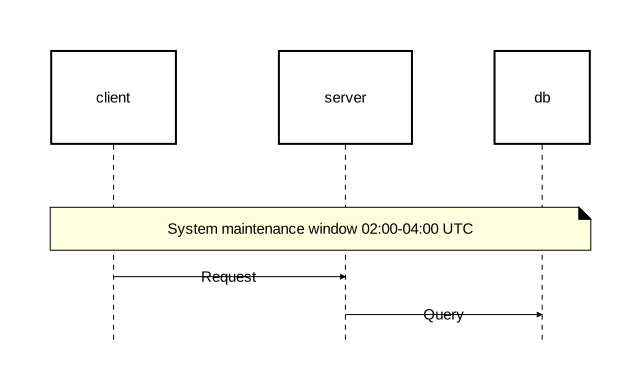
A note with no on and no align (or align="over" in sequence diagrams) spans all participants:
diagram sequence;

client: Rectangle;
server: Rectangle;
db: Rectangle;

note: "System maintenance window 02:00-04:00 UTC";

client -> server: "Request";
server -> db: "Query";
Alignment
The align attribute controls note placement. Available values differ by diagram type.
Sequence diagram alignment
| Value | Description |
|---|---|
"over" | Over the element(s) — default |
"left" | To the left of the element(s), or in the left margin |
"right" | To the right of the element(s), or in the right margin |
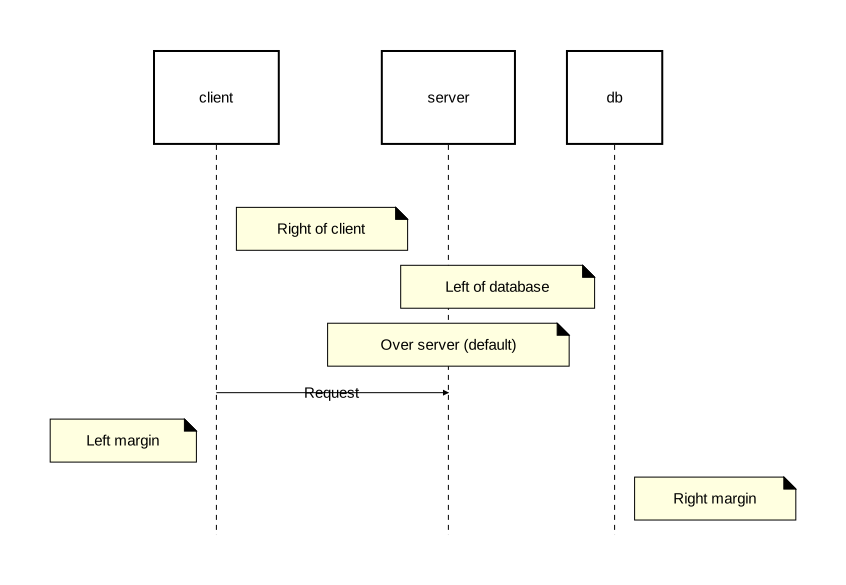
diagram sequence;

client: Rectangle;
server: Rectangle;
db: Rectangle;

// Attached with alignment
note [on=[client], align="right"]: "Right of client";
note [on=[db], align="left"]: "Left of database";
note [on=[server]]: "Over server (default)";

client -> server: "Request";

// Margin notes
note [align="left"]: "Left margin";
note [align="right"]: "Right margin";
Component diagram alignment
| Value | Description |
|---|---|
"bottom" | Below the element(s) — default |
"top" | Above the element(s) |
"left" | To the left of the element(s) |
"right" | To the right of the element(s) |
Styling
Customize notes with background_color, stroke, and text attributes:
diagram sequence;

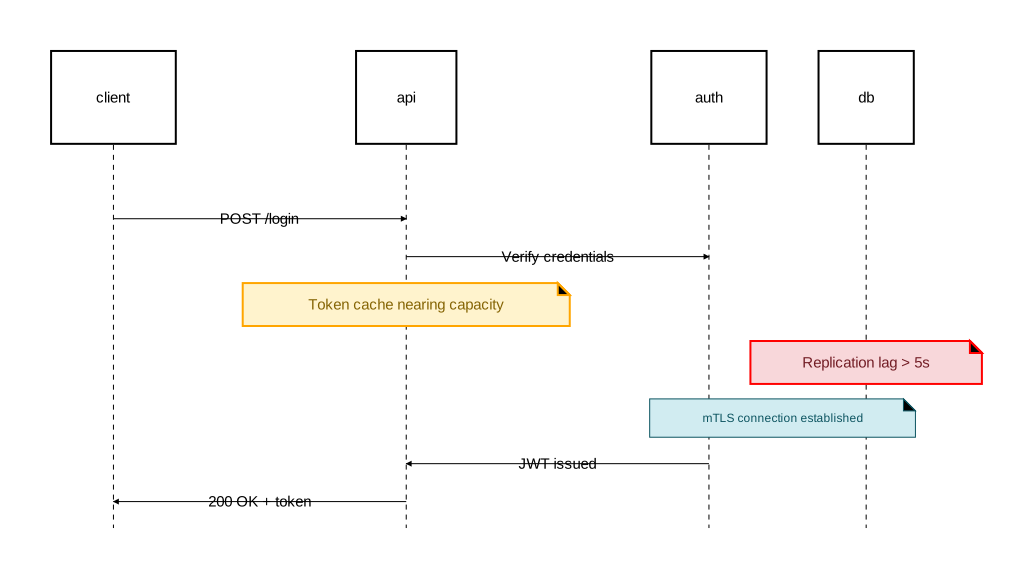
type WarningNote = Note [background_color="#fff3cd", stroke=[color="orange", width=2.0], text=[color="#856404"]];
type ErrorNote = Note [background_color="#f8d7da", stroke=[color="red", width=2.0], text=[color="#721c24"]];
type InfoNote = Note [background_color="#d1ecf1", stroke=[color="#0c5460"], text=[color="#0c5460", font_size=12]];

client: Rectangle;
api: Rectangle;
auth: Rectangle;
db: Rectangle;

client -> api: "POST /login";
api -> auth: "Verify credentials";

note @WarningNote [on=[api]]: "Token cache nearing capacity";
note @ErrorNote [on=[db]]: "Replication lag > 5s";
note @InfoNote [on=[auth, db]]: "mTLS connection established";

auth -> api: "JWT issued";
api -> client: "200 OK + token";
Note attributes
| Attribute | Type | Description |
|---|---|---|
on | identifier list | Elements the note attaches to. Empty or omitted = margin/over-all note |
align | string | Positioning relative to target(s) |
background_color | color | Background color of the note box |
stroke | Stroke | Border styling |
text | Text | Text styling |
Typed notes
Define reusable note types with type, then apply them with @:
diagram sequence;

type WarningNote = Note [background_color="#fff3cd", stroke=[color="orange", width=2.0], text=[color="#856404"]];

client: Rectangle;
server: Rectangle;

// Named type
note @WarningNote [on=[server]]: "High traffic detected";

client -> server: "Request";

// Anonymous type (inline)
note @Note[on=[server], background_color="lavender", stroke=[color="slateblue"]]: "Query plan cached";
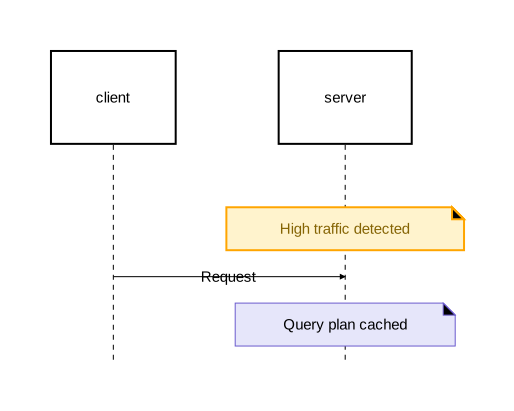
When @TypeSpec is omitted, it defaults to @Note:
note: "Simple note";                              // same as: note @Note: "Simple note";
note [background_color="yellow"]: "Warning";      // same as: note @Note[background_color="yellow"]: "Warning";
Notes inside activation and fragments
Notes can appear inside activation blocks and fragments:
diagram sequence;

type InfoNote = Note [background_color="#d1ecf1", stroke=[color="#0c5460"], text=[color="#0c5460", font_size=12]];
type WarningNote = Note [background_color="#fff3cd", stroke=[color="orange", width=2.0], text=[color="#856404"]];

client: Rectangle;
api: Rectangle;
db: Rectangle;

client -> api: "GET /dashboard";

activate api {
    note @InfoNote [on=[api]]: "Rate limiter: 42/100 requests used";

    alt "cache hit" {
        api -> client: "Cached dashboard";
    } else "cache miss" {
        api -> db: "SELECT dashboard_data";
        note @WarningNote [on=[db]]: "Slow query: full table scan";
        db -> api: "Result set";
        api -> client: "Fresh dashboard";
    };
};
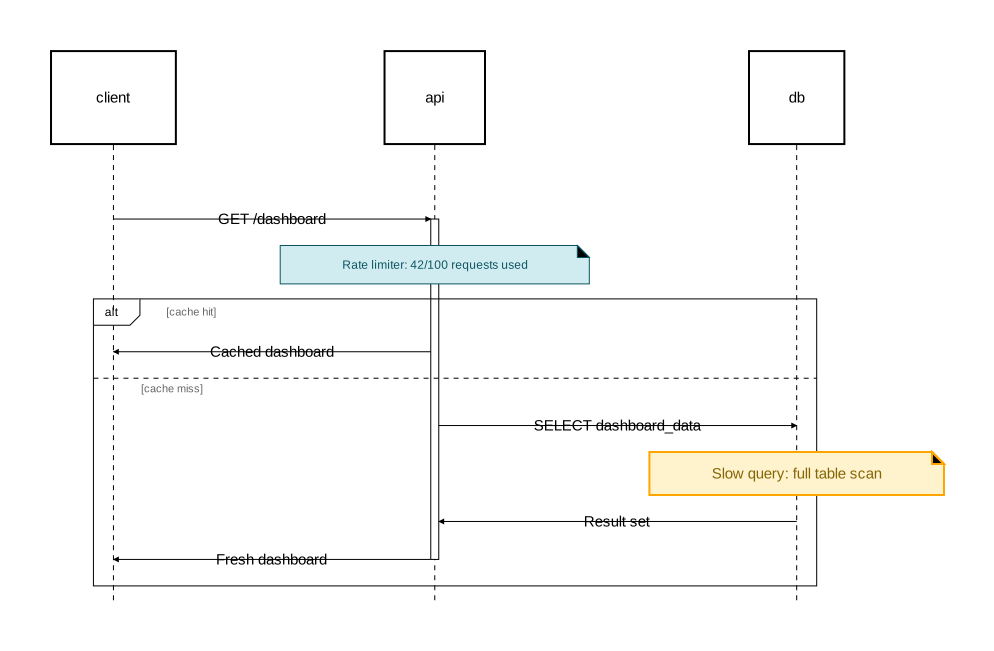
Styling
Orrery provides attributes for controlling colors, borders, text, and shapes. Styles can be applied inline or through reusable types.
Colors
All color attributes accept CSS color strings in four formats:
| Format | Example | Description |
|---|---|---|
| Named | "red", "steelblue", "lightyellow" | CSS named colors |
| Hex | "#cc3333", "#e6f3ff" | 6-digit hex |
| RGB | "rgb(100, 149, 237)" | Red, green, blue (0-255) |
| RGBA | "rgba(255, 0, 0, 0.3)" | RGB with alpha transparency (0.0-1.0) |
diagram component;

named: Rectangle [fill_color="coral"];
hex: Rectangle [fill_color="#2e8b57"];
rgb: Rectangle [fill_color="rgb(100, 149, 237)"];
rgba: Rectangle [fill_color="rgba(148, 0, 211, 0.6)"];

named -> hex;
hex -> rgb;
rgb -> rgba;
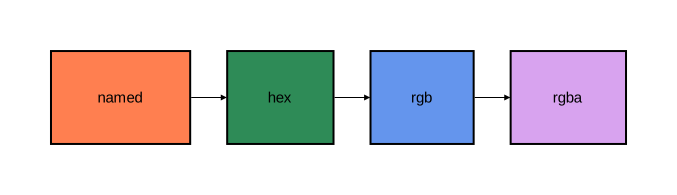
Stroke
Stroke attributes control borders and lines. They are specified as a group using nested syntax:
stroke=[color="navy", width=2.0, style="solid"]
Stroke attributes
| Attribute | Type | Default | Description |
|---|---|---|---|
color | color | — | Line color |
width | float | — | Line thickness |
style | string | "solid" | Line pattern |
cap | string | "butt" | Line endpoint style |
join | string | "miter" | Line corner style |
Line styles
| Value | Description |
|---|---|
"solid" | Continuous line |
"dashed" | Dashes with gaps |
"dotted" | Dots with gaps |
| Custom pattern | Comma-separated dash/gap lengths, e.g. "5,3" or "10,5,2,5" |
Line caps
| Value | Description |
|---|---|
"butt" | Flat ending at the endpoint (default) |
"round" | Rounded ending extending past the endpoint |
"square" | Square ending extending past the endpoint |
Line joins
| Value | Description |
|---|---|
"miter" | Sharp corner (default) |
"round" | Rounded corner |
"bevel" | Flattened corner |
Stroke examples
diagram sequence;

type SolidStroke = Stroke [color="navy", width=2.0, style="solid"];
type DashedStroke = Stroke [color="crimson", width=1.5, style="dashed"];
type DottedStroke = Stroke [color="gray", width=1.0, style="dotted"];
type CustomDashStroke = Stroke [color="purple", width=2.0, style="5,3,2,3"];
type RoundCapStroke = Stroke [color="teal", width=3.0, cap="round", join="round"];

type SolidArrow = Arrow [stroke=SolidStroke];
type DashedArrow = Arrow [stroke=DashedStroke];
type DottedArrow = Arrow [stroke=DottedStroke];
type PatternArrow = Arrow [stroke=CustomDashStroke];

client: Rectangle;
server: Rectangle;

client -> @SolidArrow server: "Solid";
server -> @DashedArrow client: "Dashed";
client -> @DottedArrow server: "Dotted";
server -> @PatternArrow client: "Custom pattern (5,3,2,3)";
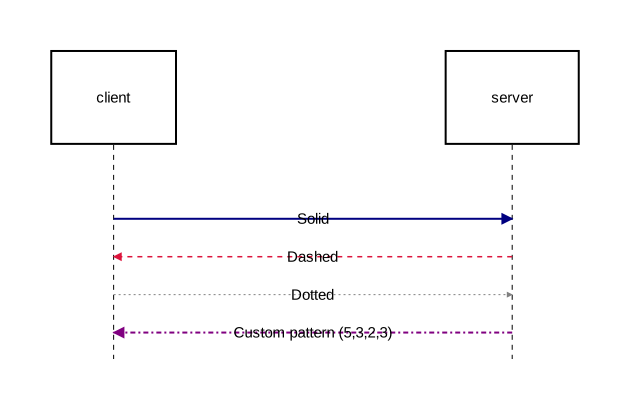
Text
Text attributes control label rendering. They are specified as a group:
text=[font_size=16, font_family="Arial", color="darkblue"]
Text attributes
| Attribute | Type | Description |
|---|---|---|
font_size | float | Font size in pixels (e.g. 16, 12.5) |
font_family | string | Font name (e.g. "Arial", "Courier New") |
color | color | Text color |
background_color | color | Background color behind text |
padding | float | Padding around text content |
Text examples
diagram sequence;

type HeaderText = Text [font_size=18, font_family="Arial", color="darkblue"];
type MonoText = Text [font_size=12, font_family="Courier New", color="#333333"];
type HighlightText = Text [font_size=14, color="darkred", background_color="lightyellow", padding=4.0];

type Primary = Rectangle [fill_color="#e6f3ff", text=HeaderText];
type Secondary = Rectangle [fill_color="#f0f0f0", text=MonoText];
type Accent = Rectangle [fill_color="#fff0f5", text=HighlightText];

client: Primary;
server: Secondary;
store: Accent;

client -> server: "Default text";
server -> [text=[color="darkorange", font_size=14, font_family="Arial"]] store: "Inline text styling";
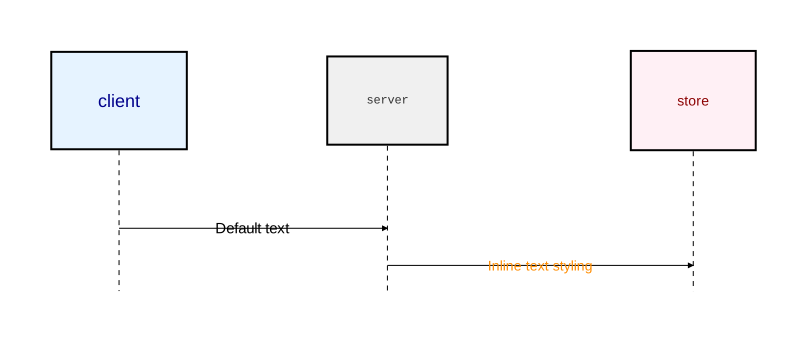
Shape styling
fill_color
Background color of a shape:
Rectangle [fill_color="#e6f3ff"]
rounded
Corner radius for rectangles (float):
Rectangle [fill_color="#e6f3ff", rounded=10]
Reusable style types
Use Stroke and Text attribute group types to define reusable style bundles, then reference them in component or arrow types:
diagram sequence;

// Define reusable style groups
type ThickSolid = Stroke [color="steelblue", width=2.5];
type ThinDashed = Stroke [color="slategray", width=1.0, style="dashed"];
type BoldText = Text [font_size=16, color="darkblue", font_family="Arial"];
type SmallText = Text [font_size=11, color="gray"];

// Use in component types
type Service = Rectangle [fill_color="#e6f3ff", stroke=ThickSolid, text=BoldText];
type Store = Rectangle [fill_color="#e0f0e0", stroke=[color="#339966"], rounded=8, text=SmallText];

// Use in arrow types
type RequestArrow = Arrow [stroke=ThickSolid];
type ResponseArrow = Arrow [stroke=ThinDashed];

client as "Browser": Service;
db as "Database": Store;

client -> @RequestArrow db: "Query";
db -> @ResponseArrow client: "Results";
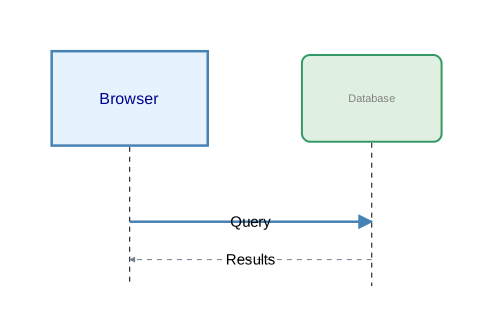
Inline attribute overrides
Attributes can be overridden at the point of use without defining a type:
diagram sequence;

client: Rectangle;
server: Rectangle;
db: Rectangle;

// Override stroke and text on a relation
client -> [stroke=[color="darkorange", width=2.5], text=[color="darkorange", font_size=14]] server: "Styled inline";

// Override on a relation with background text
server -> [stroke=[color="rgb(100, 149, 237)", width=2.0, style="dashed"], text=[color="#4169e1", background_color="white", padding=3.0]] db: "Highlighted label";
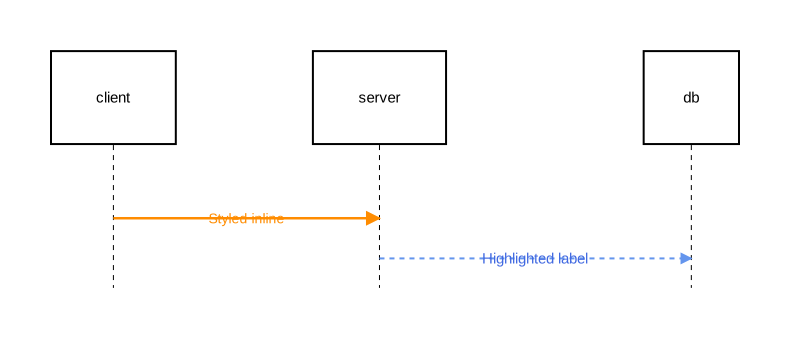
Complete attribute reference
General attributes
| Attribute | Type | Used on | Description |
|---|---|---|---|
fill_color | color | Shapes, Activations | Background color |
rounded | float | Rectangle | Corner radius |
background_color | color | Diagrams, Notes, Fragments | Background color |
style | string | Relations | Routing: "straight", "curved", "orthogonal" |
stroke | Stroke | Shapes, Relations, Notes | Border/line styling |
text | Text | Shapes, Relations | Text styling |
Fragment-specific attributes
| Attribute | Type | Description |
|---|---|---|
border_stroke | Stroke | Fragment outer border styling |
separator_stroke | Stroke | Section divider line styling |
content_padding | float | Padding around fragment content |
operation_label_text | Text | Text styling for the operation label (e.g. “alt”, “loop”) |
section_title_text | Text | Text styling for section titles |
Note-specific attributes
| Attribute | Type | Description |
|---|---|---|
on | identifier list | Elements the note attaches to |
align | string | Positioning: "over", "left", "right", "top", "bottom" |
Stroke sub-attributes
| Attribute | Type | Description |
|---|---|---|
color | color | Line color |
width | float | Line thickness |
style | string | "solid", "dashed", "dotted", or custom pattern |
cap | string | "butt", "round", "square" |
join | string | "miter", "round", "bevel" |
Text sub-attributes
| Attribute | Type | Description |
|---|---|---|
font_size | float | Font size in pixels |
font_family | string | Font name |
color | color | Text color |
background_color | color | Background behind text |
padding | float | Padding around text |
Literals
Orrery has two literal value types: strings and floats. All attribute values use one of these types.
String literals
Strings are enclosed in double quotes and contain valid UTF-8 text. They work like Rust string literals.
"hello world"
""
"line 1\nline 2"
Escape sequences
| Escape | Character |
|---|---|
\" | Double quote |
\\ | Backslash |
\/ | Forward slash |
\n | Newline |
\r | Carriage return |
\t | Tab |
\b | Backspace |
\f | Form feed |
\0 | Null character |
Unicode escapes
Use \u{...} with 1–6 hexadecimal digits to insert any Unicode code point:
"arrow: \u{2192}"         // → (Rightwards Arrow)
"check: \u{2713}"         // ✓ (Check Mark)
"emoji: \u{1F602}"        // 😂 (Face with Tears of Joy)
"math: \u{221E}"          // ∞ (Infinity)
The code point must be valid (0x0000–0x10FFFF, excluding the surrogate range 0xD800–0xDFFF).
Direct Unicode and emoji
Since strings are UTF-8, you can include Unicode characters and emoji directly without escape sequences:
"→ Next step"
"✓ Passed"
"🔒 Secure connection"
"日本語テキスト"
Escaped whitespace
A backslash at the end of a line consumes the newline and any leading whitespace on the next line, joining them into a single line:
"This is a long string that \
 appears as a single line"
// Result: "This is a long string that appears as a single line"
Multi-line text
Use \n inside strings to produce multi-line text in the rendered output. This works anywhere a string is accepted:
diagram component;

orders as "Order\nService": Rectangle;
payments as "Payment\nGateway": Rectangle;

orders -> payments: "POST /charge\n(async)";
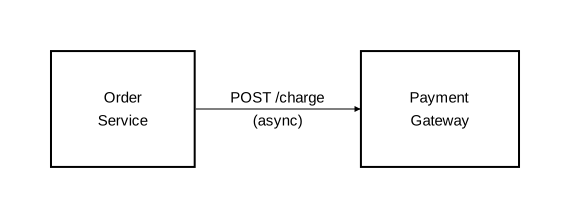
diagram sequence;

client: Rectangle;
server: Rectangle;

note [on=[server]]: "Validates:\n• JWT signature\n• Token expiry\n• User permissions";

client -> server: "POST /checkout\nContent-Type: application/json";
server -> client: "201 Created";
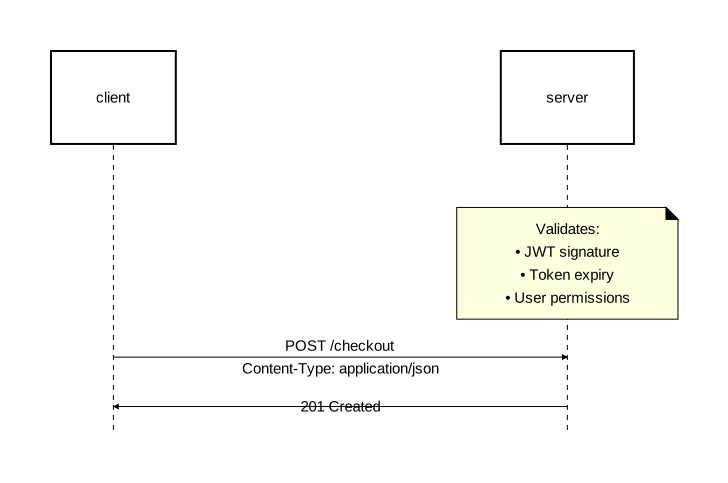
Unicode in labels
Direct Unicode and emoji work in all label positions:
diagram component;

type Service = Rectangle [fill_color="#e6f3ff", stroke=[color="#336699"]];

auth as "🔐 Auth": Service;
db as "🗄️ Database": Service;
api as "🌐 API Gateway": Service;

api -> auth: "verify → token";
api -> db: "query → results";
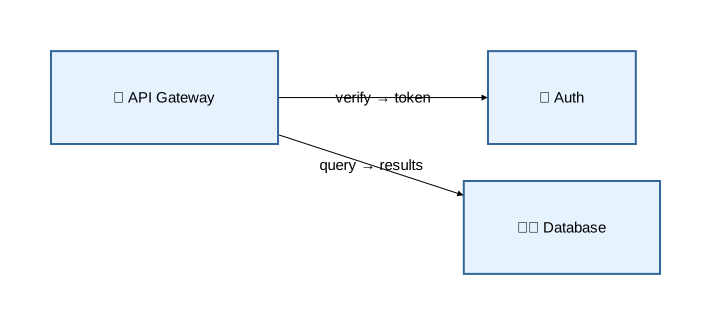
Float literals
Numeric values are stored as 32-bit floating-point numbers and support several formats:
| Format | Example | Equivalent |
|---|---|---|
| Standard | 2.5 | 2.5 |
| Whole number | 10 | 10.0 |
| Leading dot | .5 | 0.5 |
| Trailing dot | 5. | 5.0 |
| Scientific | 1.5e2 | 150.0 |
Scientific notation uses e or E with an optional sign: 2.5e-3 (0.0025), 1.23E+4 (12300.0).
Float literals are used for dimensions, sizes, and numeric attributes:
stroke=[width=2.5]
rounded=10
text=[font_size=16, padding=8.0]
Commands & Options
The orrery command reads an .orr source file and renders it as an SVG diagram.
Usage
orrery <input> [options]
Arguments
| Argument | Required | Description |
|---|---|---|
<input> | Yes | Path to the .orr source file |
Options
| Option | Short | Default | Description |
|---|---|---|---|
--output <path> | -o | out.svg | Path for the output SVG file |
--config <path> | -c | — | Path to a TOML configuration file |
--log-level <level> | — | info | Logging verbosity |
Log levels
| Level | Description |
|---|---|
off | No output |
error | Errors only |
warn | Errors and warnings |
info | General progress information (default) |
debug | Detailed processing information |
trace | Full diagnostic output |
Examples
Render a diagram with default settings:
orrery diagram.orr
Specify an output file:
orrery diagram.orr -o architecture.svg
Use a custom configuration file:
orrery diagram.orr -c orrery/config.toml -o output.svg
Quiet mode (errors only):
orrery diagram.orr --log-level error
Output
Orrery produces a single SVG file. The SVG includes all shapes, relations, text labels, and styling defined in the source file.
Exit codes
| Code | Meaning |
|---|---|
0 | Success — SVG file written |
1 | Error — syntax error, semantic error, or I/O failure |
When errors occur, Orrery prints diagnostic messages to stderr with error locations, descriptions, and visual highlighting of the relevant source code. Multiple errors can be reported at once, so you may see several diagnostics from a single run.
Error output
Each error includes a precise source location with visual context:
  × Undefined component 'cache' in relation
   ╭─[diagram.orr:12:1]
12 │ server -> cache: "Lookup";
   ·           ─────
   ╰────
  help: Did you mean to declare 'cache' as a component?
Configuration
Orrery can be configured with a TOML file that sets default layout engines and background colors. These defaults apply when attributes are not specified in the diagram source.
File locations
Orrery searches for a configuration file in this order:
- Explicit path — provided with
-cor--config - Local directory —
./orrery/config.toml - User config directory — platform-specific location following the directories crate convention (qualifier
"com", organization"orrery", application"orrery")
If no configuration file is found, built-in defaults are used.
Format
The configuration file uses TOML syntax with two optional sections:
[layout]
component = "basic"
sequence = "basic"

[style]
background_color = "#f5f5f5"
Sections
[layout]
Default layout engines for each diagram type.
| Key | Type | Default | Description |
|---|---|---|---|
component | string | "graphviz" if the feature is enabled, else "basic" | Layout engine for component diagrams |
sequence | string | "basic" | Layout engine for sequence diagrams |
Available layout engines:
| Value | Diagram types | Description | Requirement |
|---|---|---|---|
"basic" | Component, Sequence | Simple deterministic positioning | Always available |
"sugiyama" | Component only | Hierarchical layered layout | Always available |
"graphviz" | Component only | Graphviz-backed layout via dot CLI | graphviz Cargo feature + Graphviz installed |
[style]
Default visual settings for diagrams.
| Key | Type | Default | Description |
|---|---|---|---|
background_color | string | transparent | Default background color for all diagrams |
Accepts any CSS color string: named colors, #hex, rgb(), rgba().
Priority
When the same setting is specified in multiple places, Orrery uses this precedence (highest first):
Layout engine
layout_engineattribute in the diagram declaration- Default in configuration file
- Built-in default (
"graphviz"when thegraphvizCargo feature is enabled, otherwise"basic")
Background color
background_colorattribute in the diagram declaration- Default in configuration file
- Built-in default (transparent)
Embedded diagrams
- Attributes on the embedded diagram declaration
- Configuration file defaults
- Built-in defaults for that diagram type
Example
A complete configuration file:
# Use Sugiyama layout for component diagrams by default
[layout]
component = "sugiyama"
sequence = "basic"

# Light gray background for all diagrams
[style]
background_color = "#f8f8f8"
Use it with:
orrery diagram.orr -c config.toml -o output.svg
Component Diagram Examples
All source files are available in the examples directory on GitHub.
Basic Components and Relations
Custom types, display names, and all four relation types.
diagram component [background_color="#f8f8f8"];

type Service = Rectangle [fill_color="#e6f3ff", rounded=5];
type Database = Rectangle [fill_color="#e0f0e0", rounded=10];
type Client = Oval [fill_color="#fff0e0"];

web_app as "Web Application": Client;
api as "API Gateway": Service;
auth as "Auth Service": Service;
users_db as "Users DB": Database;
orders_db as "Orders DB": Database;
cache: Service;

web_app -> api: "HTTP request";
web_app <- api: "Push notification";
api <-> auth: "Verify / Result";
users_db - orders_db: "Shared cluster";
auth -> users_db;
api -> orders_db;
api -> cache;
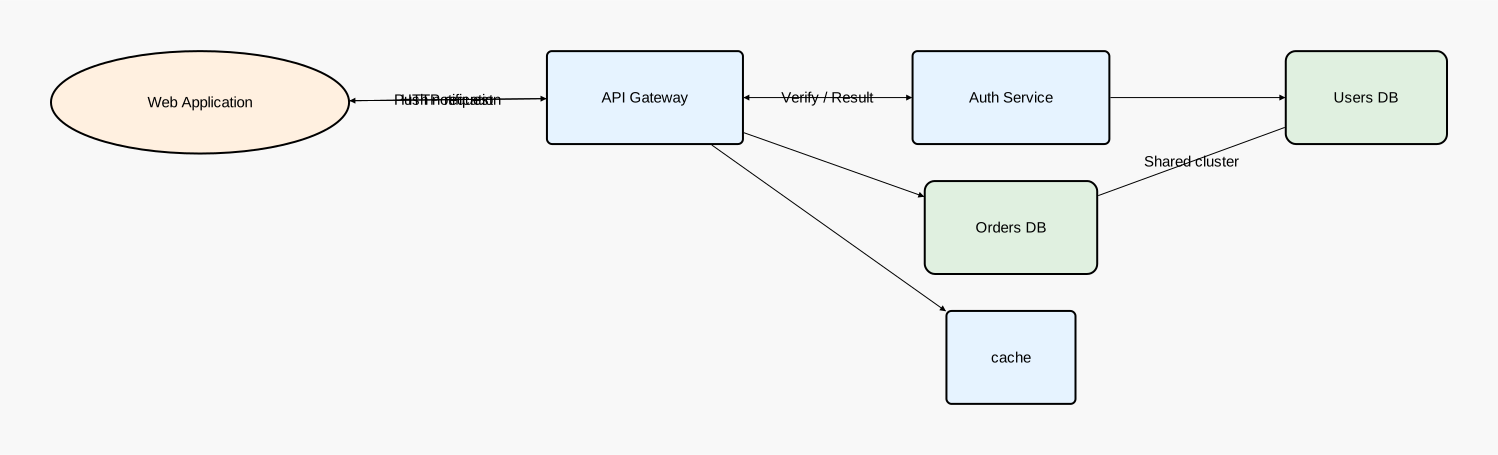
Source: component_basic.orr
All Shape Types
Content-supporting shapes (Rectangle, Oval, Component) and content-free shapes (Actor, Entity, Control, Interface, Boundary).
diagram component;

// Content-supporting shapes
rect as "Rectangle": Rectangle [fill_color="#e3f2fd", rounded=5];
oval as "Oval": Oval [fill_color="#fce4ec"];
comp as "UML Component": Component [fill_color="#e8f5e9"];

container as "Service Container": Rectangle [fill_color="#f5f5f5"] {
    inner_api: Rectangle [fill_color="#fff9c4"];
    inner_db: Rectangle [fill_color="#c8e6c9", rounded=8];
    inner_api -> inner_db;
};

// Content-free shapes
customer as "Customer": Actor;
account as "Account": Entity;
auth_logic as "Auth Logic": Control;
rest_api as "REST API": Interface;
external as "External System": Boundary;

// Styled content-free shapes
vip as "VIP User": Actor [stroke=[color="gold"], fill_color="#fff8dc"];
ledger as "Ledger": Entity [stroke=[color="purple"], fill_color="#f3e5f5"];
security as "Security": Control [stroke=[color="red"], fill_color="#ffebee"];
graphql as "GraphQL API": Interface [stroke=[color="blue"], fill_color="#e3f2fd"];
partner as "Partner Gateway": Boundary [stroke=[color="green"], fill_color="#e8f5e9"];

customer -> rest_api: "Request";
rest_api -> auth_logic: "Authenticate";
auth_logic -> account: "Validate";
account -> external: "Sync";
rect -> container;
oval -> comp;
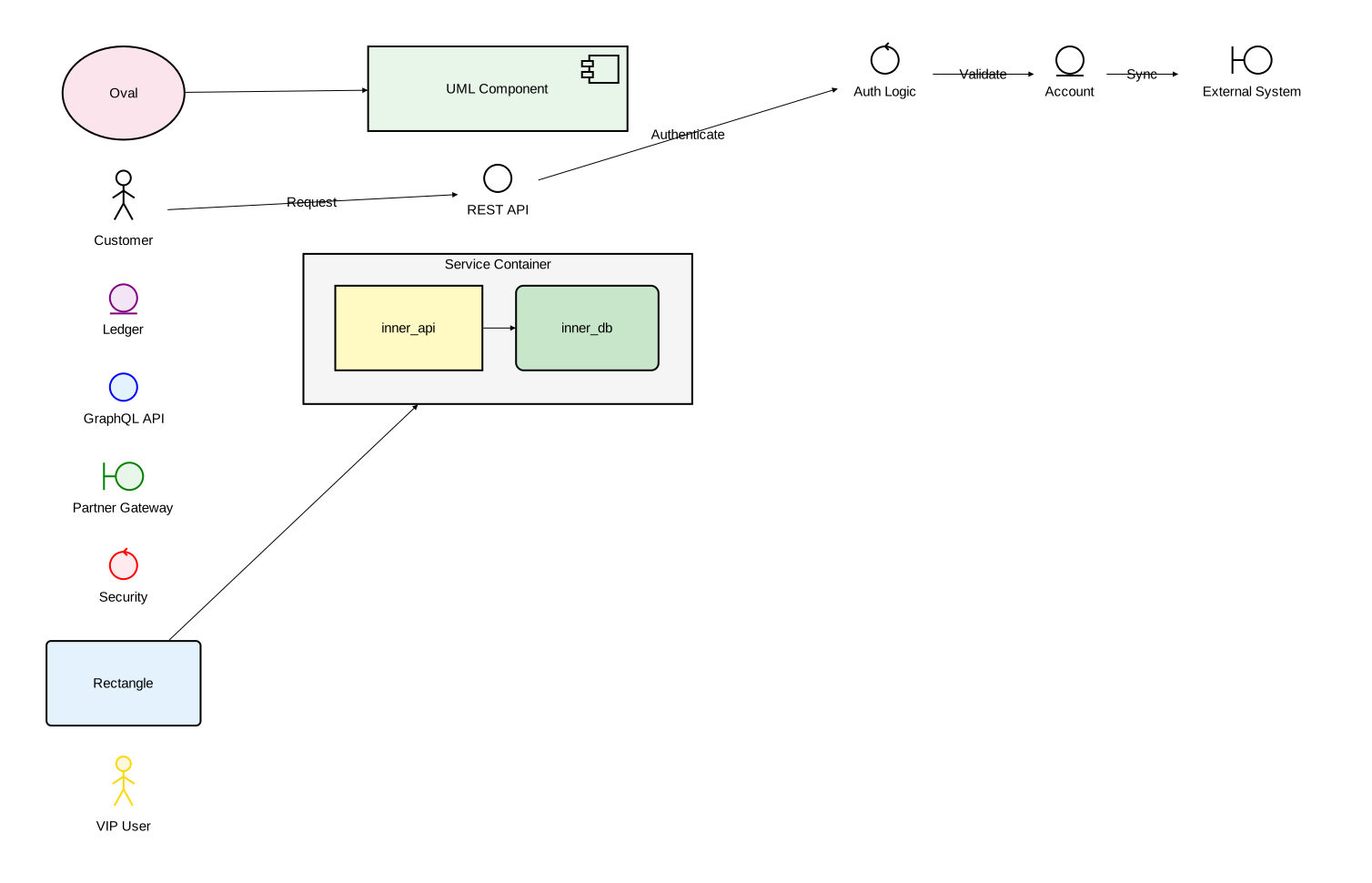
Source: component_shapes.orr
Nesting and Cross-Level Relations
Multi-level hierarchy with :: syntax for cross-level references.
diagram component;

type Service = Rectangle [fill_color="#e6f3ff", rounded=5];
type Database = Rectangle [fill_color="#e0f0e0", rounded=10];

backend: Rectangle [fill_color="#f5f5f5"] {
    api: Service;
    auth: Service;
    api -> auth;
};

platform: Rectangle [fill_color="#fafafa"] {
    gateway: Service;

    services: Rectangle [fill_color="#f0f0f0"] {
        users: Service;
        orders: Service;
        users -> orders;
    };

    data: Rectangle [fill_color="#f0f0f0"] {
        primary_db: Database;
        replica_db: Database;
        primary_db -> replica_db: "Replication";
    };

    gateway -> services;
    services -> data;
};

monitoring: Service;
monitoring -> platform::gateway;
monitoring -> platform::data::primary_db;
platform::services::orders -> monitoring: "Metrics";
platform::gateway -> platform::data::primary_db;
backend -> platform;
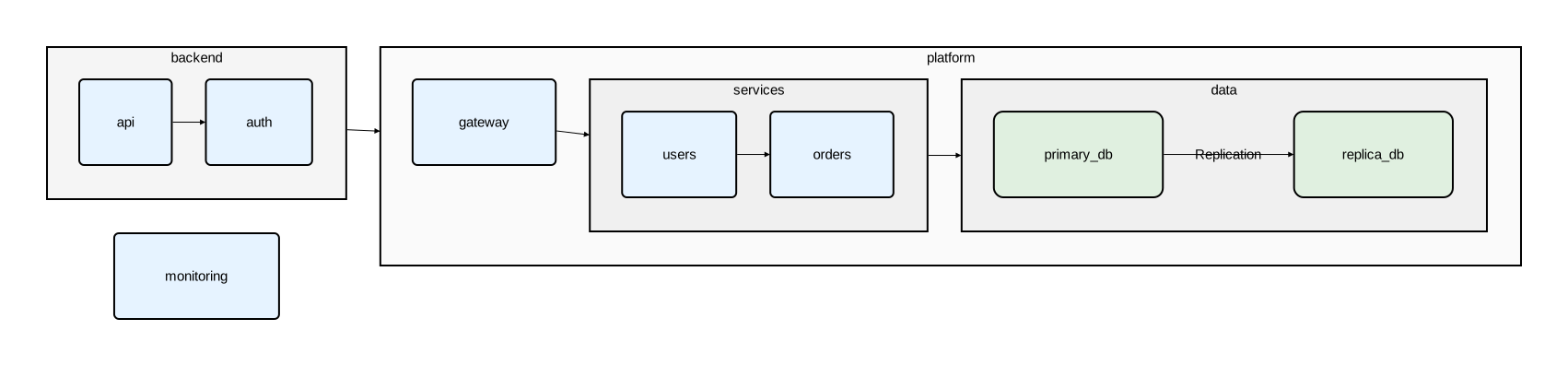
Source: component_nesting.orr
Layout Engines
The same graph rendered with basic, sugiyama, and graphviz layout engines side by side using embedded diagrams.
diagram component [background_color="#f5f5f5"];

type Service = Rectangle [fill_color="#e6f3ff", rounded=5];
type Database = Rectangle [fill_color="#e0f0e0", rounded=10];

basic_system as "Basic Engine": Rectangle embed {
    diagram component [layout_engine="basic", background_color="#ffffff"];

    type Service = Rectangle [fill_color="#e6f3ff", rounded=5];
    type Database = Rectangle [fill_color="#e0f0e0", rounded=10];

    gateway as "API Gateway": Service;
    auth as "Auth Service": Service;
    users as "User Service": Service;
    orders as "Order Service": Service;
    db as "Primary DB": Database;
    cache as "Cache": Database;

    gateway -> auth;
    gateway -> users;
    gateway -> orders;
    auth -> db;
    users -> db;
    orders -> db;
    orders -> cache;
};

sugiyama_system as "Sugiyama Engine": Rectangle embed {
    diagram component [layout_engine="sugiyama", background_color="#ffffff"];

    type Service = Rectangle [fill_color="#e6f3ff", rounded=5];
    type Database = Rectangle [fill_color="#e0f0e0", rounded=10];

    gateway as "API Gateway": Service;
    auth as "Auth Service": Service;
    users as "User Service": Service;
    orders as "Order Service": Service;
    db as "Primary DB": Database;
    cache as "Cache": Database;

    gateway -> auth;
    gateway -> users;
    gateway -> orders;
    auth -> db;
    users -> db;
    orders -> db;
    orders -> cache;
};

graphviz_system as "Graphviz Engine": Rectangle embed {
    diagram component [layout_engine="graphviz", background_color="#ffffff"];

    type Service = Rectangle [fill_color="#e6f3ff", rounded=5];
    type Database = Rectangle [fill_color="#e0f0e0", rounded=10];

    gateway as "API Gateway": Service;
    auth as "Auth Service": Service;
    users as "User Service": Service;
    orders as "Order Service": Service;
    db as "Primary DB": Database;
    cache as "Cache": Database;

    gateway -> auth;
    gateway -> users;
    gateway -> orders;
    auth -> db;
    users -> db;
    orders -> db;
    orders -> cache;
};

basic_system -> sugiyama_system: "Compare";
sugiyama_system -> graphviz_system: "Compare";
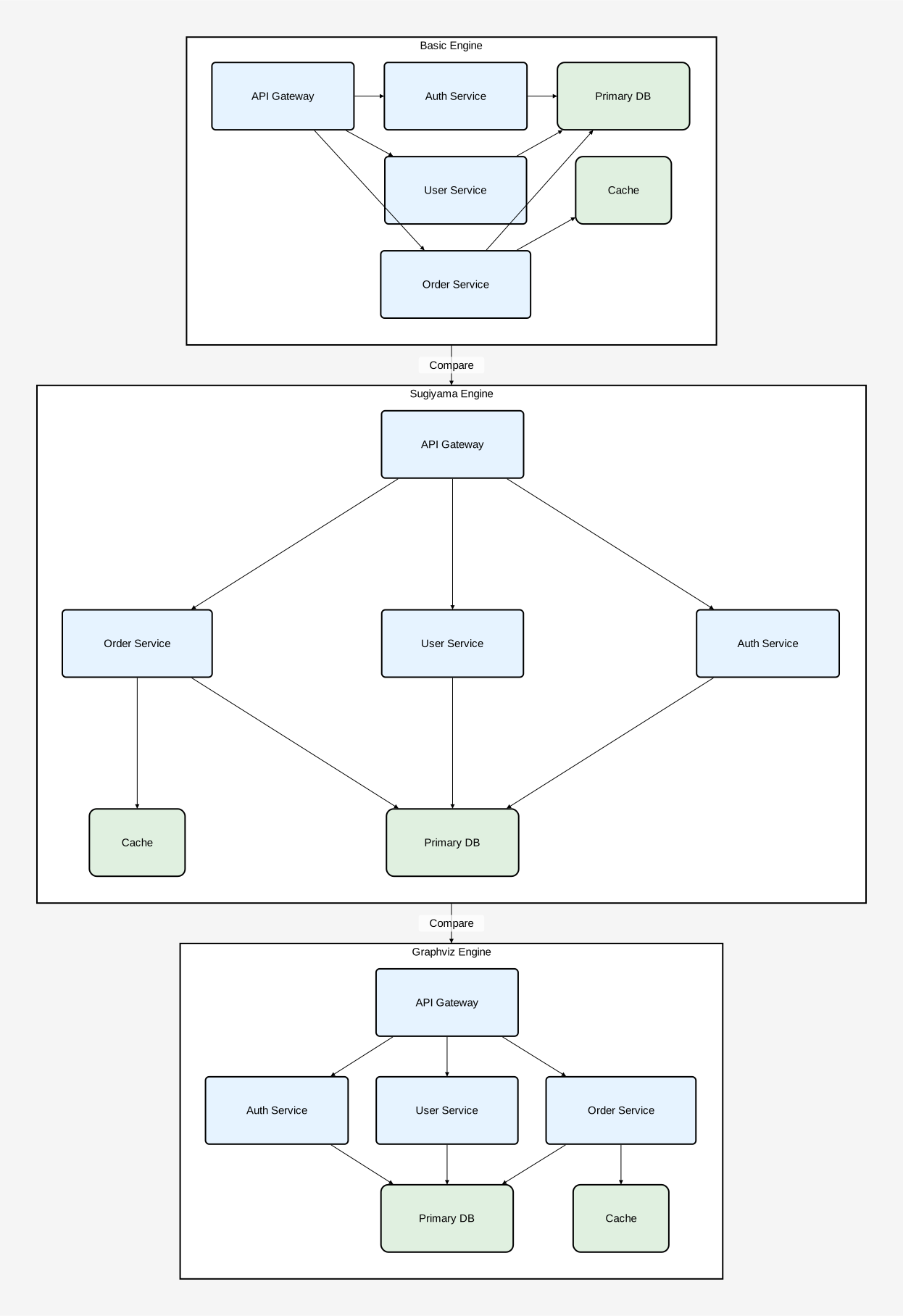
Source: component_layout_engines.orr
Sequence Diagram Examples
All source files are available in the examples directory on GitHub.
Basic Messages and Types
Custom participant types, arrow types, self-messages, and all four relation directions.
diagram sequence;

type Participant = Rectangle[fill_color="#e6f3ff", stroke=[color="#336699"]];
type Store = Rectangle[fill_color="#e0f0e0", stroke=[color="#339966"], rounded=8];
type AsyncArrow = Arrow[stroke=[color="#888888", style="dashed"]];
type ErrorArrow = Arrow[stroke=[color="#cc3333", width=2.0]];

client as "Browser": Participant;
api as "API Gateway": Participant;
auth as "Auth Service": Participant;
db as "Database": Store;

client -> api: "POST /login";
api -> [stroke=[color="blue"]] auth: "Validate credentials";
auth -> [text=[color="darkgreen"]] db: "SELECT user WHERE email = ?";
db -> auth: "User row";
auth -> [stroke=[color="green"], text=[color="green"]] api: "JWT token";
api -> client: "200 OK";

client <- @AsyncArrow api: "SSE push event";
api <-> [stroke=[color="purple"]] auth: "Healthcheck";
auth - [stroke=[style="dotted", color="gray"]] db: "Connection pool";
api -> [stroke=[color="orange"]] api: "Rate limit check";

client -> @ErrorArrow api: "Malformed request";
api -> @ErrorArrow client: "400 Bad Request";
client -> @AsyncArrow api: "WebSocket upgrade";
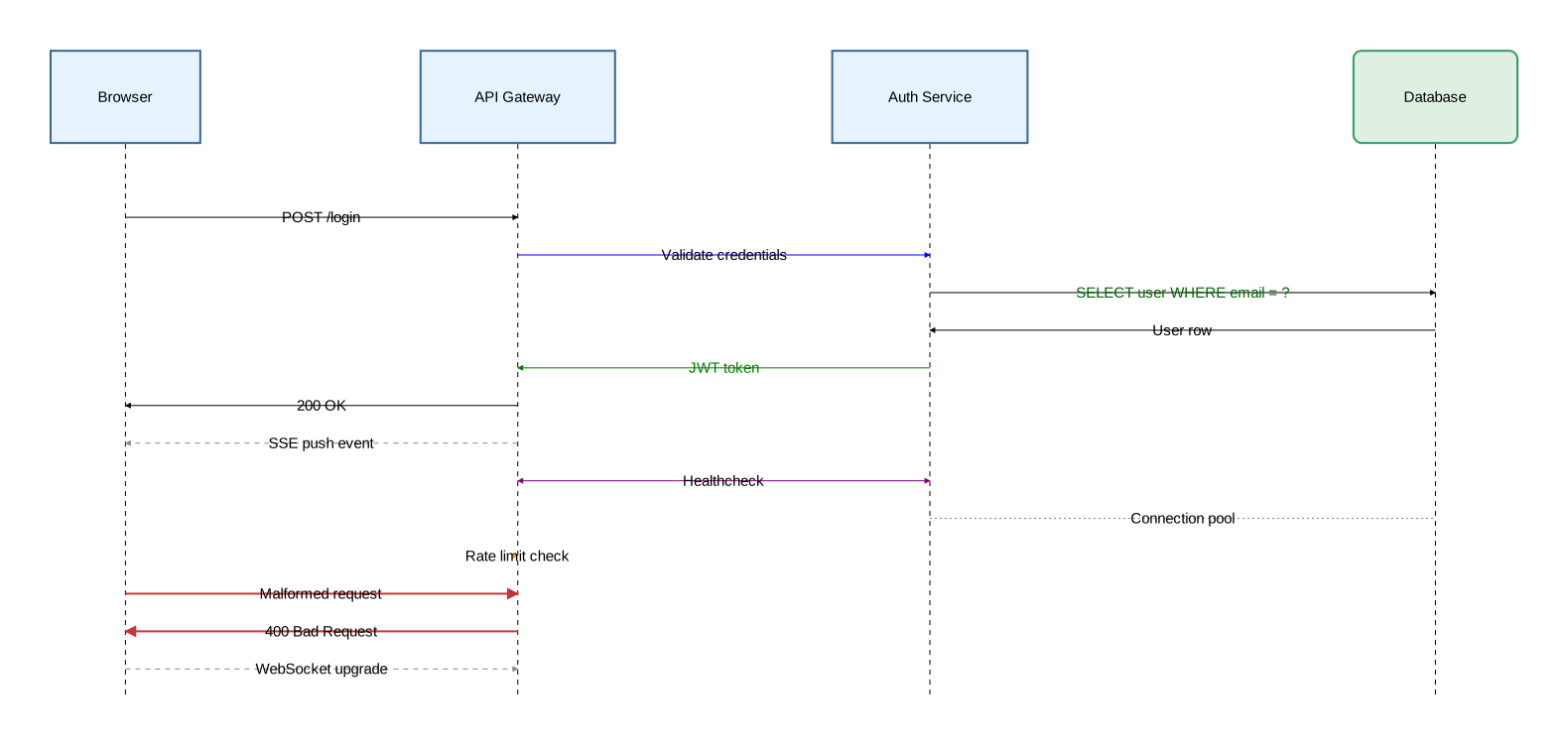
Source: sequence_basic.orr
Activation Blocks
Block-form activation, nested activation, stacked activation, explicit activate/deactivate statements, and custom activation types.
diagram sequence;

type Participant = Rectangle[fill_color="#e6f3ff", stroke=[color="#336699"]];
type Store = Rectangle[fill_color="#e0f0e0", stroke=[color="#339966"], rounded=8];
type RequestArrow = Arrow[stroke=[color="steelblue", width=1.5]];
type ResponseArrow = Arrow[stroke=[color="seagreen", style="dashed"]];
type CriticalActivation = Activate[fill_color="rgba(255,180,180,0.4)", stroke=[color="red", width=2.0]];
type HighlightActivation = Activate[fill_color="rgba(180,200,255,0.3)"];

client as "Browser": Participant;
api as "API Gateway": Participant;
auth as "Auth Service": Participant;
db as "Database": Store;

// Block form with deep nesting
client -> @RequestArrow api: "POST /checkout";
activate api {

    api -> @RequestArrow auth: "Verify session";
    activate auth {

        auth -> @RequestArrow db: "SELECT session";
        activate db {
            db -> db: "Validate TTL";
            db -> @ResponseArrow auth: "Session valid";
        };

        auth -> @ResponseArrow api: "Token refreshed";
    };

    api -> @RequestArrow db: "INSERT order";
    activate db {
        db -> @ResponseArrow api: "Order ID";
    };

    api -> @ResponseArrow client: "201 Created";
};

// Stacked activation (same participant)
client -> @RequestArrow api: "POST /payment";
activate api {
    api -> @RequestArrow db: "Check balance";
    db -> @ResponseArrow api: "Balance OK";

    api -> @RequestArrow auth: "Fraud check";
    activate api {
        auth -> @ResponseArrow api: "Cleared";

        api -> @RequestArrow db: "INSERT transaction";
        activate api {
            db -> @ResponseArrow api: "Transaction ID";
        };
    };

    api -> @ResponseArrow client: "Payment confirmed";
};

// Explicit statements
client -> @RequestArrow api: "Start export job";

activate api;
api -> @RequestArrow db: "SELECT * FROM records";
activate db;
db -> db: "Stream rows";
db -> @ResponseArrow api: "Result set";
deactivate db;
api -> @ResponseArrow client: "Export ready";
deactivate api;

// Mixed: explicit outer + block inner
client -> @RequestArrow api: "DELETE /account";
activate client;

activate @CriticalActivation api {
    api -> @RequestArrow auth: "Revoke tokens";
    auth -> @ResponseArrow api: "Revoked";

    api -> @RequestArrow db: "DELETE cascade";
    activate @CriticalActivation db {
        db -> @ResponseArrow api: "Purged";
    };

    api -> @ResponseArrow client: "Account deleted";
};

deactivate client;

// Custom activation types
api -> @RequestArrow db: "ANALYZE tables";
activate @HighlightActivation db {
    db -> @ResponseArrow api: "Statistics updated";
};

// Anonymous TypeSpec
auth -> @RequestArrow db: "Rotate encryption keys";
activate @Activate[fill_color="rgba(255,240,200,0.4)", stroke=[color="orange"]] db {
    db -> @ResponseArrow auth: "Keys rotated";
};
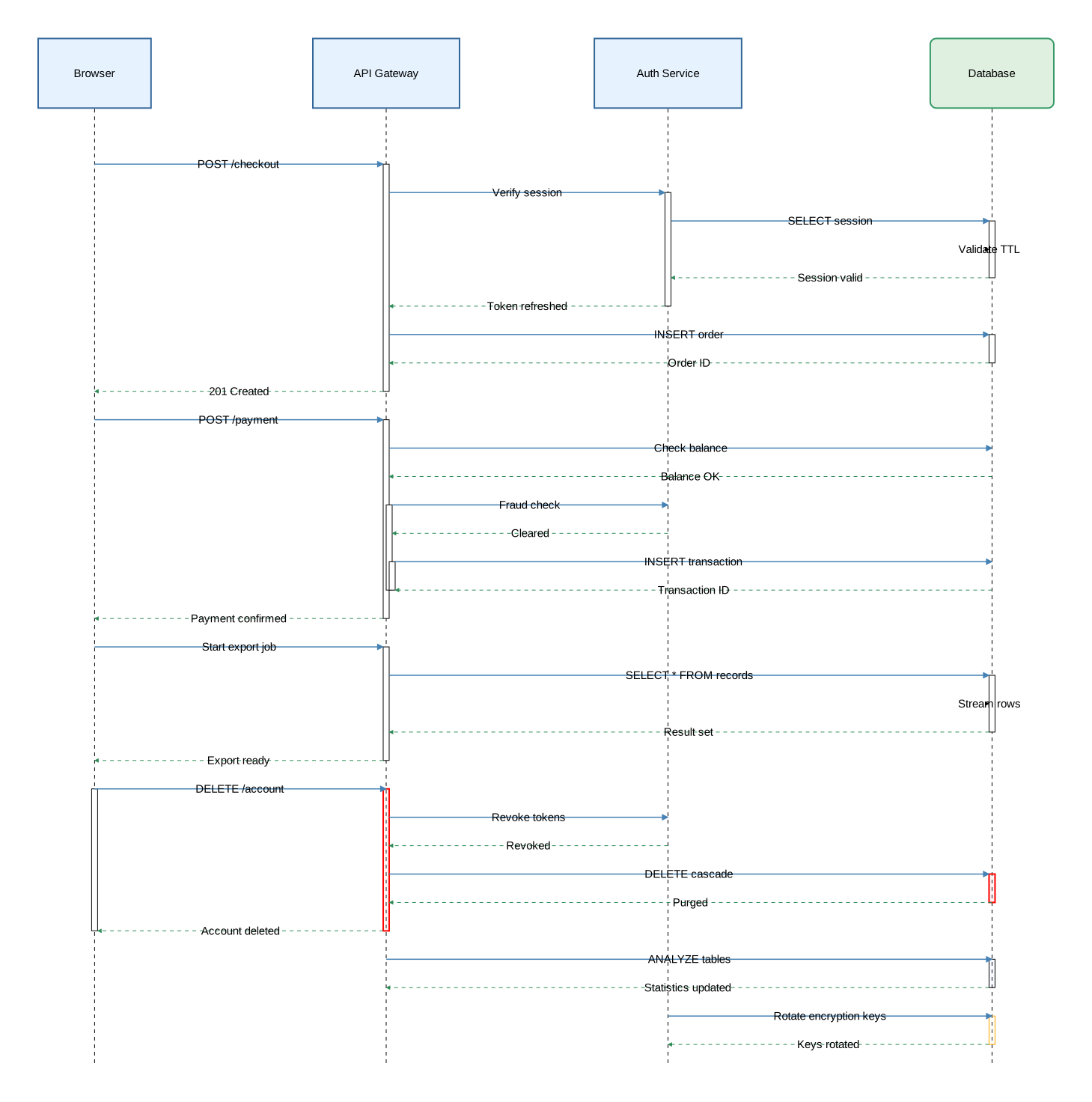
Source: sequence_activation.orr
Fragments
All fragment keywords (alt/else, opt, loop, par, break, critical), nested fragments with activation, and custom fragment styling.
diagram sequence;

type Participant = Rectangle[fill_color="#e6f3ff", stroke=[color="#336699"]];
type Store = Rectangle[fill_color="#e0f0e0", stroke=[color="#339966"], rounded=8];
type RequestArrow = Arrow[stroke=[color="steelblue", width=1.5]];
type ResponseArrow = Arrow[stroke=[color="seagreen", style="dashed"]];
type ErrorArrow = Arrow[stroke=[color="#cc3333", width=2.0]];
type SecurityFragment = Fragment[background_color="rgba(255,220,220,0.15)", border_stroke=[color="red", width=2.0]];

client as "Browser": Participant;
server as "API Server": Participant;
db as "Database": Store;
cache as "Cache": Store;

// Base fragment syntax
fragment "Request Handling" {
    section "cache hit" {
        client -> @RequestArrow server: "GET /products";
        server -> @RequestArrow cache: "Lookup key";
        cache -> @ResponseArrow server: "Cached response";
        server -> @ResponseArrow client: "200 OK";
    };
    section "cache miss" {
        server -> @RequestArrow db: "SELECT products";
        db -> @ResponseArrow server: "Result set";
        server -> @RequestArrow cache: "SET key";
        server -> @ResponseArrow client: "200 OK";
    };
};

// alt/else with custom fragment type
alt @SecurityFragment "valid session" {
    client -> @RequestArrow server: "Request with JWT";
    server -> @ResponseArrow client: "Protected resource";
} else "expired session" {
    client -> @RequestArrow server: "Request with stale JWT";
    server -> @ErrorArrow client: "401 Unauthorized";
};

// opt
opt [background_color="rgba(220,240,255,0.15)"] "cache warm" {
    server -> @RequestArrow cache: "GET session";
    cache -> @ResponseArrow server: "Session data";
};

// loop with styled border
loop [border_stroke=[color="purple"]] "for each page 1..N" {
    client -> @RequestArrow server: "GET /items?page=N";
    server -> @RequestArrow db: "SELECT LIMIT 50 OFFSET N";
    db -> @ResponseArrow server: "Page rows";
    server -> @ResponseArrow client: "JSON page";
};

// par - parallel execution
par "fetch user profile" {
    server -> @RequestArrow db: "SELECT user";
    db -> @ResponseArrow server: "User row";
} par "fetch preferences" {
    server -> @RequestArrow cache: "GET prefs";
    cache -> @ResponseArrow server: "Preferences";
};

// break
break [border_stroke=[color="red", style="dashed"]] "rate limit exceeded" {
    server -> @ErrorArrow client: "429 Too Many Requests";
};

// critical with custom styling
critical [background_color="rgba(255,255,200,0.2)", border_stroke=[color="goldenrod", width=2.0]] "payment transaction" {
    server -> @RequestArrow db: "BEGIN";
    server -> @RequestArrow db: "UPDATE balance";
    server -> @RequestArrow db: "INSERT ledger_entry";
    server -> @RequestArrow db: "COMMIT";
};

// Nested fragments with activation
alt "order placed" {
    client -> @RequestArrow server: "POST /order";
    activate server {
        critical "inventory reservation" {
            server -> @RequestArrow db: "UPDATE stock SET qty = qty - 1";
            db -> @ResponseArrow server: "Row updated";
        };
        opt "loyalty member" {
            server -> @RequestArrow db: "INSERT reward_points";
        };
        server -> @ResponseArrow client: "201 Created";
    };
} else "validation failed" {
    client -> @RequestArrow server: "POST /order (invalid)";
    server -> @ErrorArrow client: "422 Unprocessable Entity";
};
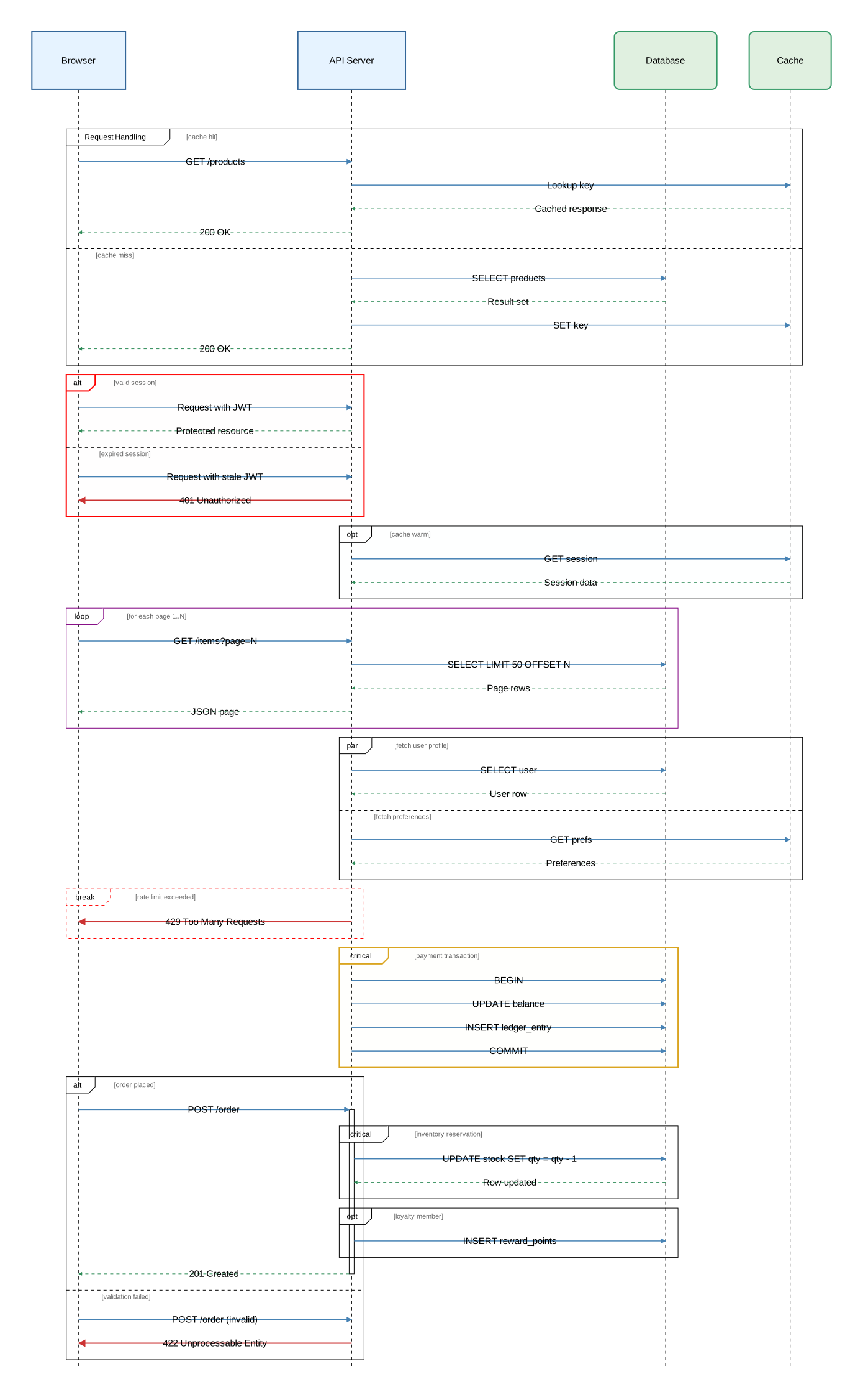
Source: sequence_fragments.orr
Notes
Attached notes, spanning notes, margin notes, alignment, custom note types, and notes inside activation blocks and fragments.
diagram sequence;

type Participant = Rectangle[fill_color="#e6f3ff", stroke=[color="#336699"]];
type Store = Rectangle[fill_color="#e0f0e0", stroke=[color="#339966"], rounded=8];
type WarningNote = Note[background_color="#fff3cd", stroke=[color="orange", width=2.0], text=[color="#856404"]];
type ErrorNote = Note[background_color="#f8d7da", stroke=[color="red", width=2.0], text=[color="#721c24"]];
type InfoNote = Note[background_color="#d1ecf1", stroke=[color="#0c5460"], text=[color="#0c5460", font_size=12]];
type RequestArrow = Arrow[stroke=[color="steelblue", width=1.5]];
type ResponseArrow = Arrow[stroke=[color="seagreen", style="dashed"]];

client as "Browser": Participant;
api as "API Gateway": Participant;
auth as "Auth Service": Participant;
db as "Database": Store;

// Attached notes with alignment
note [on=[client], align="right"]: "SPA client with local token cache";
note [on=[db], align="left"]: "PostgreSQL 16 cluster";

client -> @RequestArrow api: "POST /login";
note [on=[api]]: "Validating request schema";

// Spanning notes
api -> @RequestArrow auth: "Verify credentials";
note [on=[api, auth, db]]: "Authentication boundary";

auth -> @RequestArrow db: "SELECT user WHERE email = ?";
db -> @ResponseArrow auth: "User row";

// Margin notes
note [align="left"]: "Left margin: audit trail";
note [align="right"]: "Right margin: latency budget 250ms";

// Over all participants
note: "System-wide maintenance window 02:00\u{2013}04:00 UTC";

auth -> @ResponseArrow api: "JWT issued";

// Custom note types
note @WarningNote [on=[api]]: "Token cache nearing capacity";
note @ErrorNote [on=[db]]: "Replication lag > 5s";
note @InfoNote [on=[auth, db]]: "mTLS connection established";

api -> @ResponseArrow client: "200 OK + token";

// Notes inside activation and fragments
client -> @RequestArrow api: "GET /dashboard";
activate api {
    note @InfoNote [on=[api]]: "Rate limiter: 42/100 requests used";

    alt "cache hit" {
        api -> @ResponseArrow client: "Cached dashboard";
    } else "cache miss" {
        api -> @RequestArrow db: "SELECT dashboard_data";
        note @WarningNote [on=[db]]: "Slow query: full table scan";
        db -> @ResponseArrow api: "Result set";
        api -> @ResponseArrow client: "Fresh dashboard";
    };
};
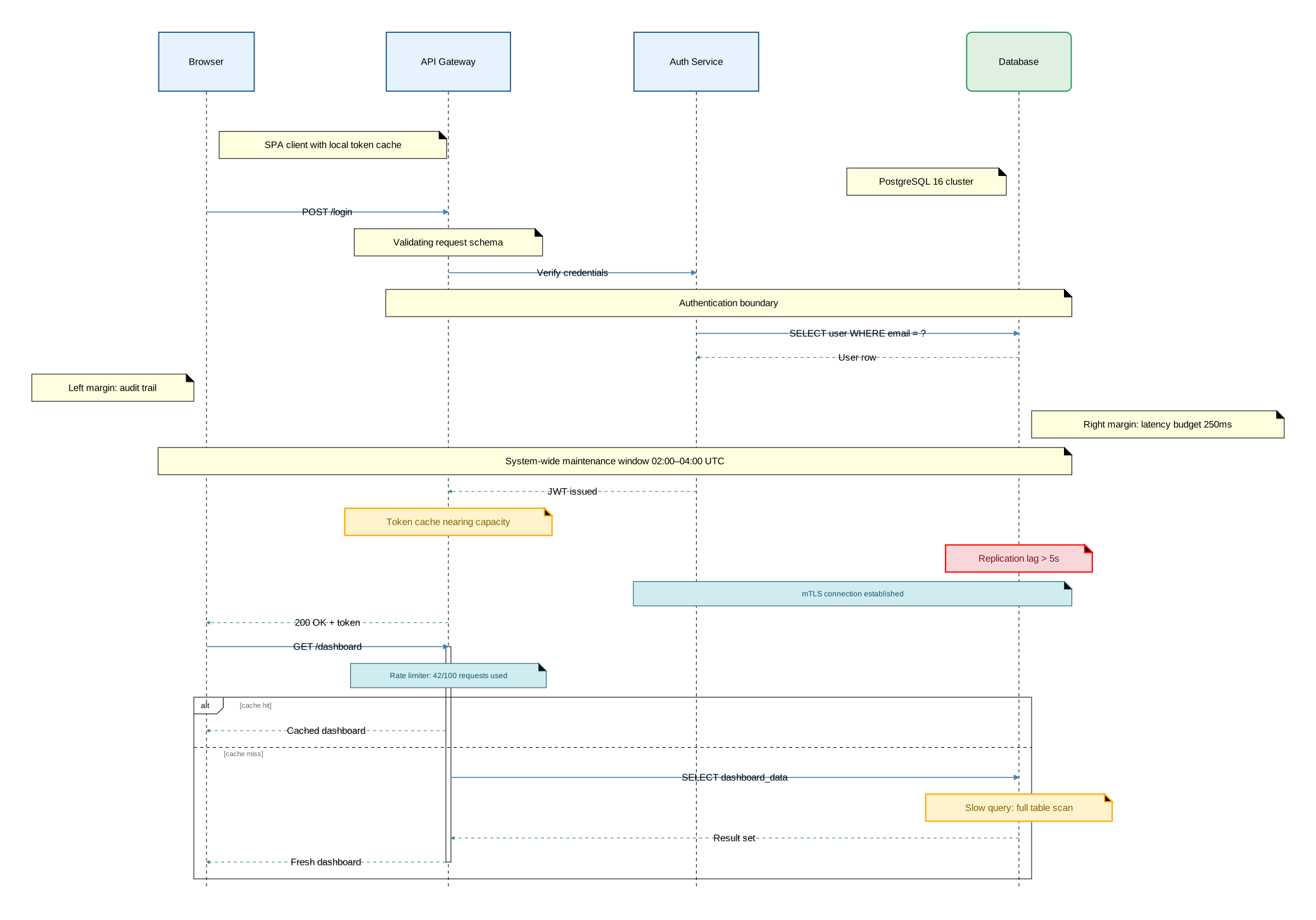
Source: sequence_notes.orr
Cross-Cutting Examples
All source files are available in the examples directory on GitHub.
Type System
Type declarations, attribute group types (Stroke, Text), type extension, named and anonymous invocations, and syntactic sugar.
diagram sequence;

// Attribute group types
type ThinDashed = Stroke[color="slategray", width=1.0, style="dashed"];
type ThickSolid = Stroke[color="steelblue", width=2.5];
type BoldText = Text[font_size=16, color="darkblue", font_family="Arial"];
type SmallText = Text[font_size=11, color="gray"];

// Component types using attribute groups
type Service = Rectangle[fill_color="#e6f3ff", stroke=ThickSolid, text=BoldText];
type Store = Rectangle[fill_color="#e0f0e0", stroke=[color="#339966"], rounded=8, text=[color="#2d6a2d"]];

// Type extension — later attributes override earlier ones
type CriticalService = Service[fill_color="#ffe0e0", stroke=[color="red", width=3.0]];
type ReadReplica = Store[fill_color="#f0f0e0", stroke=ThinDashed];

// Arrow types and extension
type RequestArrow = Arrow[stroke=ThickSolid];
type ResponseArrow = Arrow[stroke=ThinDashed];
type UrgentRequest = RequestArrow[stroke=[color="red"]];

// Construct types
type WarningNote = Note[background_color="#fff3cd", stroke=[color="orange", width=2.0], text=[color="#856404"]];
type CriticalActivation = Activate[fill_color="rgba(255,180,180,0.3)", stroke=[color="red", width=2.0]];
type HighlightFragment = Fragment[background_color="rgba(200,220,255,0.15)", border_stroke=[color="blue", width=2.0]];

// Declarations (`:`) define participants
client as "Browser": Service;
api as "API Gateway": CriticalService;
auth as "Auth Service": Service;
primary_db as "Primary DB": Store;
replica_db as "Read Replica": ReadReplica;

// Sugar syntax — omitting @TypeSpec defaults to @Arrow, @Note, etc.
client -> api: "GET /dashboard";
note [on=[api]]: "Default @Note styling";

// Named invocations (`@`)
api -> @RequestArrow auth: "Validate session";
auth -> @ResponseArrow api: "Session valid";
note @WarningNote [on=[auth]]: "Token expires in 60s";

// Anonymous invocations — one-off types inline
api -> @Arrow[stroke=[color="purple", width=2.0]] primary_db: "SELECT dashboard";

// Named + instance overrides
primary_db -> @ResponseArrow[stroke=[color="green"]] api: "Result set";

// Custom activation and fragment types
api -> @UrgentRequest primary_db: "UPDATE session.last_active";
activate @CriticalActivation primary_db {
    primary_db -> @ResponseArrow api: "Ack";
};

alt @HighlightFragment "replica available" {
    api -> @RequestArrow replica_db: "SELECT analytics (read replica)";
    replica_db -> @ResponseArrow api: "Analytics data";
} else "replica down" {
    api -> @RequestArrow primary_db: "SELECT analytics (fallback)";
    primary_db -> @ResponseArrow api: "Analytics data";
};

api -> @ResponseArrow client: "Dashboard payload";
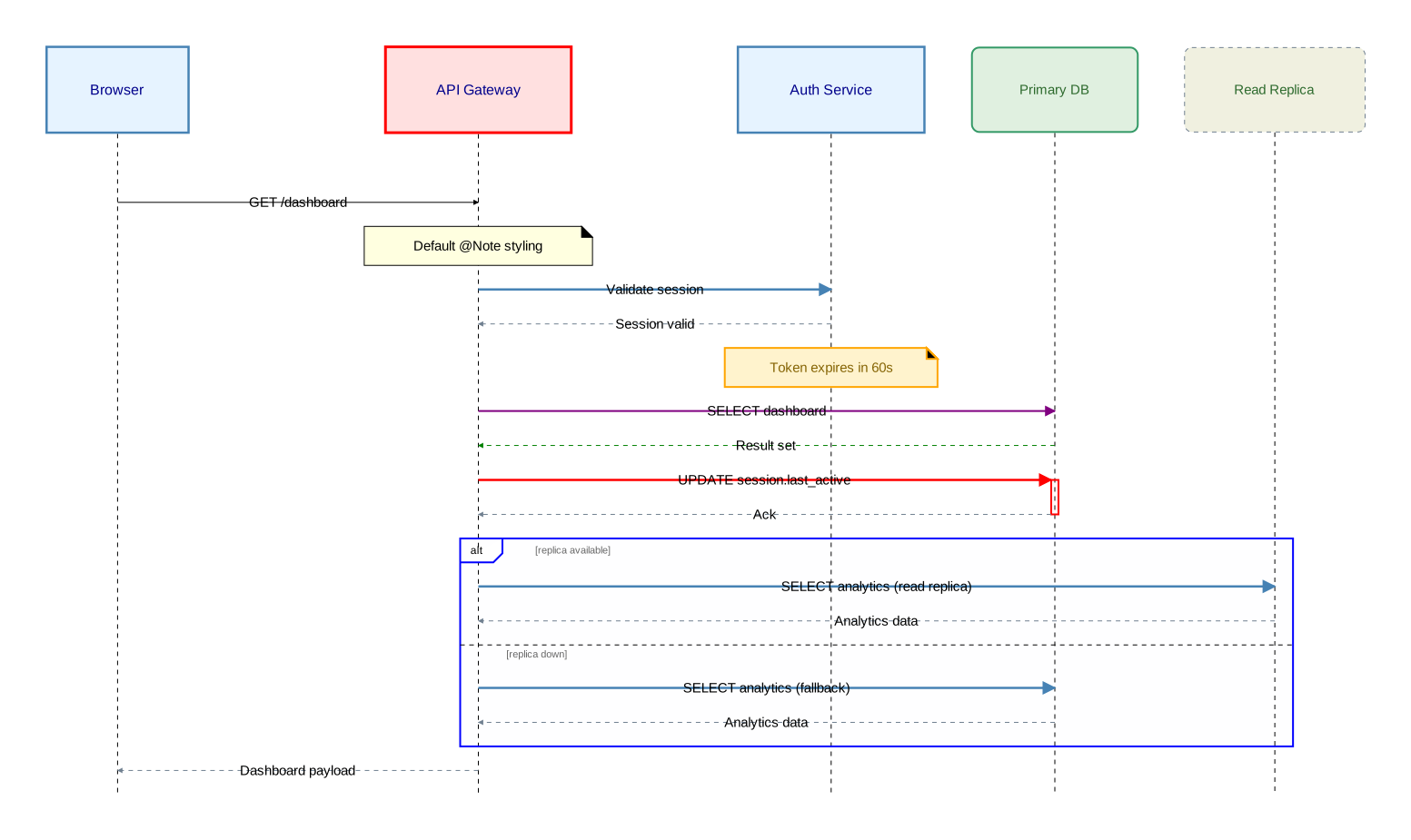
Source: type_system.orr
Styling
Stroke attributes (color, width, style, dash patterns, line cap/join), text attributes (font size, font family, color, background, padding), color formats (named, hex, rgb, rgba), and styling on components, relations, notes, activations, and fragments.
diagram sequence;

// Stroke types
type SolidStroke = Stroke[color="navy", width=2.0, style="solid"];
type DashedStroke = Stroke[color="crimson", width=1.5, style="dashed"];
type DottedStroke = Stroke[color="gray", width=1.0, style="dotted"];
type CustomDashStroke = Stroke[color="purple", width=2.0, style="5,3,2,3"];
type RoundCapStroke = Stroke[color="teal", width=3.0, cap="round", join="round"];

// Text types
type HeaderText = Text[font_size=18, font_family="Arial", color="darkblue"];
type MonoText = Text[font_size=12, font_family="Courier New", color="#333333"];
type HighlightText = Text[font_size=14, color="darkred", background_color="lightyellow", padding=4.0];

// Component types using stroke and text groups
type Primary = Rectangle[fill_color="#e6f3ff", stroke=SolidStroke, text=HeaderText];
type Secondary = Rectangle[fill_color="#f0f0f0", stroke=DashedStroke, text=MonoText];
type Accent = Rectangle[fill_color="#fff0f5", stroke=RoundCapStroke, text=HighlightText];

// Arrow types
type SolidArrow = Arrow[stroke=SolidStroke];
type DashedArrow = Arrow[stroke=DashedStroke];
type DottedArrow = Arrow[stroke=DottedStroke];
type PatternArrow = Arrow[stroke=CustomDashStroke];

// Color format arrows: named, hex, rgb, rgba
type NamedColor = Arrow[stroke=[color="coral", width=2.0]];
type HexColor = Arrow[stroke=[color="#2e8b57", width=2.0]];
type RgbColor = Arrow[stroke=[color="rgb(100, 149, 237)", width=2.0]];
type RgbaColor = Arrow[stroke=[color="rgba(148, 0, 211, 0.6)", width=2.0]];

client: Primary;
server: Secondary;
store: Accent;

// Styled relations
client -> @SolidArrow server: "Solid stroke";
server -> @DashedArrow store: "Dashed stroke";
store -> @DottedArrow server: "Dotted stroke";
server -> @PatternArrow client: "Custom dash pattern (5,3,2,3)";

// Inline stroke + text on relations
client -> [stroke=[color="darkorange", width=2.5], text=[color="darkorange", font_size=14, font_family="Arial"]] server: "Inline stroke + text";

server -> [stroke=[color="rgb(100, 149, 237)", width=2.0, style="dashed"], text=[color="#4169e1", background_color="peachpuff", padding=3.0]] store: "RGB stroke, highlighted label";

// Color formats
client -> @NamedColor server: "Named: coral";
server -> @HexColor store: "Hex: #2e8b57";
store -> @RgbColor server: "RGB: cornflower";
server -> @RgbaColor client: "RGBA: semi-transparent violet";

// Styled note
note @Note[on=[server], background_color="rgba(255, 255, 200, 0.8)", stroke=[color="goldenrod", width=2.0, style="dashed"], text=[font_size=13, color="darkgoldenrod"]]: "Fully styled note: bg, stroke, text";

// Styled activation
activate @Activate[fill_color="rgba(70, 130, 180, 0.15)", stroke=[color="steelblue", width=2.0]] store {
    server -> [stroke=RoundCapStroke, text=HighlightText] store: "Round cap + join, highlighted text";
    store -> @DashedArrow server: "Response";
};

// Styled fragment
opt @Fragment[background_color="rgba(144, 238, 144, 0.1)", border_stroke=[color="seagreen", width=2.0], separator_stroke=[color="gray", style="dotted"], operation_label_text=[font_size=14, color="seagreen"], section_title_text=[font_size=12, color="gray"]] "cache available" {
    server -> [stroke=[color="seagreen"]] store: "Cache lookup";
    store -> @DashedArrow server: "Cache hit";
};
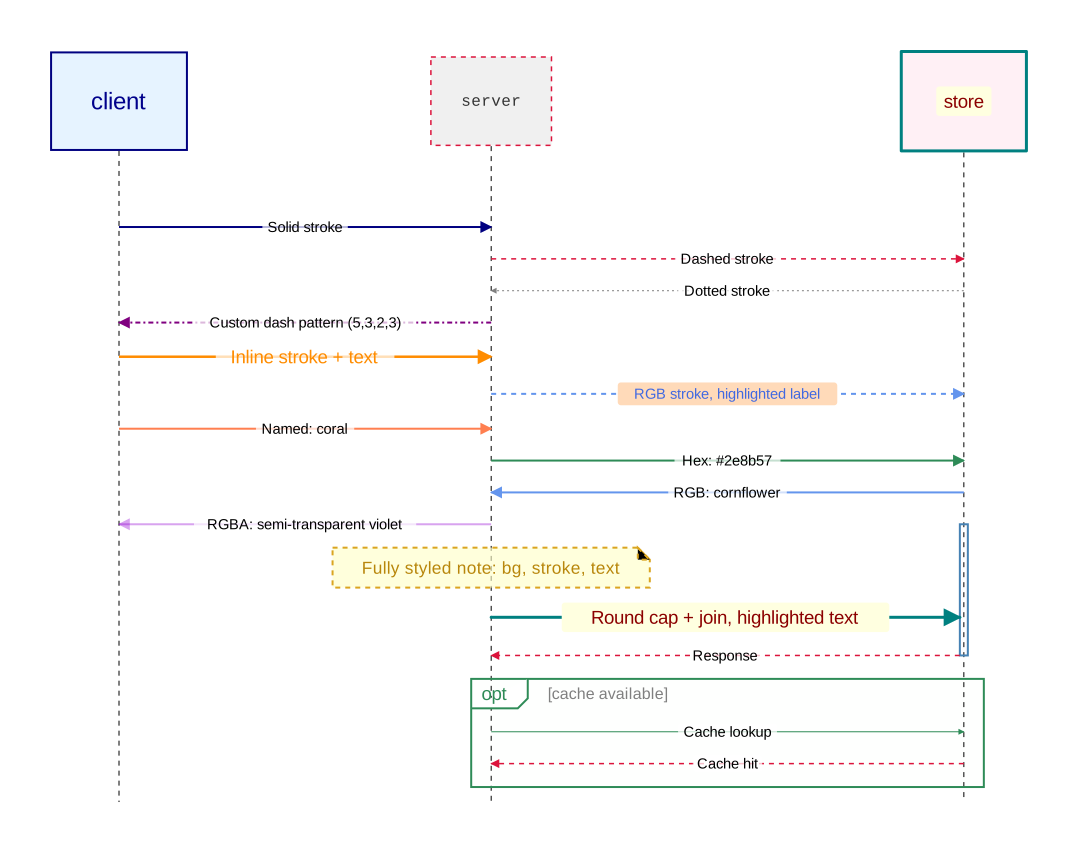
Source: styling.orr
Embedded Diagrams
Sequence diagrams inside component nodes, component diagrams inside component nodes (with different layout engines), and embedded diagrams inside sequence diagram participants.
diagram component;

type Service = Rectangle[fill_color="#e6f3ff", stroke=[color="#336699"], rounded=5];
type Store = Rectangle[fill_color="#e0f0e0", stroke=[color="#339966"], rounded=8];

// Sequence diagram embedded in a component node
auth_service as "Auth Service": Service embed {
    diagram sequence;

    client: Rectangle[fill_color="#fff0e0"];
    validator: Rectangle[fill_color="#e6f3ff"];
    token_store: Rectangle[fill_color="#e0f0e0"];

    client -> [stroke=[color="steelblue"]] validator: "Credentials";

    activate validator {
        validator -> [stroke=[color="steelblue"]] token_store: "Lookup user";
        token_store -> [stroke=[color="seagreen", style="dashed"]] validator: "User record";
        validator -> validator: "Verify hash";
    };

    alt [border_stroke=[color="green"]] "valid" {
        validator -> [stroke=[color="green"]] token_store: "Create session";
        token_store -> [stroke=[color="seagreen", style="dashed"]] validator: "Session ID";
        validator -> [stroke=[color="green"]] client: "JWT token";
    } else "invalid" {
        validator -> [stroke=[color="#cc3333"]] client: "401 Unauthorized";
    };
};

// Component diagram embedded with basic layout
order_service as "Order Service": Service embed {
    diagram component [layout_engine="basic", background_color="#fafafa"];

    api as "API Layer": Rectangle[fill_color="#e6f3ff", rounded=3];
    validation as "Validation": Rectangle[fill_color="#fff3cd", rounded=3];
    persistence as "Persistence": Rectangle[fill_color="#e0f0e0", rounded=3];
    cache as "Cache": Rectangle[fill_color="#f0e6ff", rounded=3];

    api -> validation: "Validate";
    validation -> persistence: "Store";
    persistence -> cache: "Invalidate";
    api -> cache: "Read-through";
};

// Component diagram embedded with sugiyama layout
analytics as "Analytics Pipeline": Service embed {
    diagram component [layout_engine="sugiyama", background_color="#fafafa"];

    ingress as "Ingress": Rectangle[fill_color="#fff0e0"];
    parser as "Parser": Rectangle[fill_color="#e6f3ff"];
    enricher as "Enricher": Rectangle[fill_color="#e6f3ff"];
    aggregator as "Aggregator": Rectangle[fill_color="#e0f0e0"];
    sink as "Sink": Rectangle[fill_color="#f0e6ff"];

    ingress -> parser;
    ingress -> enricher;
    parser -> aggregator;
    enricher -> aggregator;
    aggregator -> sink;
};

gateway as "API Gateway": Service;
db as "Primary DB": Store;

gateway -> auth_service: "Authenticate";
gateway -> order_service: "Place order";
gateway -> analytics: "Stream events";
auth_service -> db: "Sessions";
order_service -> db: "Orders";
order_service -> analytics: "Order events";

// Sequence diagram whose participants contain embedded diagrams
outer as "Outer System": Service embed {
    diagram sequence;

    // Participant with an embedded component diagram
    api_node as "API Server": Rectangle embed {
        diagram component [layout_engine="basic", background_color="#f8f8ff"];

        router as "Router": Rectangle[fill_color="#e6f3ff", rounded=3];
        middleware as "Middleware": Rectangle[fill_color="#fff3cd", rounded=3];
        handler as "Handler": Rectangle[fill_color="#e0f0e0", rounded=3];

        router -> middleware: "Pre-process";
        middleware -> handler: "Dispatch";
    };

    // Participant with an embedded sequence diagram
    payment_node as "Payment Gateway": Rectangle embed {
        diagram sequence;

        charge_svc: Rectangle[fill_color="#fff0e0"];
        fraud_check: Rectangle[fill_color="#fce4ec"];
        ledger: Rectangle[fill_color="#e0f0e0"];

        charge_svc -> [stroke=[color="steelblue"]] fraud_check: "Evaluate risk";
        fraud_check -> [stroke=[color="seagreen", style="dashed"]] charge_svc: "Score";

        charge_svc -> [stroke=[color="steelblue"]] ledger: "Debit";
        activate ledger {
            ledger -> [stroke=[color="seagreen", style="dashed"]] charge_svc: "Confirmation";
        };
    };

    user: Rectangle[fill_color="#fff0e0"];

    user -> [stroke=[color="steelblue"]] api_node: "POST /checkout";

    activate api_node {
        api_node -> [stroke=[color="steelblue"]] payment_node: "Charge $42.00";

        activate payment_node {
            payment_node -> [stroke=[color="seagreen", style="dashed"]] api_node: "tx_id=abc123";
        };

        api_node -> [stroke=[color="seagreen", style="dashed"]] user: "201 Created";
    };
};

gateway -> outer: "Delegate";
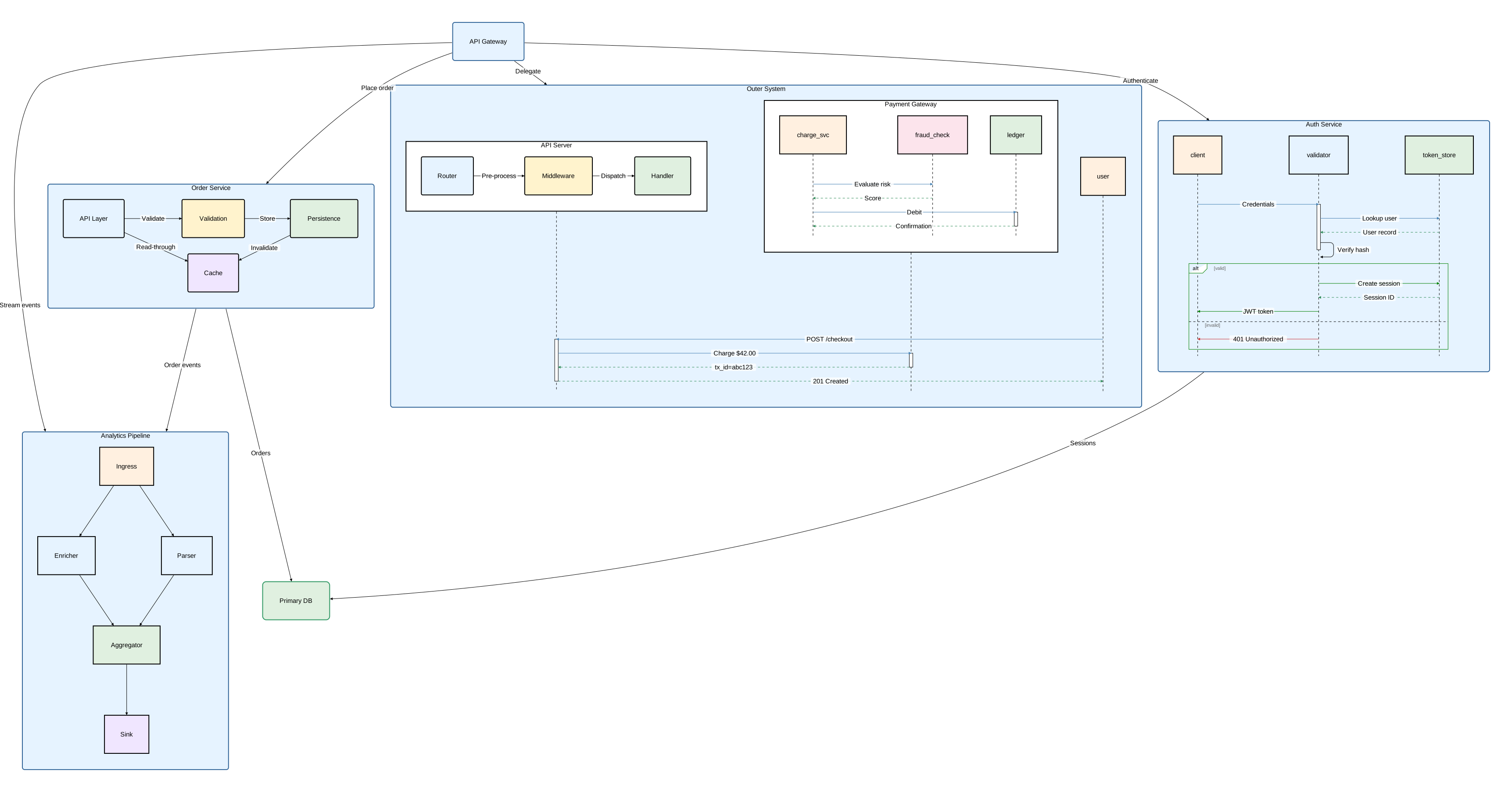
Source: embedded_diagrams.orr
Imports
Shared type libraries, namespaced and glob imports, transitive re-export, import aliasing, and diagram embedding via import.
Shared library
library;

type DashedLine = Stroke[style="dashed", color="gray"];
type ThickBorder = Stroke[color="#336699", width=2.0];

type Service = Rectangle[fill_color="#e6f3ff", stroke=ThickBorder, rounded=5];
type Database = Oval[fill_color="#e0f0e0", stroke=[color="#339966"]];
type Client = Oval[fill_color="#fff0e0", stroke=DashedLine];

type DashedArrow = Arrow[stroke=DashedLine];
type StrongArrow = Arrow[stroke=ThickBorder];
Source: shared/styles.orr
Extended library
library;

import "styles";

type SecureService = styles::Service[stroke=[color="red", width=2.0]];
type CriticalService = SecureService[fill_color="#8b0000", text=[color="white"]];

type SecureArrow = styles::DashedArrow[stroke=[color="red"]];
Source: shared/secure.orr
Reusable diagram
diagram sequence;

import "shared/styles"::*;

client: Service;
server: Service;
database: Database;

client -> server: "Login Request";
server -> database: "Verify Credentials";
database -> @DashedArrow server: "Auth Token";
server -> client: "Login Response";
Source: auth_flow.orr
Main diagram with all import forms
This example shows how a diagram can combine namespaced imports, glob imports, aliasing, and import-based embedding:
diagram component;

import "auth_flow";
import "shared/secure" as sec;
import "shared/styles"::*;

type Gateway = Service[rounded=10, fill_color="orange"];

api_gateway: Gateway;
auth_service: sec::SecureService;
core_service: sec::CriticalService;
user_db: Database;

auth_detail: Rectangle embed auth_flow;

api_gateway -> auth_service: "Authenticate";
api_gateway -> core_service: "Process";
auth_service -> @DashedArrow user_db: "Query";
core_service -> user_db: "Read";