Styling
Orrery provides attributes for controlling colors, borders, text, and shapes. Styles can be applied inline or through reusable types.
Colors
All color attributes accept CSS color strings in four formats:
| Format | Example | Description |
|---|---|---|
| Named | "red", "steelblue", "lightyellow" | CSS named colors |
| Hex | "#cc3333", "#e6f3ff" | 6-digit hex |
| RGB | "rgb(100, 149, 237)" | Red, green, blue (0-255) |
| RGBA | "rgba(255, 0, 0, 0.3)" | RGB with alpha transparency (0.0-1.0) |
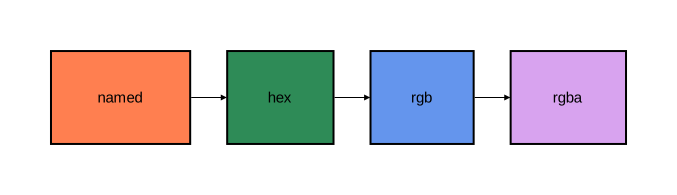
diagram component;

named: Rectangle [fill_color="coral"];
hex: Rectangle [fill_color="#2e8b57"];
rgb: Rectangle [fill_color="rgb(100, 149, 237)"];
rgba: Rectangle [fill_color="rgba(148, 0, 211, 0.6)"];

named -> hex;
hex -> rgb;
rgb -> rgba;
Stroke
Stroke attributes control borders and lines. They are specified as a group using nested syntax:
stroke=[color="navy", width=2.0, style="solid"]
Stroke attributes
| Attribute | Type | Default | Description |
|---|---|---|---|
color | color | — | Line color |
width | float | — | Line thickness |
style | string | "solid" | Line pattern |
cap | string | "butt" | Line endpoint style |
join | string | "miter" | Line corner style |
Line styles
| Value | Description |
|---|---|
"solid" | Continuous line |
"dashed" | Dashes with gaps |
"dotted" | Dots with gaps |
| Custom pattern | Comma-separated dash/gap lengths, e.g. "5,3" or "10,5,2,5" |
Line caps
| Value | Description |
|---|---|
"butt" | Flat ending at the endpoint (default) |
"round" | Rounded ending extending past the endpoint |
"square" | Square ending extending past the endpoint |
Line joins
| Value | Description |
|---|---|
"miter" | Sharp corner (default) |
"round" | Rounded corner |
"bevel" | Flattened corner |
Stroke examples
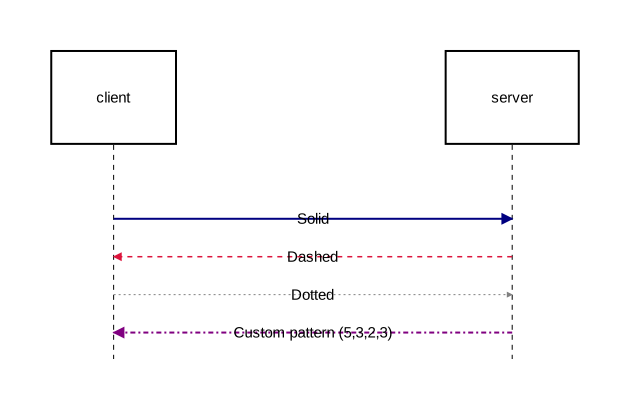
diagram sequence;

type SolidStroke = Stroke [color="navy", width=2.0, style="solid"];
type DashedStroke = Stroke [color="crimson", width=1.5, style="dashed"];
type DottedStroke = Stroke [color="gray", width=1.0, style="dotted"];
type CustomDashStroke = Stroke [color="purple", width=2.0, style="5,3,2,3"];
type RoundCapStroke = Stroke [color="teal", width=3.0, cap="round", join="round"];

type SolidArrow = Arrow [stroke=SolidStroke];
type DashedArrow = Arrow [stroke=DashedStroke];
type DottedArrow = Arrow [stroke=DottedStroke];
type PatternArrow = Arrow [stroke=CustomDashStroke];

client: Rectangle;
server: Rectangle;

client -> @SolidArrow server: "Solid";
server -> @DashedArrow client: "Dashed";
client -> @DottedArrow server: "Dotted";
server -> @PatternArrow client: "Custom pattern (5,3,2,3)";
Text
Text attributes control label rendering. They are specified as a group:
text=[font_size=16, font_family="Arial", color="darkblue"]
Text attributes
| Attribute | Type | Description |
|---|---|---|
font_size | float | Font size in pixels (e.g. 16, 12.5) |
font_family | string | Font name (e.g. "Arial", "Courier New") |
color | color | Text color |
background_color | color | Background color behind text |
padding | float | Padding around text content |
Text examples
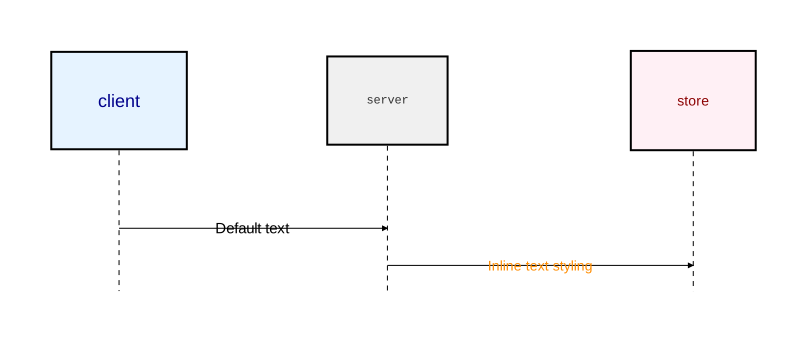
diagram sequence;

type HeaderText = Text [font_size=18, font_family="Arial", color="darkblue"];
type MonoText = Text [font_size=12, font_family="Courier New", color="#333333"];
type HighlightText = Text [font_size=14, color="darkred", background_color="lightyellow", padding=4.0];

type Primary = Rectangle [fill_color="#e6f3ff", text=HeaderText];
type Secondary = Rectangle [fill_color="#f0f0f0", text=MonoText];
type Accent = Rectangle [fill_color="#fff0f5", text=HighlightText];

client: Primary;
server: Secondary;
store: Accent;

client -> server: "Default text";
server -> [text=[color="darkorange", font_size=14, font_family="Arial"]] store: "Inline text styling";
Shape styling
fill_color
Background color of a shape:
Rectangle [fill_color="#e6f3ff"]
rounded
Corner radius for rectangles (float):
Rectangle [fill_color="#e6f3ff", rounded=10]
Reusable style types
Use Stroke and Text attribute group types to define reusable style bundles, then reference them in component or arrow types:
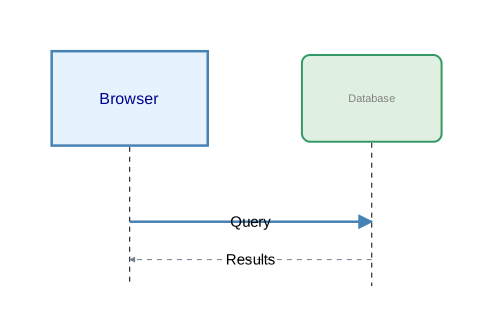
diagram sequence;

// Define reusable style groups
type ThickSolid = Stroke [color="steelblue", width=2.5];
type ThinDashed = Stroke [color="slategray", width=1.0, style="dashed"];
type BoldText = Text [font_size=16, color="darkblue", font_family="Arial"];
type SmallText = Text [font_size=11, color="gray"];

// Use in component types
type Service = Rectangle [fill_color="#e6f3ff", stroke=ThickSolid, text=BoldText];
type Store = Rectangle [fill_color="#e0f0e0", stroke=[color="#339966"], rounded=8, text=SmallText];

// Use in arrow types
type RequestArrow = Arrow [stroke=ThickSolid];
type ResponseArrow = Arrow [stroke=ThinDashed];

client as "Browser": Service;
db as "Database": Store;

client -> @RequestArrow db: "Query";
db -> @ResponseArrow client: "Results";
Inline attribute overrides
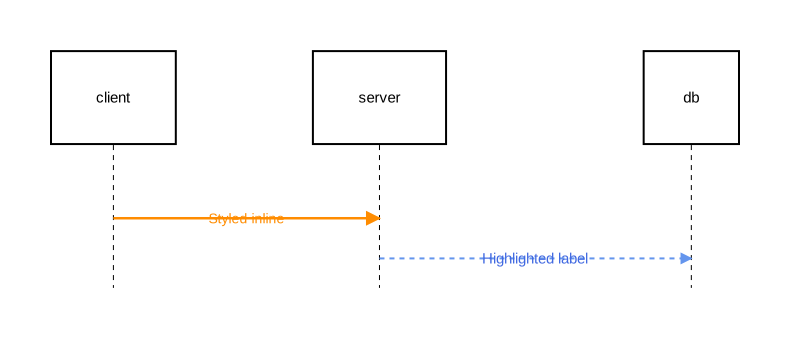
Attributes can be overridden at the point of use without defining a type:
diagram sequence;

client: Rectangle;
server: Rectangle;
db: Rectangle;

// Override stroke and text on a relation
client -> [stroke=[color="darkorange", width=2.5], text=[color="darkorange", font_size=14]] server: "Styled inline";

// Override on a relation with background text
server -> [stroke=[color="rgb(100, 149, 237)", width=2.0, style="dashed"], text=[color="#4169e1", background_color="white", padding=3.0]] db: "Highlighted label";
Complete attribute reference
General attributes
| Attribute | Type | Used on | Description |
|---|---|---|---|
fill_color | color | Shapes, Activations | Background color |
rounded | float | Rectangle | Corner radius |
background_color | color | Diagrams, Notes, Fragments | Background color |
style | string | Relations | Routing: "straight", "curved", "orthogonal" |
stroke | Stroke | Shapes, Relations, Notes | Border/line styling |
text | Text | Shapes, Relations | Text styling |
Fragment-specific attributes
| Attribute | Type | Description |
|---|---|---|
border_stroke | Stroke | Fragment outer border styling |
separator_stroke | Stroke | Section divider line styling |
content_padding | float | Padding around fragment content |
operation_label_text | Text | Text styling for the operation label (e.g. “alt”, “loop”) |
section_title_text | Text | Text styling for section titles |
Note-specific attributes
| Attribute | Type | Description |
|---|---|---|
on | identifier list | Elements the note attaches to |
align | string | Positioning: "over", "left", "right", "top", "bottom" |
Stroke sub-attributes
| Attribute | Type | Description |
|---|---|---|
color | color | Line color |
width | float | Line thickness |
style | string | "solid", "dashed", "dotted", or custom pattern |
cap | string | "butt", "round", "square" |
join | string | "miter", "round", "bevel" |