Imports
Orrery’s import system enables reuse and composition across .orr files. Import types from shared libraries to keep diagrams DRY, or reference external diagram files and embed them inside components.
File types
Orrery distinguishes two kinds of .orr files based on their header declaration. See Diagrams — File types for an overview.
| Feature | Diagram file | Library file |
|---|---|---|
| Header | diagram <kind> [attributes]; | library; |
| Contains imports | Yes | Yes |
| Contains type definitions | Yes | Yes |
| Contains diagram elements | Yes | No |
| Renderable | Yes | No |
| Exports types to importers | No | Yes |
| Can be embedded via import | Yes | No |
Import syntax
The import keyword brings types and diagram references from other .orr files into the current file’s scope.
Namespaced import
Imports all types behind a namespace. Types are accessed via namespace::TypeName.
import "path";
import "shared/styles";

api: styles::Service;
db: styles::Database;
Glob import
Imports all types flat into the current scope. No namespace prefix is required.
import "path"::*;
import "shared/styles"::*;

api: Service;
db: Database;
Summary
| Form | Syntax | Result |
|---|---|---|
| Namespaced | import "path"; | All types behind namespace, accessed as name::Type |
| Glob | import "path"::*; | All types flat in current scope |
Import paths
Import paths are expressed as string literals:
import "shared/styles";
import "../common/base";
The .orr extension is omitted from import paths — the compiler appends it automatically.
Paths are resolved relative to the importing file’s directory. There are no global search paths or project-root-relative resolution.
Path rules
- Paths use forward slashes only (
/), regardless of operating system - The
.orrextension is never included in the path - Circular import dependencies are a compile-time error
Namespaces
Derived namespace name
For namespaced imports, the namespace name is derived from the last segment of the import path:
import "shared/styles";       // namespace: styles
import "../common/base";      // namespace: base
import "auth_flow";           // namespace: auth_flow
Namespace override with as
The derived namespace name can be overridden using the as keyword:
import "shared/styles" as theme;
import "../common/base" as core;
Namespace access with ::
Types within a namespace are accessed using the :: operator:
import "shared/styles";

api: styles::Service;
db: styles::Database;
api -> @styles::DashedArrow db: "Query";
Diagram embedding via import
A namespaced import of a diagram file creates an embed reference. The namespace identifier doubles as the embed name, which can be used with the embed keyword:
import "auth_flow";

auth_box: Rectangle embed auth_flow;
The as keyword customizes the embed reference name:
import "diagrams/complex_authentication_flow" as auth;

auth_box: Rectangle embed auth;
Restrictions
- Only namespaced imports create embed references — glob imports do not
- Only diagram files can be embedded — attempting to embed a library file is a compile-time error
- The derived namespace name must be a valid identifier (starts with a letter, contains only letters, digits, and underscores). If the file name does not qualify (e.g.
my-utils), useasto provide one:import "my-utils" as my_utils;
| Import form | Creates embed reference |
|---|---|
import "diagram_file"; | Yes |
import "diagram_file" as name; | Yes (uses alias) |
import "diagram_file"::*; | No |
Comparison with inline embedding
Orrery supports two approaches to embedding diagrams:
Inline embedding (defined in Embedded Diagrams):
user_service: Rectangle embed {
    diagram sequence;

    client: Rectangle;
    server: Rectangle;
    client -> server: "Request";
};
Import-based embedding:
import "user_service_flow";

user_service: Rectangle embed user_service_flow;
Scope and visibility
Everything is public
Orrery has no visibility modifiers. All types in a library file are accessible to any file that imports it.
Diagram files are self-contained renderable units. Their type definitions are internal and are not exported. Importing a diagram file creates an embed reference only.
Transitive re-export
Transitive re-export is the default behavior for library files. A library’s namespace exposes everything visible in its scope — its own types plus everything it imported.
Diagram file types are not re-exported.
Example:
base.orr:
library;

type Service = Rectangle[fill_color="lightblue"];
type Database = Oval[fill_color="lightgreen"];
extended.orr:
library;

import "base"::*;

type SecureService = Service[stroke=[color="red"]];
main.orr:
diagram component;

import "extended";

// Own types from extended
api: extended::SecureService;

// Transitively re-exported from base via extended
db: extended::Database;
svc: extended::Service;
Chained access
Transitive visibility enables chained namespace access:
import "parent";

item: parent::child::TypeName;
This works when parent.orr contains import "child"; (namespaced), making child’s types accessible through parent’s namespace.
Conflict resolution
Last writer wins
When multiple imports or definitions introduce the same type name into the flat scope, the last definition wins. The order of import statements and type definitions matters.
import "theme_a"::*;   // defines Service with fill_color="blue"
import "theme_b"::*;   // defines Service with fill_color="red"

api: Service;           // uses theme_b's Service
Local definitions override imports
Local type definitions override any imported type with the same name:
import "shared/styles"::*;   // defines Service

type Service = Rectangle[fill_color="#fff3e0"];  // overrides imported Service

api: Service;  // uses local Service
Namespaced imports avoid conflicts
Namespaced imports avoid flat-scope conflicts entirely:
import "theme_a";
import "theme_b";

blue_api: theme_a::Service;
red_api: theme_b::Service;
File structure
See Diagrams — Document structure for the strict declaration ordering that applies to all Orrery files. Import declarations go between the file header and type definitions.
Complete example
Project structure
project/
├── shared/
│   ├── styles.orr       # library — base types
│   └── secure.orr       # library — imports styles, adds secure types
├── auth_flow.orr        # diagram — reusable sequence diagram
└── main.orr             # diagram — imports everything, embeds auth_flow
shared/styles.orr
library;

type DashedLine = Stroke[style="dashed", color="gray"];
type ThickBorder = Stroke[color="#336699", width=2.0];

type Service = Rectangle[fill_color="#e6f3ff", stroke=ThickBorder, rounded=5];
type Database = Oval[fill_color="#e0f0e0", stroke=[color="#339966"]];
type Client = Oval[fill_color="#fff0e0", stroke=DashedLine];

type DashedArrow = Arrow[stroke=DashedLine];
type StrongArrow = Arrow[stroke=ThickBorder];
shared/secure.orr
library;

import "styles";

type SecureService = styles::Service[stroke=[color="red", width=2.0]];
type CriticalService = SecureService[fill_color="#8b0000", text=[color="white"]];

type SecureArrow = styles::DashedArrow[stroke=[color="red"]];
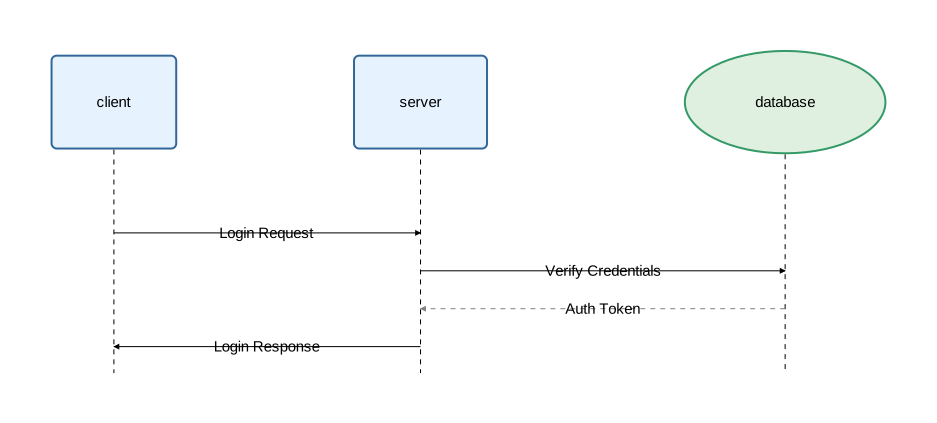
auth_flow.orr
diagram sequence;

import "shared/styles"::*;

client: Service;
server: Service;
database: Database;

client -> server: "Login Request";
server -> database: "Verify Credentials";
database -> @DashedArrow server: "Auth Token";
server -> client: "Login Response";
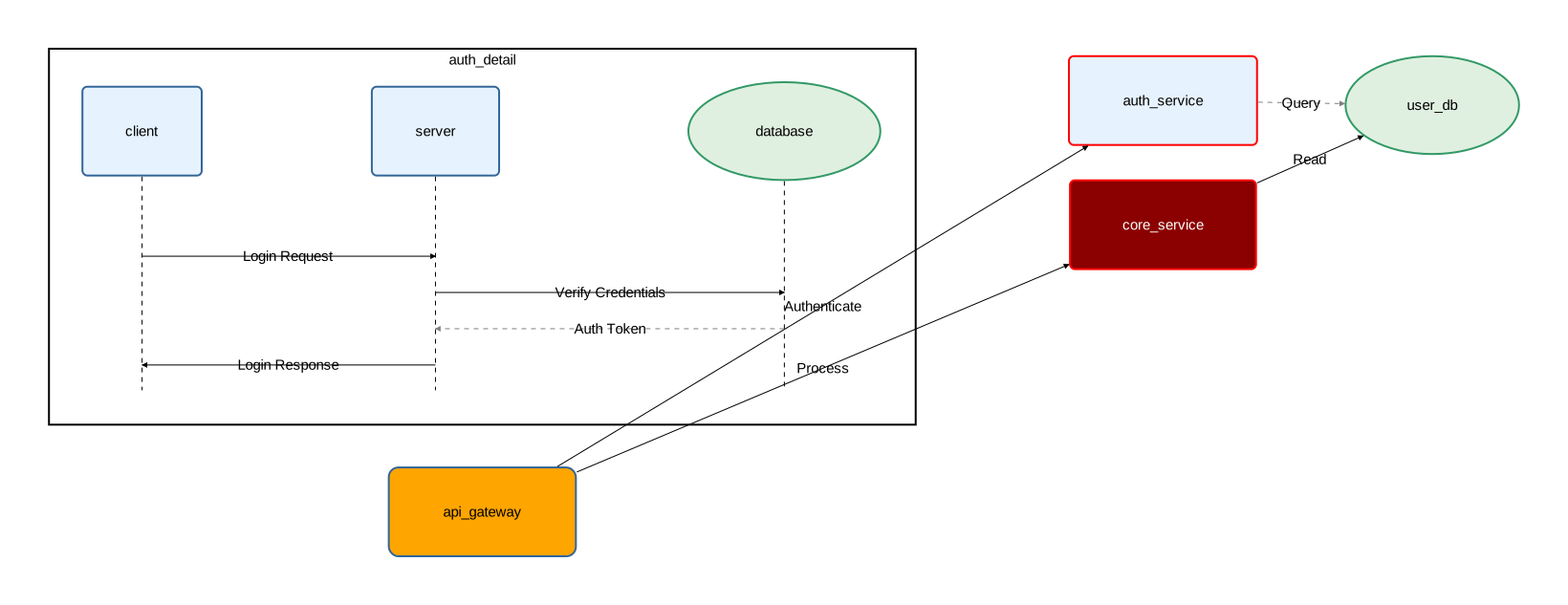
main.orr
diagram component;

import "auth_flow";
import "shared/secure" as sec;
import "shared/styles"::*;

type Gateway = Service[rounded=10, fill_color="orange"];

api_gateway: Gateway;
auth_service: sec::SecureService;
core_service: sec::CriticalService;
user_db: Database;

auth_detail: Rectangle embed auth_flow;

api_gateway -> auth_service: "Authenticate";
api_gateway -> core_service: "Process";
auth_service -> @DashedArrow user_db: "Query";
core_service -> user_db: "Read";