Your First Diagram
Let’s create a simple component diagram and render it to SVG.
Create the source file
Create a file called hello.orr with the following content:
diagram component;

client: Oval;
server: Rectangle;
database: Rectangle;

client -> server: "Request";
server -> database: "Query";
database -> server: "Result";
server -> client: "Response";
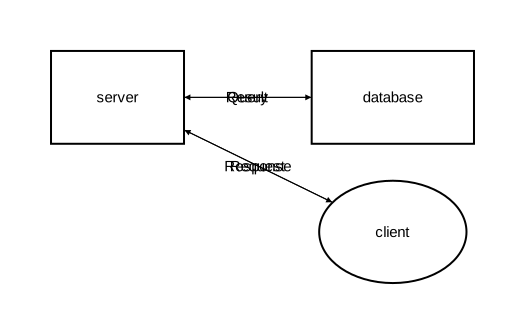
This defines:
- A component diagram with three elements
clientas an oval shape,serveranddatabaseas rectangles- Four relations (arrows) with labels describing the data flow
Render to SVG
orrery hello.orr -o hello.svg
Open hello.svg in a browser or image viewer. You should see a diagram with three components connected by labeled arrows.
Add types for reusable styles
Now let’s improve the diagram with custom types:
diagram component;

type Service = Rectangle [fill_color="#e6f3ff", rounded=5];
type Database = Rectangle [fill_color="#e0f0e0", rounded=10];
type Client = Oval [fill_color="#fff0e0"];

client: Client;
server as "API Server": Service;
database as "Users DB": Database;

client -> server: "HTTP Request";
server -> database: "SELECT * FROM users";
database -> server: "Result set";
server -> client: "JSON Response";
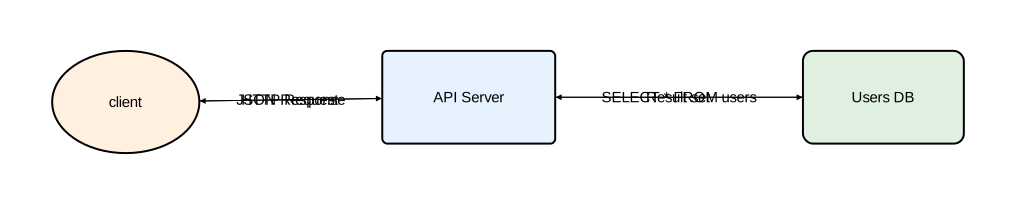
New concepts:
typedeclarations define reusable styles with custom colors and rounded cornersas "..."gives elements a display name different from their identifier- Types are applied with the
: TypeNamesyntax
Render it:
orrery hello.orr -o hello.svg
The output now shows colored, rounded shapes with descriptive labels.
Try a sequence diagram
Change the diagram type to sequence:
diagram sequence;

type Service = Rectangle [fill_color="#e6f3ff", rounded=5];
type Database = Rectangle [fill_color="#e0f0e0", rounded=10];
type Client = Oval [fill_color="#fff0e0"];

client: Client;
server as "API Server": Service;
database as "Users DB": Database;

client -> server: "HTTP Request";
server -> database: "SELECT * FROM users";
database -> server: "Result set";
server -> client: "JSON Response";
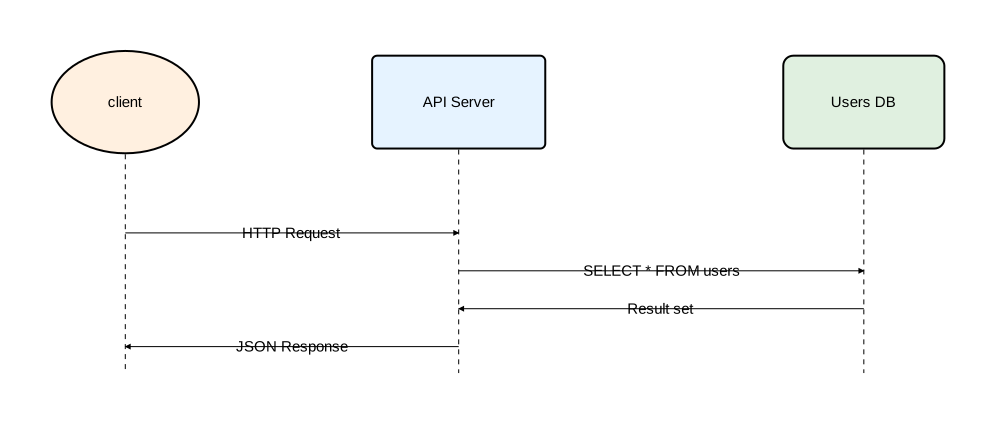
The same elements and types are now laid out as a sequence diagram: participants arranged horizontally with messages flowing downward in order.
Next steps
- CLI Usage — command-line options and configuration
- Language Reference — complete language reference
- Examples — more diagram examples